Java API for JSON Processing: An Introduction to JSON
JSON (JavaScript Object Notation) is a lightweight, text-based, language-independent data exchange format that is easy for humans and machines to read and write. JSON can represent two structured types: objects and arrays. An object is an unordered collection of zero or more name/value pairs. An array is an ordered sequence of zero or more values. The values can be strings, numbers, booleans, null, and these two structured types.
Listing 1 is an example from Wikipedia that shows the JSON representation of an object that describes a person. The object has string values for first name and last name, a number value for age, an object value representing the person’s address, and an array value of phone number objects.
Listing 1. Example of JSON representation of an object
JSON is often used in Ajax applications, configurations, databases, and RESTful web services. All popular websites offer JSON as the data exchange format with their RESTful web services.
JSON Processing
The Java API for JSON Processing (JSR 353) provides portable APIs to parse, generate, transform, and query JSON using object model and streaming APIs.
The object model API creates a random-access, tree-like structure that represents the JSON data in memory. The tree can then be navigated and queried. This programming model is the most flexible and enables processing that requires random access to the complete contents of the tree. However, it is often not as efficient as the streaming model and requires more memory.
The streaming API provides a way to parse and generate JSON in a streaming fashion. It hands over parsing and generation control to the programmer. The streaming API provides an event-based parser and allows an application developer to ask for the next event rather than handling the event in a callback. This gives a developer more procedural control over the JSON processing. Application code can process or discard the parser event and ask for the next event (pull the event). The streaming model is adequate for local processing where random access of other parts of the data is not required. Similarly, the streaming API provides a way to generate well-formed JSON to a stream by writing one event at a time.
The Object Model API
The object model API is similar to the Document Object Model (DOM) API for XML. It is a high-level API that provides immutable object models for JSON object and array structures. These JSON structures are represented as object models using the Java types JsonObject and JsonArray . Table 1 lists the main classes and interfaces in the object model API.
JsonObject provides a Map view to access the unordered collection of zero or more name/value pairs from the model. Similarly, JsonArray provides a List view to access the ordered sequence of zero or more values from the model.
Table 1. Main classes in the object model API
JsonObject , JsonArray , JsonString , and JsonNumber are subtypes of JsonValue . These are constants defined in the API for null, true, and false JSON values.
The object model API uses builder patterns to create these object models from scratch. Application code can use the interface JsonObjectBuilder to create models that represent JSON objects. The resulting model is of type JsonObject . Application code can use the interface JsonArrayBuilder to create models that represent JSON arrays. The resulting model is of type JsonArray .
These object models can also be created from an input source (such as InputStream or Reader ) using the interface JsonReader . Similarly, these object models can be written to an output source (such as OutputStream or Writer ) using the class JsonWriter .
For example, let’s write code to search Facebook’s public posts using the object model API. The Facebook API gives the search results in the JSON format shown in Listing 2:
Listing 2. JSON representation of searching Facebook public posts
We can use the object model API to get names and their public posts about the term java. In the Listing 3, lines 1 through 3 lines create JsonReader ; line 5 creates JsonObject for the results; line 7 loops over each result; and lines 8 through 11 get the name of the person who posted, get the public post, and prints them. Note that the JsonReader and other objects in this API can be used in the try -with-resources statement (which is also called automatic resource management [ARM]).
Listing 3. Processing Facebook posts using the object model API
The Streaming API
The streaming API is similar to the Streaming API for XML (StAX) and consists of the interfaces JsonParser and JsonGenerator . JsonParser contains methods to parse JSON data using the streaming model. JsonGenerator contains methods to write JSON data to an output source. Table 2 lists the main classes and interfaces in the streaming API.
Table 2. Main classes in the streaming API
| Class or Interface | Description |
|---|---|
| Json | Contains static methods to create JSON parsers, generators, and their factory objects. |
| JsonParser | Represents an event-based parser that can read JSON data from a stream. |
| JsonGenerator | Writes JSON data to a stream one value at a time |
JsonParser provides forward, read-only access to JSON data using the pull parsing programming model. In this model, the application code controls the thread and calls methods in the parser interface to move the parser forward or to obtain JSON data from the current state of the parser.
JsonGenerator provides methods to write JSON data to a stream. The generator can be used to write name/value pairs in JSON objects and values in JSON arrays.
The streaming API is a low-level API designed to process large amounts of JSON data efficiently. Other JSON frameworks (such as JSON binding) can be implemented using this API.
Let’s use the streaming API to do the same thing that was done with the object model API, that is, to search Facebook’s public posts about java. In Listing 4, lines 1 through 3 create a streaming parser, lines 4 through 5 get the next event, line 6 looks for the KEY_NAME event, lines 8 through 11 read names and print them, and lines 14 through 16 read the public posts and print them. The use of streaming API provides an efficient way to access names and their public posts when compared to the same task using the object model API.
Listing 4. Processing Facebook posts using the streaming API
Conclusion
The Java API for JSON Processing provides the following capabilities:
- Parsing input streams into immutable objects or event streams
- Writing event streams or immutable objects to output streams
- Programmatically navigating immutable objects
- Programmatically building immutable objects with builders
The API becomes a base for building data binding, transformation, querying, or other manipulation APIs. JAX-RS 2.0 provides native integration for the Java API for JSON Processing.
See Also
About the Author
Jitendra Kotamraju, a principal member of the technical staff at Oracle, is the JSON Processing specification lead and one of the key engineers behind GlassFish. Before leading the JSON Processing project, he was in charge of both the specification and implementation of JAX-WS 2.2.
Join the Conversation
Join the Java community conversation on Facebook, Twitter, and the Oracle Java Blog!
Кофе-брейк #175. Как мы можем прочитать файл JSON в Java? Что такое Java Development Kit (JDK)?

Источник: DZone JSON — это простой формат для хранения и отправки данных на веб-страницу. Обычно он используется в JavaScript, но сегодня мы узнаем, как с ним работать в Java.
Как и чем парсить Json на Java?
Часто возникает потребность работы с Json, в частности его чтения и парсинга. В Java обычно ты знаешь с каким типом переменных работаешь, а при парсинге Json смущает то, что тип полей может быть любой.
Какие есть способы разбора Json? Как это делать?
Вот, допустим, как достать данные из Json, представленного ниже?


Достать данные можно разными способами и, конечно, зависит от задач. Попробую рассмотреть некоторые варианты разбора Json.
Заметка: для каждого из примеров для парсинга будет взят Json из вопроса, чтобы зря не копировать в ответ.
Simple Json
Где взять: здесь / репозиторий на github / или через Maven и пр.
Это самый примитивный способ. По сути, всё, что тут есть — это JSONObject и JSONArray .
- JSONArray может включать в себя несколько объектов JSONObject , его можно обходить циклом на каждой итерации получая объект JSONObject .
- JSONObject — объект, из которого можно доставать его отдельные свойства.
Я бы использовал его для небольших Json строк, где не надо сильно заморачиваться или если не лень писать свой класс-обработчик на основе кода, который продемонстрирован ниже:
Остальная работа с вложенными массивами аналогична. Можно складывать в List, Map и пр.
Где взять: здесь / репозиторий на github / или через Maven и пр.
Позволяет парсить Json также, как и Json-simple, т.е. используя JSONObject и JSONArray (см. документацию), но имеет более мощный инструмент парсинга. Достаточно создать классы, которые повторяют структуру Json‘а. Для парсинга Json из вопроса создадим классы:
Теперь достаточно написать:
Всё! Магия! Чудо! Теперь в person лежит объект с типом Person , в котором находятся данные именно с теми типами, которые были указаны в созданных классах! Теперь можно работать с любым типом, как это привыкли всегда делать: String, Integer, List, Map и всё остальное.
Пример парсинга в Map :
. JSON для разбора:
. Сам разбор выглядит так:
Дополнительно в GSON можно использовать аннотации, например: исключить указанные поля при парсинге, поменять имя переменной (например не personFirstName , а fName ) и многое другое. Подробнее см. в документации.
Jackson
Где взять: здесь / репозиторий на github / или через Maven и пр.
Как и GSON он также позволяет работать используя JSONObject и JSONArray если это требуется, и тоже умеет парсить на основе предоставленных классов (см. пример ниже).
Аналогично в нем можно указывать дополнительные требования за счет аннотаций, например: не парсить указанные поля, использовать кастомный конструктор класса, поменять имя переменной (например не firstName , а fName ) и многое другое. Подробнее см. в документации.
JsonPath
Где взять: через Maven и другие сборщики / репозиторий на github
Относится к так называемым XPath библиотекам. Её суть аналогична xpath в xml, то есть легко получать часть информации из json‘а, по указанному пути. А также позволяет фильтровать по условию.
Пример с выборкой по условию:
Еще несколько вариантов
LoganSquare
LoganSquare — основана на Jackson‘s streaming API. По демонстрируемым тестам работает быстрее GSON и Jackson. Поэтому хорош для Android.
Где взять: репозиторий на github / или через Maven / Gradle и пр.
- Классы должны быть помечены аннотацией @JsonObject
- Поля должны быть помечены аннотацией @JsonField (с различными варианциями входных параметров, например @JsonField(name=»message») )
- Другие предъявляемые требования: https://github.com/bluelinelabs/LoganSquare/blob/development/docs/Models.md
Moshi
Moshi is a modern JSON library for Android and Java.
Хорош, как утверждают разработчики, для работы с Android.
Где взять: репозиторий на github / или через Maven / Gradle и пр.
Пример разбора Json строки в объект Person :
Пример парсинга в Map :
Genson
Где взять: здесь / репозиторий на github / или через Maven и пр.
За счет создания POJO (создаются классы, которые повторяют структуру Json‘а) — парсится объект из строки, распихивая по нужным полям объектов. Есть возможность фильтровать свойства, включить или исключить поля при парсинге, переименовать, возможность работы с аннотациями и пр. Подробнее в документации.
Разбор в список:
Пример парсинга в Map :
. JSON для разбора:
FastJson
Где взять: через Maven и другие сборщики / репозиторий на github. Непосредственно описание работы с xpath. Осторожно, ̶н̶е̶н̶о̶р̶м̶а̶т̶и̶в̶н̶а̶я̶ ̶л̶е̶к̶с̶и̶к̶а̶ китайский язык.
Относится к XPath аналогам.
JSON-P
Поддерживает сериализацию и парсинг JSON без предварительного маппинга в классах:
Maven:
Пример разбора строки JSON:
Пример вывода объекта в строку JSON:
Здесь расположена общая информация о парсерах, которая может помочь при выборе и понять, что он умеет. Текст и таблица, представленные ниже, взяты из публикации на Habrahabr: Шпаргалка Java программиста 8. Библиотеки для работы с Json, автор статьи @ВеденинВячеслав
- Data bind
- Tree Model
- Streaming API
- Аналоги XPath (дополнительный способ)
Data bind
Самый популярный и простой способ — вы просто указываете класс, который нужно преобразовать в json, может быть часть полей отмечаете аннотациями (а зачастую даже это необязательно), а библиотека сама превращает этот класс и всю его иерархию классов в json.
Плюсы: наиболее простой из всех
Минусы: скорость и память. Большинство библиотек использует рефлексию и т.п. методы работы с Java классами (хотя не все), что очевидно не очень быстро. К тому же, весь json файл сразу превращается в Java объекты, что может просто исчерпать всю доступную память, если вы попытаетесь обработать очень большой json.
Вывод: если нет проблем с производительностью, памятью и вы не собираетесь обрабатывать многогигабайтные json’ы скорее всего самый лучший способ.
Tree Model
Данный парсер представляет json в виде Java классов таких как Node или `JsonElement c иерархической структурой, а уже сам программист их обходит и получает из них информацию.
Плюсы: обычно быстрее первого способа и проще третьего
Минусы: уступает Data bind по простоте, плюс ряд библиотек способен генерить классы при Data bind, а не использовать рефлексию, в этом случае то что Tree Model будет быстрее не очевидно, к тому же не решается проблема огромных файлов и ограничения памяти.
Streaming API
Самый низкоуровневый способ, по сути программист сам вручную разбирает токены json’a. Зато никаких ограничений по памяти и в теории максимальная производительность.
Плюсы: производительность и минимальное потребление памяти
Минусы: сложность использования
Аналоги XPath
Не очень подходит, если нужно получит всю информацию из json‘a, зато позволяет написав выражение, например $.store.book[*].author получить список всех авторов всех книг из json‘a магазина. То есть легко получать часть информации из json‘а.
Плюсы: позволяет быстро получить информацию из json‘а по сложным критериям
Минусы: не очень подходит, когда нужна все информация из json‘а, не работает в обратную сторону на формирования json‘ов
Таблица библиотек и способы парсинга, которые они поддерживают:
* — Генерация классов для Data bind позволяет сгенерировать классы на стадии компиляции, что в теории должно давать значительный прирост производительности библиотеки,
** — Работает со static inner class имеет смысл только для случая Data bind, возможно ли сериализация и десериализация для случая статических внутренних классов (не статические внутренние классы сериализовать не рекомендуется),
*** — тоже только для случая Data bind можно ли не использовать аннотации или их использование крайне рекомендуется,
Jackson Tutorial
JSON is not new to developers, as most of today’s web services, mobile applications, and even the Internet of Things use JSON as a data exchange format. Learning the tools for manipulating the JSON format is essential for developers. This article will describe how to use Jackson, an open source tool library, to perform common operations on JSON.
JSON Introduction
What is JSON?JSON stands for “JavaScript Object Notation”, JSON is a text-based format that can be understood as a structured data that can contain key-value mapping, nested objects and arrays of information.
Jackson Introduction
Jackson and FastJson as well, is a Java language written for JSON processing open source tool library , Jackson is very widely used , Spring Framework default use Jackson for JSON processing .
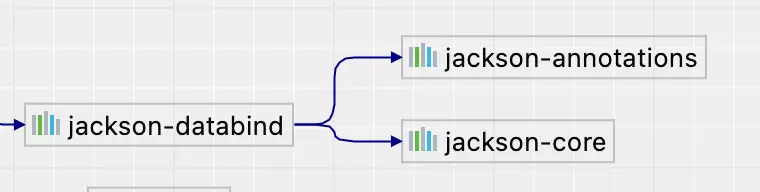
Jackson has three core packages, namely Streaming, Databid, Annotations, through which you can easily operate on JSON.
-
in the jackson-core module. Defines a number of APIs related to stream processing and specific JSON implementations. in the jackson-annotations module, contains annotations in Jackson. in the jackson-databind module, implements databinding on top of the Streaming package, relying on Streaming and Annotations packages.
Thanks to Jackson’s highly extensible design, there are many common text formats and tools that have adaptations for Jackson, such as CSV, XML, YAML, etc.
Jackson Maven dependencies
When using Jackson, in most cases we just need to add the jackson-databind dependency to use the Jackson functionality, which depends on the following two packages.
- com.fasterxml.jackson.core:jackson-annotations
- com.fasterxml.jackson.core:jackson-core
To facilitate the code demonstration that follows in this article, we import both Junit for unit testing and Lombok to reduce Get/Set code writing.
ObjectMapper
ObjectMapper is one of the most commonly used classes in the Jackson library for fast conversion between Java objects and JSON strings. If you have used FastJson, then ObjectMapper in Jackson is like the JSON class in FastJson.
There are some common methods in this class.
- readValue() method can perform JSON deserialization operations, such as converting strings, file streams, byte streams, byte arrays, and other common content into Java objects.
- writeValue() method can perform JSON serialization operations, which can convert Java objects into JSON strings.
Most of the time, ObjectMapper works by mapping the Java bean objects through their Get/Set methods, so it is important to write the Get/Set methods of Java objects correctly, but ObjectMapper also provides a lot of configurations. For example, you can customize the conversion process between Java objects and JSON strings through configuration or annotations. These are described in the following sections.
Jackson JSON Basic Operations
Jackson is a JSON tool library in Java, and handling JSON strings and Java objects is its most basic and common function. Here are some examples to demonstrate the usage.
Jackson JSON Serialization
Write a Person class that defines three properties, name, age, and skill.
Converts a Java object to a JSON string.
The output JSON string is as follows.
Jackson can even write the serialized JSON string directly to a file or read it as a byte array.
Jackson JSON deserialization
The code is as follows.
The output is as follows.
The above example shows how to use Jackson to deserialize a JSON string into a Java object, but in fact it is just as easy for Jackson to deserialize a JSON string in a file, or in byte form.
First, prepare a JSON file Person.json with the following contents.
Read this file and deserialize it to a java object.
The output is as follows.
JSON to List
The above demonstrates that JSON strings are all single objects, if JSON is a list of objects then how do you handle it using Jackson?
There is already a file PersonList.json with the following contents.
Read it and convert it to List<Person> .
The output is as follows.
JSON to Map
JSON to Map is useful when we don’t have a Java object, here’s how to use Jackson to convert JSON text to Map objects.
The output is as follows.
Jackson ignores fields
If when doing a JSON to Java object conversion. If there are properties in JSON that do not exist in the Java class, then an exception is thrown: com.fasterxml.jackson.databind.exc.UnrecognizedPropertyException .
Non-existent properties can be ignored by setting objectMapper.configure(DeserializationFeature.FAIL_ON_UNKNOWN_PROPERTIES, false) .
The output is as follows.
Jackson Date Formatting
Before Java 8 we usually used the java.util.Date class to handle time, but when Java 8 was released a new time class was introduced java.time.LocalDateTime . The two are handled slightly differently in Jackson.
First create an Order class with two time type properties.
Date type
Let’s create a new test case to test the JSON conversion of the two time types.
In this test code, we have only initialized the Date type property, and here is the output.
You can see that the JSON serialization and deserialization is done normally, but the time in the JSON is in a timestamp format, which may not be what we want.
LocalDateTime type
Why isn’t the value of the LocalDateTime type property set? Because by default JSON conversion of the LocalDateTime class throws an exception.
Running it will throw an exception.
Here we need to add the appropriate data binding support libraries.
Then the dependencies are registered with the findAndRegisterModules() method when the ObjectMapper is defined.
Running it gives you the normal serialization and deserialization logs, though the time format after serialization remains strange.
Time formatting
Customize the time format by using the annotation @JsonFormat on the field.
Run the above column again to get the time-formatted JSON string.
Jackson common annotations
@JsonIgnore
Use @JsonIgnore to ignore attributes in a Java object that will not participate in JSON serialization and deserialization.
Write unit test classes.
You can see that the value of the age property in the output is null .
@JsonGetter
Use @JsonGetter to customize property names when JSON serializing Java objects.
Write unit test classes for testing.
The output is as follows. java object’s name property name has been serialized to catName .
@JsonSetter
Use @JsonSetter to set the mapping of keys in JSON to Java properties when deserializing JSON.
Write unit test classes for testing.
The output is as follows.
@JsonAnySetter
The @JsonAnySetter allows you to handle all the properties that do not exist in the Java object when deserializing JSON. The following code demonstrates storing non-existent properties into a Map collection.
Write unit test cases.
You can see from the output that the skill property in JSON is placed in the diyMap collection because it is not in the Java class Student .
@JsonAnyGetter
Use @JsonAnyGetter to make the Map collection of Java objects as the source of properties in JSON when serializing them. Here’s an example.