JS: Как узнать тип переменной
В JavaScript есть несколько способов определить тип переменной. В этой статье мы рассмотрим некоторые из них.
Оператор typeof
Один из самых простых способов узнать тип переменной в JavaScript — использовать оператор typeof .
Определение типа массива и объекта
Определение типа массива и объекта может быть более сложным, поскольку оператор typeof вернет «object» для обоих типов.
В таких случаях можно использовать метод Array.isArray() для определения, является ли переменная массивом.
Или можно использовать метод constructor для определения типа объекта или массива.
Определение типа функции
Тип функции можно определить, используя оператор typeof .
В заключение, JavaScript предлагает множество способов для определения типа переменной. Важно выбрать подходящий метод в зависимости от конкретной ситуации.
Особенности типов данных и преобразования в JavaScript
На первый взгляд тема типов данных и преобразований может показаться легкой.
Обычно она изучается в самом начале погружения в JavaScript. Однако в этих темах есть неочевидные подводные камни, которые знает далеко не каждый разработчик.
В этой статье мы рассмотрим особенности типов данных и преобразований, которые многие пропустили.
typeof
JavaScript имеет 8 встроенных типов данных:
Подробности о каждом типе данных вы можете причитать в любой документации.
Значения typeof отличаются:
Оператор typeof возвращает строку, указывающую тип операнда.
Операнд – то, к чему применяется оператор. Например, в умножении 5 * 2 есть два операнда: левый операнд равен 5 , а правый операнд равен 2 .
Оператор typeof напрямую не коррелирует со встроенными типами!
typeof null
Давайте рассмотрим пример:
В консоль будет выведено значение true .
Такой результат будет из-за того, что JavaScript имеет старый баг.
typeof null возвращает «object» .
Этот баг существует уже много лет и вероятнее всего уже никогда не будет исправлен. Это связано с тем, что написано слишком много кода, который полагается на это ошибочное поведение.
typeof function
Что будет выведено в консоль?
У многих людей, которые не встречали такого вопроса ранее, может возникнуть недоумение. Учитывая, что typeof y и typeof x возвращает “function” , кто-то может ожидать, что функция является одним из встроенных типов в JS. На самом деле, согласно спецификации, функция — это подтип объекта. Благодаря этому можно проверить количество аргументов у функции через .length
typeof NaN
Важно запомнить особенности NaN :
NaN никогда не равен сам себе независимо от того используем мы == или === .
typeof NaN всегда возвращает “number” . Это может показаться странным из-за того, что NaN — не число, которое является числом. NaN все еще числовой тип несмотря на этот факт.
window.isNaN вернет true только для фактических значений NaN , когда результат просто не число.
window.isNaN преобразует аргумент в number и возвращает true , если результат будет равен NaN
Number.isNaN был добавлен в ES6. Number.isNaN вернет true только для тех значений, которые не являются числами, например, применимо к строке, будет возвращено false .
Number.isNaN производит приведение типов, в то время как window.isNaN не делает приведение.
Значение vs Ссылка
Вспомним простые значения в JS:
Простые значения в JS имутабельные. Комплексные значения мутабельные.
Сначала повторим разницу между мутабельными и имутабельными данными.
В примере мутабельности мы определили массив x . Константе y мы присвоили ссылку на х . Когда мы модифицируем массив x , мы также модифицируем и y .
При работе с имутабельными данными такого эффекта не происходит. Это важно запомнить!
Мы рассмотрели пример с числами. Давайте взглянем на пример со строками:
В данном примере не произойдет изменение строки!
Если вы хотите изменить строку, то вам придется создать новую переменную.
С использованием метода .toUpperCase() ситуация будет отличаться.
Метод .toUpperCase() возвращает новую строку и присваивает переменной a .
Взглянем, как ведут себя массивы со строками:
Тут мы получили модифицированный массив b .
После повторения разницы между мутабельными и имутабельными данными может возникнуть вопрос: “Откуда у примитивных данных есть полезные методы вроде .toUpperCase() ?”
Если движок JavaScript встречает запись подобную «hello».toUpperCase() и у нас есть примитив, то мы вызываем у него метод. В таком случае вокруг примитива создается обертка в виде объекта, у которого как раз есть методы. После выполнения инструкции обертка удаляется и у нас снова остается примитивное значение.
Давайте рассмотрим легкий пример:
После повторения теории результат выполнения будет очевидным.
Но существует особенность в другом похожем примере:
Переменной a мы присвоили массив.
Переменной b мы присвоили ссылку на переменную а , а затем переменной b присвоили новый массив.
В момент последнего присвоения старая ссылка была удалена!
Если мы создали новую ссылку в b , то мы уже не можем, модифицируя b , изменять и a .
Сравнение типов
Преобразование может быть явным, когда мы целенаправленно приводим один тип к другому, либо неявным, когда приведение типа происходит автоматически без явных команд.
В JavaScript преобразование всегда приводит к 3м типам:
к логическому значению ( true / false )
Приведение к строке
В данном примере преобразование происходит очевидным образом.
Приведение к числу
Тут есть исключения, которые нужно помнить:
Number(null) приводится к 0
Number(undefined) приводится к NaN
Пустой массив Number([]) приводится к 0
Не пустой массив Number([1, 2, 3]) приводится к NaN
Приведение к логическому типу
В этом примере стоит заострить внимание на объектах и массивах.
Пустая функция, объект или массив приведет к true .
Приведение комплексных данных
Комплексные данные, такие как объекты и массивы, сначала будут преобразованы в их примитивные значения, а уже потом это значение будет преобразовано в число.
Разберем более подробно. Если у объекта доступен метод .valueOf , который возвращает примитивное значение, то оно будет использоваться для приведения к числу, а если нет, то будет использоваться метод .toString() .
Если ни одна операция не может предоставить примитивное значение, то выдается ошибка “Type Error”
Давайте коснемся логических операторов прежде чем продолжить дальше:
Как вы думаете что будет выведено в консоль?
Казалось бы простой вопрос, но не все ответят правильно.
В консоль будет выведено с . Особенно для тех, кто пришел из других языков такой результат будет неочевиден.
Вспомним как работают логические операторы:
Если оба операнда истины, тогда будет возвращен последний операнд.
Строгое сравнение и сравнение с приведением типов
Обычно считается, что === использует “строгое” сравнение, и сравнивает типы, а == нет.
Если говорить более корректно, == позволяет делать приведение типов, тогда как === не разрешает.
Таблицы ниже показывают в результатах между == и ===
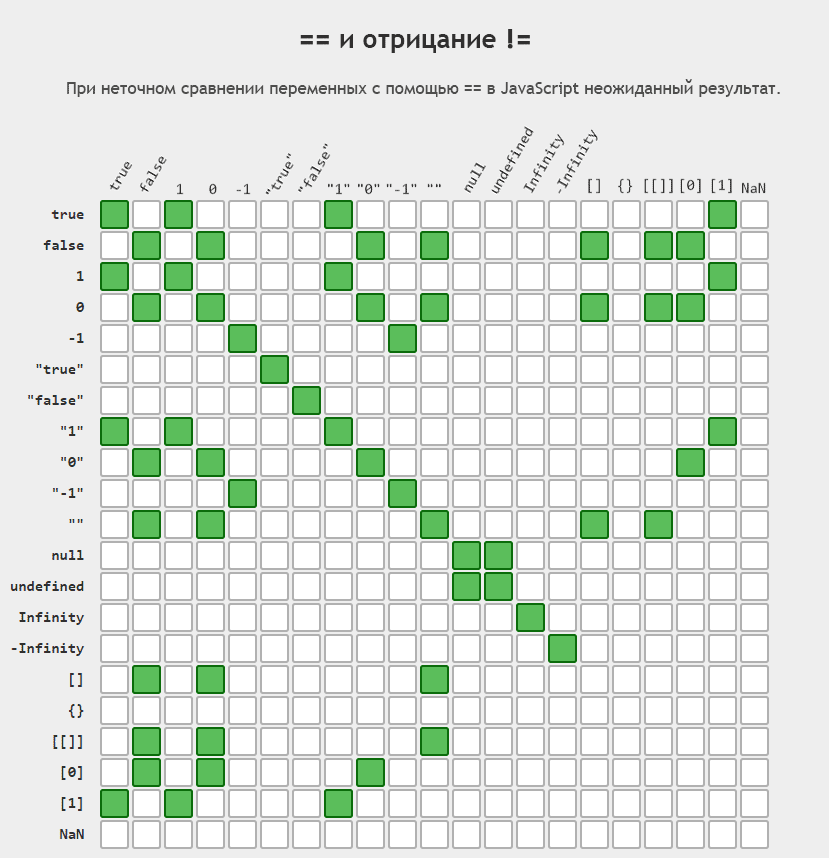

Неявное приведение между строкой и числом
Можно неявно привести строку к числу, используя оператор + .
В JS оператор + используется как для сложения чисел, так и для конкатенации строк.
Оператор + выполняет операцию .toPrimitive над значением левой и правой стороны.
Метод .toPrimitive вызывает valueOf у значения. Если одно из значений является строкой, то он их объединяет.
Также существует небольшая разница между неявным приведением числа к строке с помощью + и явным с помощью String() .
+ вызывает valueOf , в то время как явный метод вызывает toString
Искусственный пример. Не берите его в свой код. Пример только для наглядности:
Алгоритмы сравнения
Нас интересует, что происходит, когда boolean находится по обе стороны от == .
Вы могли ожидать, что «22» == true вернет true , т.к. “22” является истинным значением, но фактически результат будет false .
Это происходит из-за того, что значение true приводится к числу. Результат выполнения будет 1 . Далее «22» приводится к числу 22 . В конце идет сравнение 22 == 1 , где и возвращается false .
Задачи на собеседованиях
Мы готовы рассмотреть интересные примеры, которые встречаются на собеседованиях.
Более сложные примеры
Операнд — то к чему применяется оператор.
Бинарный оператор — оператор, который применяется к 2м операндам ( 1 + 3 )
Унарный оператор — оператор, который применяется к одному операнду ( 2++ )
Пользуясь возможность возможностью хотелось бы рассказать о youtube канале Open JS на котором выкладываются обучающие ролики по JavaScript. Ни какой воды, рекламы и пустых рассуждений. Канал только начал свое развитие. Буду рад поддержке!
JavaScript Type Checking – How to Check Type in JS with typeof()

Joel Olawanle

JavaScript is a dynamically typed (or loosely typed) programming language. It allows you to declare variables without specifying or defining the variable type.
You can create a variable in JavaScript without defining the type of value you can store in the variable. This can affect your program and cause bugs during runtime because the type can change.
For example, a variable can be declared and assigned a number. But as you write more code, values might get misplaced, and you might assign the same variable a string or boolean. This would affect your code when it runs:
As you can see from the above example, a variable in JavaScript can change types throughout the execution of a program. This can be hard to keep track of as a programmer. This is one of the reasons why TypeScript is considered a superset of JavaScript.
To validate variables by checking their types in JavaScript, you can use the typeof operator. Type checking in JavaScript is not straightforward for non-primitive data types and specific values. This is why type-checking can become annoying, especially for inexperienced JS developers.
In this article, you will learn how to use the typeof operator, instances when you should not use typeof , and the best way to check type in JavaScript for such instances.
JavaScript Data Types
In JavaScript, data types are classified into two groups: you have primitive and non-primitive data types. Aside from the object, which is a non-primitive data type, all other data types are primitive.
These data types include:
- String
- Number
- Boolean (true and false)
- null
- undefined
- Symbol
At this point, you may assume that I omitted arrays and functions. But no, I didn’t. This is because they are both objects.
How to Check Type with the typeof Operator in JavaScript
The typeof operator accepts a single operand (a unary operator) and determines the operand’s type.
There are two ways you can use the typeof operator. You can evaluate a single value or an expression:
The typeof operator will return the type as a string, meaning “number”, “string”, «boolean”, and lots more.
It is important to know that you should always use the expression method (in the form of a function) when evaluating an expression rather than a single value. For example:
The above returns a string because the output of typeof 45 is evaluated as «number» (which is returned as a string), then the output of typeof(«number») is evaluated as «string”.
Another example is if your number has a hyphen in it:
The single value method will return NaN (Not a Number) because it will first evaluate typeof 123 , which will return a string, «number». This means you are now left with «number» — 4567-890 , which cannot be subtracted and will return NaN .
How to Check for the Number Data Type
Let’s now explore the possible instances that will return the number data type.
There are different possible values that JavaScript considers a number, such as positive and negative integers, zero, floating-point numbers, and infinity:
It’s also important to know that values like NaN, even though it means Not-a-Number, will always return a type of “number”. Also, math functions will have the data type of number:
Finally, when you use the Number() constructor to explicitly typecast a string that holds a number to a number or even a value like an actual string that cannot be typecasted to an integer, it will always return a number as its data type:
Finally, when you make use of methods like parseInt() and parseFloat(), which convert a string to a number and also round up a number, its data type will be number:
How to Check for the String Data Type
There are just a few instances that will return “string”. These instances are the empty string, a string of characters (this can also be a number), and multiple words:
Also, when you use the String() constructor with any value:
How to Check for the Boolean Data Type
When you check for the true and false values, it will always return the type “boolean”. Also, when you check anything that makes use of the Boolean() constructor:
Additionally, when you use the double not operator ( !! ), which works just like the Boolean() constructor, “boolean” will be returned:
How to Check for the Symbol Data Type
When you use the Symbol() constructor, the «symbol» data type will be returned even if no value is passed. Also, when you pass in a parameter or use the Symbol.iterator symbol, which specifies the default iterator for an object:
How to Check for the Undefined Data Type
A variable is said to be undefined when you declare it without initiating a value. When you check for undefined, a declared variable with no value (undefined), and an undefined variable, they will always return “undefined”:
So far, you have learned how to check for types of all primitive data types except null. It’s a little tricky and I covered it in detail in my article on Null Checking in JavaScript Explained.
But I will briefly go over how to check for null in this article so you can understand the basics.
How to Check for the Object Data Type
Certain instances will always return “object”, though that of null is a historical bug that cannot be fixed, while function has its technical reason.
As you can see in the example above, an array will always return “object” when you use the typeof operation. This may not be very pleasant, but technically, an Array is a special type of object:
In ES6, the Array.isArray method was introduced, which makes it possible for you to detect an Array easily:
Also, before the introduction of ES6, the instanceof operator is used to detect an Array:
How to Check for the Null Data Type
When you use the typeof operator to check the null value, it returns “object” because of a historical bug that cannot be fixed.
Note: Do not confuse null with undefined. A variable is referred to as null if it intentionally contains the value of null . In contrast, a variable is undefined when you declare it without initiating a value.
A very straightforward way to detect null is to use the strict comparison:
You can read this article on Null Checking in JavaScript Explained for more options and detailed explanations.
A Generic Solution to Type Checking in JavaScript
In an earlier article by Tapas Adhikary on How to Check the Type of a Variable or Object in JS, he added and explained a generic solution that you can use to check for type more accurately:
Wrapping up!
In this article, you have learned how to check for types in JavaScript with the typeof operator.
You also learned the limitations and how to use other methods to overcome the limitations. Remember that for most primitive data types, you can always use the typeof operator.
typeof
The typeof operator returns a string indicating the type of the unevaluated operand.
Syntax
The typeof operator is followed by its operand:
Parameters
operand is an expression representing the object or primitive whose type is to be returned.
Description
The following table summarizes the possible return values of typeof . For more information about types and primitives, see also the JavaScript data structure page.
| Type | Result |
|---|---|
| Undefined | «undefined» |
| Null | «object» (see below) |
| Boolean | «boolean» |
| Number | «number» |
| String | «string» |
| Symbol (new in ECMAScript 2015) | «symbol» |
| Host object (provided by the JS environment) | Implementation-dependent |
| Function object (implements [[Call]] in ECMA-262 terms) | «function» |
| Any other object | «object» |
Examples
In the first implementation of JavaScript, JavaScript values were represented as a type tag and a value. The type tag for objects was 0. null was represented as the NULL pointer (0x00 in most platforms). Consequently, null had 0 as type tag, hence the bogus typeof return value. (reference)
A fix was proposed for ECMAScript (via an opt-in), but was rejected. It would have resulted in typeof null === ‘null’ .
using new operator
Regular expressions
Callable regular expressions were a non-standard addition in some browsers.
Exceptions
All current browsers expose a non-standard host object document.all with type Undefined.
Although the specification allows custom type tags for non-standard exotic objects, it requires those type tags to be different from the predefined ones. The case of document.all having type tag ‘undefined’ must be classified as an exceptional violation of the rules.
Specifications
| Specification | Status | Comment |
|---|---|---|
| ECMAScript Latest Draft (ECMA-262) The definition of ‘The typeof Operator’ in that specification. |
Draft | |
| ECMAScript 2015 (6th Edition, ECMA-262) The definition of ‘The typeof Operator’ in that specification. |
Standard | |
| ECMAScript 5.1 (ECMA-262) The definition of ‘The typeof Operator’ in that specification. |
Standard | |
| ECMAScript 3rd Edition (ECMA-262) The definition of ‘The typeof Operator’ in that specification. |
Standard | |
| ECMAScript 1st Edition (ECMA-262) The definition of ‘The typeof Operator’ in that specification. |
Standard | Initial definition. Implemented in JavaScript 1.1. |
Browser compatibility
| Feature | Chrome | Edge | Firefox (Gecko) | Internet Explorer | Opera | Safari |
|---|---|---|---|---|---|---|
| Basic support | (Yes) | (Yes) | (Yes) | (Yes) | (Yes) | (Yes) |
| Feature | Android | Chrome for Android | Edge | Firefox Mobile (Gecko) | IE Mobile | Opera Mobile | Safari Mobile |
|---|---|---|---|---|---|---|---|
| Basic support | (Yes) | (Yes) | (Yes) | (Yes) | (Yes) | (Yes) | (Yes) |
IE-specific notes
On IE 6, 7, and 8 a lot of host objects are objects and not functions. For example: