Interaction to Next Paint (INP)

Chrome usage data shows that 90% of a user’s time on a page is spent after it loads, Thus, careful measurement of responsiveness throughout the page lifecycle is important. This is what the INP metric assesses.
Good responsiveness means that a page responds quickly to interactions made with it. When a page responds to an interaction, the result is visual feedback, which is presented by the browser in the next frame the browser presents. Visual feedback tells you if, for example, an item you add to an online shopping cart is indeed being added, whether a mobile navigation menu has opened, if a login form’s contents are being authenticated by the server, and so forth.
Some interactions will naturally take longer than others, but for especially complex interactions, it’s important to quickly present some initial visual feedback as a cue to the user that something is happening. The time until the next paint is the earliest opportunity to do this. Therefore, the intent of INP is not to measure all the eventual effects of the interaction (such as network fetches and UI updates from other asynchronous operations), but the time in which the next paint is being blocked. By delaying visual feedback, you may be giving users the impression that the page is not responding to their actions.
The goal of INP is to ensure the time from when a user initiates an interaction until the next frame is painted is as short as possible, for all or most interactions the user makes.
In the following video, the example on the right gives immediate visual feedback that an accordion is opening. It also demonstrates how poor responsiveness can cause multiple unintended responses to input because the user thinks the experience is broken.
An example of poor versus good responsiveness. At left, long tasks block the accordion from opening. This causes the user to click multiple times, thinking the experience is broken. When the main thread catches up, it processes the delayed inputs, resulting in the accordion opening and closing unexpectedly.
This article explains how INP works, how to measure it, and points to resources for improving it.
What is INP? #
INP is a metric that assesses a page’s overall responsiveness to user interactions by observing the latency of all click, tap, and keyboard interactions that occur throughout the lifespan of a user’s visit to a page. The final INP value is the longest interaction observed, ignoring outliers. A note on how INP is calculated
As stated above, INP is calculated by observing all the interactions made with a page. The chosen value is then a percentile of those interactions. A formula is then used to choose a high percentile value of those interactions. For pages with few interactions, the interaction with the worst latency (the 100th percentile) is chosen. For pages with many interactions, the 99th or 98th percentile is chosen.
An interaction is a group of event handlers that fire during the same logical user gesture. For example, «tap» interactions on a touchscreen device include multiple events, such as pointerup , pointerdown , and click . An interaction can be driven by JavaScript, CSS, built-in browser controls (such as form elements), or a combination thereof.
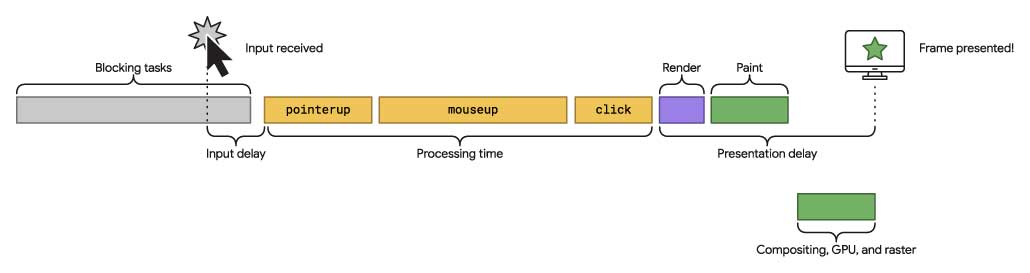
An interaction’s latency consists of the single longest duration of a group of event handlers that drives the interaction, from the time the user begins the interaction to the moment the next frame is presented with visual feedback.
Important
What is a good INP score? #
Pinning labels such as «good» or «poor» on a responsiveness metric is difficult. On one hand, you want to encourage development practices that prioritize good responsiveness. On the other hand, you must account for the fact that there’s considerable variability in the capabilities of devices people use to set achievable development expectations.
- An INP below or at 200 milliseconds means that your page has good responsiveness.
- An INP above 200 milliseconds and below or at 500 milliseconds means that your page’s responsiveness needs improvement.
- An INP above 500 milliseconds means that your page has poor responsiveness.
What’s in an interaction? #
The primary driver of interactivity is often JavaScript, though browsers do provide interactivity through controls not powered by JavaScript, such as checkboxes, radio buttons, and controls powered by CSS.
- Clicking with a mouse.
- Tapping on a device with a touchscreen.
- Pressing a key on either a physical or onscreen keyboard.
Important
Interactions happen in the main document or in iframes embedded in the document—for example clicking play on an embedded video. End users will not be aware what is in an iframe or not. Therefore, INP within iframes are needed to measure the user experience for the top level page. Note JavaScript Web APIs will not have access to the iframe contents so may not be able to measure INP within an iframe and this will show as a difference between CrUX and RUM.
Interactions may consist of two parts, each with multiple events. For example, a keystroke consists of the keydown , keypress , and keyup events. Tap interactions contain pointerup and pointerdown events. The event with the longest duration within the interaction is chosen as the interaction’s latency. A depiction of an interaction with multiple event handlers. The first part of the interaction receives an input when the user clicks down on a mouse button. However, before they release the mouse button, a frame is presented. When the user releases the mouse button, another series of event handlers must run before the next frame is presented.
INP is calculated when the user leaves the page, resulting in a single value that is representative of the page’s overall responsiveness throughout the entire page’s lifecycle. A low INP means that a page is reliably responsive to user input.
How is INP different from First Input Delay (FID)? #
Where INP considers all page interactions, First Input Delay (FID) only accounts for the first interaction. It also only measures the first interaction’s input delay, not the time it takes to run event handlers, or the delay in presenting the next frame.
Given that FID is also a load responsiveness metric, the rationale behind it is that if the first interaction made with a page in the loading phase has little to no perceptible input delay, the page has made a good first impression.
INP is more than about first impressions. By sampling all interactions, responsiveness can be assessed comprehensively, making INP a more reliable indicator of overall responsiveness than FID.
What if no INP value is reported? #
- The page was loaded, but the user never clicked, tapped, or pressed a key on their keyboard.
- The page was loaded, but the user interacted with the page using gestures that did not involve clicking, tapping, or using the keyboard. For example, scrolling or hovering over elements does not factor into how INP is calculated.
- The page is being accessed by a bot such as a search crawler or headless browser that has not been scripted to interact with the page.
How to measure INP #
INP can be measured both in the field and in the lab (with some effort) through a variety of tools.
Important
Field tools #
-
..
- Via BigQuery in the CrUX dataset’s interaction_to_next_paint table.
- CrUX API via interaction_to_next_paint .
- CrUX Dashboard.
- Lighthouse Panel in DevTools, available in «Timespan Mode».
- Clicking with a mouse;
- Tapping on a device with a touchscreen;
- Pressing a key on a physical or digital keyboard.
- Input delay — the time between the user's first interaction with the page and when event handlers execute
- Processing delay — the total amount of time it takes to execute code in associated event handlers.
- Presentation delay — the time between when event handlers have finished executing and when the browser presents the next frame.
- PageSpeed Insights;
- Chrome User Experience Report (CrUX);
- Lighthouse User Flows;
- Lighthouse Panel in DevTools, available in "Timespan Mode";
- Web Vitals extension for Chrome.
- The user loaded the page alongside several other pages and never used it.
- The user loaded the page, scrolled through it (which is not considered an interaction) but never interacted (clicked, tapped, pressed a key) with it.
- The page has been visited by a bot that has not been scripted to interact with the page.
- input delay — which is the time between a user interacting with the page and event handlers executing
- processing time — which is the time it takes associated event handler code to execute
- presentation delay — which is the time between processing finishing and the browser rendering the next frame
- Good is below 200 milliseconds
- Needs Improvement is between 200 and 500 milliseconds
- Poor is above 500 milliseconds
- Latency caused by blocking JS at client side which can cause delay in rendering.
- Latency caused by a subsequent API call which is tied up to that event triggered by user and is mandatory to create next frame.
- How to identify INP ?
- Impact areas created by INP on system(frontend and backend)?
- final outcome impact to user and business.
- Exact redBus use-cases samples for both client side interaction latency and API based latency.
- Use a JS module “ https://unpkg.com/web-vitals@3.1.0/dist/web-vitals.attribution.js?module” This lib is good enough to start finding your INP scores in your webpages.
- Optimised user’s first interaction points which is mandatory to navigate to next screen for booking.
- On click of date change by user on search page, we call all relevant data for that source and destination for next date. It was having bad INP.
- Adding a debounced function call to scroll listener method calls and making one-time calculations out of scroll listener methods to reduce browser recalculations and repaint frequency.
- You can also use the `requestAnimationFrame`, It tells the browser that you wish to perform an animation and requests that the browser calls a specified function to update an animation before the next repaint. The method takes a callback as an argument to be invoked before the repaint.
- Fetching new batches of results on the second last card on the SRP page to improve UX and visual performance.
- Decreasing the initial batch size of search results from 30 to 10 for all routes. After implementing just this change, we checked the 95 percentile of field data from ELK and found that the scores improved significantly from 870–900 to 350–370.
Lab tools #
Measure interactions in JavaScript #
INP is calculated based on interaction events. The following example shows how to create a PerformanceObserver to log interaction entries to the console:
Measure INP in JavaScript #
To measure INP in JavaScript, it’s advised that you use the web-vitals JavaScript library, which exports an onINP function to handle the aggregation of each individual interaction. You can then get a page’s INP by passing a function to the onINP method:
As with other methods exported by web-vitals , onINP accepts a function as an argument, and will pass metric data to the function you give it. From there, you can send that data to an endpoint for collection and analysis.
See the onINP() reference documentation for additional usage instructions.
Warning
How to improve INP #
A collection of guides on optimizing INP is available to guide you through the process of identifying slow interactions in the field and using lab data to drill down and optimize them in a variety of ways.
CHANGELOG #
Occasionally, bugs are discovered in the APIs used to measure metrics, and sometimes in the definitions of the metrics themselves. As a result, changes must sometimes be made, and these changes can show up as improvements or regressions in your internal reports and dashboards.
To help you manage this, all changes to either the implementation or definition of these metrics will be surfaced in this CHANGELOG.
If you have feedback for these metrics, you can provide it in the web-vitals-feedback Google group.
Interaction to Next Paint (INP): The New Responsiveness Metric

Interaction to Next Paint (INP) is an experimental field responsiveness metric that records the latency of all interactions throughout the entire page lifecycle. Then, the longest delay from all interactions is recorded as the page’s INP.
The difference between Interaction to Next Paint and First Input Delay (FID) comes from the fact that the new metric measures all interactions, whereas FID only accounts for the first one.
In simple terms, a good FID means that your website has made a good first impression. But INP is more than about first impressions. It covers the entire period from the time the page begins loading to the time the user leaves the page.
How is INP calculated?
Similar to Cumulative Layout Shift, INP is calculated when the user leaves the page, measuring the page’s overall responsiveness through its entire lifecycle.
The interactions that play a part in INP’s calculations are:
Actions like scrolling or mouse movements are not considered interactions.
Each interaction consists of multiple events. An interaction's latency consists of the single longest duration of any event that is part of the interaction. The duration is the sum of the following periods:

What is a good INP score?
To provide “good” responsiveness to your users, you should strive to have an INP of 200 milliseconds or less.
An INP between 200 and 500 milliseconds means your page’s responsiveness needs improvement.
And if you have an INP of 500 milliseconds or above, it means that your visitors are experiencing poor responsiveness.

To ensure you're hitting this target for most of your users, a good threshold to measure is the 75th percentile of page loads, segmented across mobile and desktop devices.

How to Measure INP?
There are several ways to measure your site’s INP:
Why is no INP value reported?
The fact that a page is loaded doesn’t mean that the user interacted with it. This can occur for several reasons:
In these cases, no INP value will be reported.
Our Take on INP
“Interaction to Next Paint is a huge step toward a better way to measure the user experience on the web. Undoubtedly, it’s more comprehensive than First Input Delay, which, as Google says, has its limitations. Nevertheless, INP is still in its early stages of development, and there is a lot more to unfold regarding its usage and effectiveness.” — Ivaylo Hristov, CTO of NitroPack.
 Niko Kaleev | Web Performance Geek
Niko has 5+ years of experience turning those “it’s too technical for me” topics into “I can’t believe I get it” content pieces. He specializes in dissecting nuanced topics like Core Web Vitals, web performance metrics, and site speed optimization techniques. When he’s taking a breather from researching his next content piece, you’ll find him deep into the latest performance news.
Interaction to next paint inp что это

If you care about site speed and improving your Core Web Vitals for SEO, it's time to start paying attention to a new metric in town: Interaction to Next Paint, or INP. Interaction to Next Paint measures website responsiveness. Faster response times will feel snappy and smooth, while slower response times will feel laggy, with the latter causing frustration with each consecutive action until a user ends up leaving your site.
As with all web performance metrics, the ultimate goal is not to achieve the lowest number, but instead to create the best possible user experience so that visitors will stay on your site longer and be more inclined to make a purchase.
On the 10th of May 2023, Google announced that INP will replace FID (First Input Delay) in its Core Web Vitals. Both INP and FID are similar in that they measure page responsiveness, but FID has some shortcomings that INP addresses. Where as FID was pretty easy to keep under control, INP will be more challenging to optimize for since its a more comprehensive metric.
How is INP measured?
Since INP's goal is to measure how responsive a page is, it does this by looking at interactions with a page and looking at how long they take. You can think of an interaction as when a visitor taps on a link, adds something to their cart, opens a menu, etc.
If there are less than 50 interactions in total on a page, INP will be how long the single longest interaction took (interaction latency). If there are more than 50 interactions, INP will be the 98th percentile of interaction latency.
Interaction latency measures the time from when a user interacts with a page (such as a tap, click, or press of a key) until the next frame is presented (meaning the user sees something different on their screen and gets the feedback that their interaction has triggered the change). This duration of time includes:
INP considers all page interactions and the full interaction latency, where as FID measures the first interaction and only the input delay of that interaction — hence why FID measurements are faster and have lower thresholds. Since INP gives a much more accurate representation of a page's responsiveness, we wouldn't be surprised if INP replaced FID in the near future, when it's no longer an experimental metric (opinion).
What should my site's INP be?
Like other performance metrics, Google has set standards for thresholds of "Good", "Needs Improvement", and "Poor" for INP:

If your site was within the Good threshold for all Core Web Vitals (LCP, FID, CLS) prior to the release of INP, it does not guarantee that your site is within the Good threshold for INP (see the example featured image from this article). We recommend running your site through PageSpeed Insights and looking at the metrics to see where your site falls.
How do I improve INP?
To improve INP, we recommend looking at the typical ways of optimizing interaction delays, such as reducing the number of 3rd parties, deferring code that doesn't need to load early on, prioritizing elements and features that your users will most likely want to interact with immediately, etc.
Additionally, Google provided an example of the difference between poor responsiveness and good responsiveness, so it might be worth recording interactions across your site and determining where you can add elements to provide better feedback to your visitor that the action they've taken is processing.
Next Steps
Web performance optimization is a balancing act and requires consistent experimentation to do well. INP is just one out of other performance metrics you'll need to pay attention to keep your site fast and to improve your search rankings in Google.
Render Better has been optimizing Shopify sites of all sizes for years, so we have a lot of experience with performance issues that INP tracks and how to solve them so you don't have to figure this out on your own. If you'd like to try our platform or get some help analyzing your performance, check out our offer below to book a call with one of our experts.
Render Better automatically reduces site speed, allowing shoppers to browse and checkout faster, resulting in a better user experience and more sales.
Book a free 30-min call with one of our experts to assess your web performance and see how Render Better can improve your site.
How improved INP scores @redBus pulled up sales.

Major challenge on browser world was, when you give so much load on your JavaScript to power all features which can slow down your site and give bad user experience. Off-course you can use webpack or other tools to split chunks or dynamic loads etc but its difficult to manage and reduce unused code.
Thankfully we have full set of web vitals matrix which tells us the pain points of our sites and helps us to make it better…
There are 6 major vitals but we will constrain our discussion to one latest vitals (INP)we will talk majorly about this.
What is INP ?
Web developers were struggling to fix other vitals and that is still in progress….we have this new bomb �� on us.
But trust me guys this is one of the very interesting vital and helps to understand user experience and bottle necks in it.
Definition by web dev:
Interaction to Next Paint (INP) is an experimental metric that assesses responsiveness. When an interaction causes a page to become unresponsive, that is a poor user experience. INP observes the latency of all interactions a user has made with the page, and reports a single value which all (or nearly all) interactions were below. A low INP means the page was consistently able to respond quickly to all – or the vast majority – of user interactions.
Interaction to Next Paint (INP)
Updated Interaction to Next Paint (INP) is an experimental metric that assesses responsiveness. When an interaction…
So basically it means that how is your webpage responding to major user interaction, if your page is not getting stuck on users interaction and performs smoothly in response to these interaction then mostly your INP is low.
To define it in one line:-
The Interaction to Next Paint measures the time taken between the user click or any event by user and the presentation of the next intractable frame on webpage.
You can think about this in terms of interaction latency. Based on this you can also categories it in two aspects.
@redBus browser world I was very confident on my application that INP is pretty good and it was good also till I saw the numbers for 95th percentile of users , my confidence went a bit lower when I broke down in network categories……
As this is a very new and interesting topic at the time when I am writing this article I would like to break it down into 4 major categories:-
How to identify INP?
There are multiple ways to identify the INP scores in your page.. I will briefly describe few of them and then we will discuss how redBus worked on it’ INP scores.
Lets immediately start with a sample code:-
The Logging system which has been used here is ELK , you can send the data to your logging system as needed.@redBus we started taking this data at our logging system and we analyse the INP per page and per interaction and categorise it based on network also.
IT’s really amazing to analyse this data and understand users interaction issues. By the way it’s important to understand that you will not get exact issues or INP numbers from same events, but you will surely get a direction to look into.
Sample Data Collected at RUM :-
2. Another approach to get this data is using webpack module.
GitHub — GoogleChrome/web-vitals: Essential metrics for a healthy site.
The web-vitals library is a tiny (
1.5K, brotli'd), modular library for measuring all the Web Vitals metrics on real…
This is more preferred approach but the only point we need to focus on here is :- It will get added to all the bundles wherever you want to track the INP and integration effort is at all pages (depends on architecture.)
This brings us to next part:- Impact areas created by INP on system(frontend and backend)?
This might look a bit controversial but trust me this vitals will guide you in such a way that you may fix your api which powers your frontend. Changes which redBus did:-
2. Made our api lighter which are tied up to all user interactions.
3. Reduced API response time and data transferred over api calls, (This is use-case based), ex- On our search page user can see only 3 busses at once hence creating more search results can be deferred on demand which means on user scroll.
Exact redBus use-cases samples.
Lets see some use cases:-
2. On scroll of inventory redBus does a lazy load of inventory and calls next set of inventory from next offset(ex:- initial load batch 0–10 buses then next batch api response 11–20).
Fixes:
To improve the INP value and performance of the search page, we made several improvements, including:
Conclusion:
By making several changes, including adding a debounced function call, changing the initial batch size, and improving the UX by fetching new results beforehand, we significantly improved the INP score and overall performance of the search page. The changes resulted in a smoother and faster user experience and improved performance.
3. Input Fields on Customer Info Page
Problem:
The onChange function on the input fields called the reducer for each change, resulting in unwanted re-rendering and poor INP values.
Fixes:
To improve the INP value of the input fields on the Customer Information page, we managed the state of input components locally and synced it with the redux store only when the onBlur event was triggered. This change reduced the number of re-renders and eliminated unwanted re-rendering caused by calling the reducer for each change.
Conclusion:
By managing the state of input components locally and syncing with the redux store only when the onBlur event was triggered, we significantly improved the INP value of the input fields by 72%. The change resulted in a faster and smoother user experience and eliminated unwanted re-rendering caused by calling the reducer for each change.
final outcome impact to user and business.
Here comes the most interesting part which is important for every one to understand what impact this can create.
redBus has not fixed all the INP related issues at different page of booking funnel, for different network divisions etc… but we have identified major bottleneck which blocks our user from travelling deeper into the booking funnel , this helped us to increase our page to page conversion rate but the major impact was when our CR improved by 6% — 7.2% approx for one our operating countries and decent increments are on other geo also.
Hopefully this would bring out the importance of having good user experience and INP helped us in solving it till great extent.
FINAL WORDS
To conclude, I would just say that if you really want to understand user interaction problems, then this vital is a perfect starting point. Analyse these numbers and you will get a clear indication about your users flow problems.