Руководство по проектированию реляционных баз данных (4-6 часть из 15) [перевод]
Выкладываю продолжение перевода цикла статей для новичков.
В настоящих и последующих — больше информации по существу.
Начало — здесь.
4. ТАБЛИЦЫ И ПЕРВИЧНЫЕ КЛЮЧИ
Как вы уже знаете из прошлых частей, данные хранятся в таблицах, которые содержат строки или по-другому записи. Ранее я приводил пример таблицы, содержащей информацию об уроках. Давайте снова на нее взглянем.
В таблице имеются 6 уроков. Все 6 – разные, но для каждого урока значения одинаковых полей хранятся в таблице, а именно: tutorial_id (идентификатор урока), title (заголовок)и category (категория). Tutorial_id – первичный ключ таблицы уроков. Первичный ключ – это значение, которое уникально для каждой записи в таблице.
В таблице клиентов ниже customer_id – первичный ключ. В данном случае первичный ключ – также уникальное значение (число) для каждой записи.
Первичные ключи в повседневной жизни
В базе данных первичные ключи используются для идентификации. В жизни первичные ключи вокруг нас везде. Каждый раз, когда вы сталкиваетесь с уникальным числом это число может служить первичным ключом в базе данных (может, но не обязательно должно использоваться как таковое. Все базы данных способны автоматически генерировать уникальное значение для каждой записи в виде числа, которое автоматически увеличивается и вставляется вместе с каждой новой записью [Т.н. синтетический или суррогатный первичный ключ – прим.перев.]).
- Номер заказа, который вы получаете при покупке в интернет-магазине может быть первичным ключом какой-нибудь таблицы заказов в базе данных этого магазина, т.к. он является уникальным значением.
- Номер социального страхования может быть первичным ключом в какой-нибудь таблице в базе данных государственного учреждения, т.к. она также как и в предыдущем примере уникален.
- Номер счета-фактуры может быть использован в качестве первичного ключа в таблице базы данных, в которой хранятся выданные клиентам счета-фактуры.
- Числовой номер клиента часто используется как первичный ключ в таблице клиентов.
- .
Что объединяет эти примеры? То, что во всех из них в качестве первичного ключа выбирается уникальное, не повторяющееся значение для каждой записи. Еще раз. Значения поля таблицы базы данных, выбранного в качестве первичного ключа, всегда уникально.
Что характеризует первичный ключ? Характеристики первичного ключа.
Первичный ключ служит для идентификации записей.
Первичный ключ используется для идентификации записей в таблице, для того, чтобы каждая запись стала уникальной. Еще одна аналогия… Когда вы звоните в службу технической поддержки, оператор обычно просит вас назвать какой-либо номер (договора, телефона и пр.), по которому вас можно идентифицировать в системе.
Если вы забыли свой номер, то оператор службы технической поддержки попросит предоставить вас какую-либо другую информацию, которая поможет уникальным образом идентифицировать вас. Например, комбинация вашего дня рождения и фамилия. Они тоже могут являться первичным ключом, точнее их комбинация.
Первичный ключ уникален.
Первичный ключ всегда имеет уникальное значение. Представьте, что его значение не уникально. Тогда его бы нельзя было использовать для того, чтобы идентифицировать данные в таблице. Это значит, что какое-либо значение первичного ключа может встретиться в столбце, который выбран в качестве первичного ключа, только один раз. РСУБД устроены так, что не позволят вам вставить дубликаты в поле первичного ключа, получите ошибку.
Еще один пример. Представьте, что у вас есть таблица с полями first_name и last_name и есть две записи:
| first_name | last_name |
| vasya |pupkin |
| vasya |pupkin |
Т.е. есть два Васи. Вы хотите выбрать из таблицы какого-то конкретного Васю. Как это сделать? Записи ничем друг от друга не отличаются. Вот здесь и помогает первичный ключ. Добавляем столбец id (классический вариант синтетического первичного ключа) и…
Id | first_name | last_name |
1 | vasya |pupkin |
2 | vasya |pupkin |
Теперь каждый Вася уникален.
Типы первичных ключей.
Обычно первичный ключ – числовое значение. Но он также может быть и любым другим типом данных. Не является обычной практикой использование строки в качестве первичного ключа (строка – фрагмент текста), но теоретически и практически это возможно.
Составные первичные ключи.
Часто первичный ключ состоит из одного поля, но он может быть и комбинацией нескольких столбцов, например, двух (трех, четырех…). Но вы помните, что первичный ключ всегда уникален, а значит нужно, чтобы комбинация n-го количества полей, в данном случае 2-х, была уникальна. Подробнее об этом расскажу позднее.
Автонумерация.
Поле первичного ключа часто, но не всегда, обрабатывается самой базой данных. Вы можете, условно говоря, сказать базе данных, чтобы она сама автоматически присваивала уникальное числовое значение каждой записи при ее создании. База данных, обычно, начинает нумерацию с 1 и увеличивает это число для каждой записи на одну единицу. Такой первичный ключ называется автоинкрементным или автонумерованным. Использование автоинкрементных ключей – хороший способ для задания уникальных первичных ключей. Классическое название такого ключа – суррогатный первичный ключ [Как и упоминалось выше. – прим. перев.]. Такой ключ не содержит полезной информации, относящейся к сущности (объекту), информация о которой хранится в таблице, поэтому он и называется суррогатным.
5. СВЯЗЫВАНИЕ ТАБЛИЦ С ПОМОЩЬЮ ВНЕШНИХ КЛЮЧЕЙ
Когда я начинал разрабатывать базы данных я часто пытался сохранять информацию, которая казалась родственной, в одной таблице. Я мог, например, хранить информацию о заказах в таблице клиентов. Ведь заказы принадлежат клиентам, верно? Нет. Клиенты и заказы представляют собой отдельные сущности в базе данных. И тому и другому нужна своя собственная таблица. А записи в этих двух таблицах могут быть связаны для того, чтобы установить отношения между ними. Проектирование базы данных – это решение двух вопросов:
- определение того, какие сущности вы хотите хранить в ней
- какие связи между этими сущностями существуют
Один-ко-многим.
Клиенты и заказы имеют связь (состоят в отношениях) один-ко-многим потому, что один клиент может иметь много заказов, но каждый конкретный заказ (их множество) оформлен только одним клиентом, т.е. может иметь только одного клиента. Не беспокойтесь, если на данный момент понимание этой связи смутно. Я еще расскажу о связях в следующих частях.
Одно является важным сейчас – то, что для связи один-ко-многим необходимо две отдельные таблицы. Одна для клиентов, другая для заказов. Давайте немного попрактикуемся, создавая эти две таблицы.
Какую информацию мы будем хранить? Решаем первый вопрос.
Для начала мы определимся какую информацию о заказах и о клиентах мы будем хранить. Чтобы это сделать мы должны задать себе вопрос: “Какие единичные блоки информации относятся к клиентам, а какие единичные блоки информации относятся к заказам?”
Проектируем таблицу клиентов.
Заказы действительно принадлежат клиентам, но заказ – это это не минимальный блок информации, который относится к клиентам (т.е. этот блок можно разбить на более мелкие: дата заказа, адрес доставки заказа и пр., к примеру).
Поля ниже – это минимальные блоки информации, которые относятся к клиентам:
- customer_id (primary key) – идентификатор клиента
- first_name — имя
- last_name — отчество
- address — адрес
- zip_code – почтовый индекс
- country — страна
- birth_date – дата рождения
- username – регистрационное имя пользователя (логин)
- password – пароль
Давайте перейдем к непосредственному созданию этой таблицы в SQLyog (естественно, что вы можете использовать любую другую программу). Ниже приведен пример того, как могла бы выглядеть таблица в программе SQLyog после создания. Все графические приложения для управления базами данных имеют приблизительно одинаковую структуру интерфейса. Вы также можете создать таблицу с помощью командной строки без использования графической утилиты.
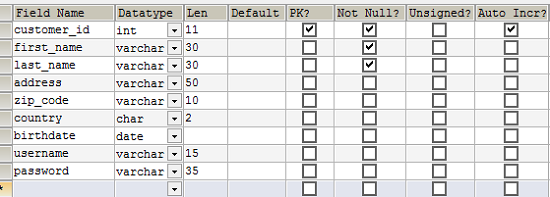
Создание таблицы в SQLyog. Обратите внимание, что выбран флажок первичного ключа (PK) для поля customer_id. Поле customer_id является первичным ключом. Также выбран флажок Auto Incr, что означает, что база данных будет автоматически подставлять уникальное числовое значение, которое, начиная с нуля, будет каждый раз увеличиваться на одну единицу.
Проектируем таблицу заказов.
Какие минимальные блоки информации, необходимые нам, относятся к заказу?
- order_id (primary key) – идентификатор заказа
- order_date – дата и время заказа
- customer – клиент, который сделал заказ
Ниже – пример таблицы в SQLyog.

Проект таблицы. Поле customer является ссылкой (внешним ключом) для поля customer_id в таблице клиентов.
Эти две таблицы (клиентов и заказов) связаны потому, что поле customer в таблице заказов ссылается на первичный ключ (customer_id) таблицы клиентов. Такая связь называется связью по внешнему ключу. Вы должны представлять себе внешний ключ как простую копию (копию значения) первичного ключа другой таблицы. В нашем случае значение поля customer_id из таблицы клиентов копируется в таблицу заказов при вставке каждой записи. Таким образом, у нас каждый заказ привязан к клиенту. И заказов у каждого клиента может быть много, как и говорилось выше.
Создание связи по внешнему ключу.
Вы можете задаться вопросом: “Каким образом я могу убедиться или как я могу увидеть, что поле customer в таблице заказов ссылается на поле customer_id в таблице клиентов”. Ответ прост – вы не можете сделать этого потому, что я еще не показал вам как создать связь.
Ниже – окно SQLyog с окном, которое я использовал для создания связи между таблицами.
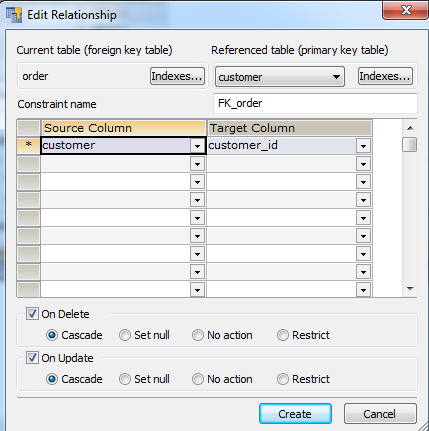
Создание связи по внешнему ключу между таблицами заказов и клиентов.
В окне выше вы можете видеть, как поле customer таблицы заказов слева связывается с первичным ключом (customer_id) таблицы клиентов справа.
Теперь, когда вы посмотрите на данные, которые могли бы быть в таблицах, вы увидите, что две таблицы связаны.
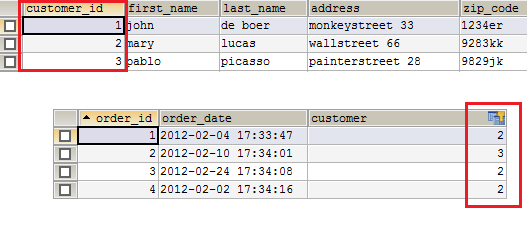
Заказы связаны с клиентами через поле customer, которое ссылается на таблицу клиентов.
На изображении вы видите, что клиент mary поместила три заказа, клиент pablo поместил один, а клиент john – ни одного.
Вы можете спросить: “А что же именно заказали все эти люди?” Это хороший вопрос. Вы возможно ожидали увидеть заказанные товары в таблице заказов. Но это плохой пример проектирования. Как бы вы поместили множественные продукты в единственную запись? Товары – это отдельные сущности, которые должны храниться в отдельной таблице. И связь между таблицами заказов и товаров будет являться связью один-ко-многим. Я расскажу об этом далее.
6. СОЗДАНИЕ ДИАГРАММЫ СУЩНОСТЬ-СВЯЗЬ
Ранее вы узнали как записи из разных таблиц связываются друг с другом в реляционных базах данных. Перед созданием и связыванием таблиц важно, чтобы вы подумали о сущностях, которые существуют в вашей системе (для которой вы создаете базу данных) и решили каким образом эти сущности бы связывались друг с другом. В проектировании баз данных сущности и их отношения обычно предоставляются в диаграмме сущность-связь (англ. entity-relationship diagram, ERD). Данная диаграмма является результатом процесса проектирования базы данных.
Сущности.
Вы можете задаться вопросом, что же такое сущность. Нуу… это “вещь” в системе. Там. Моя Мама всегда хотела, чтобы я стал учителем потому, что я очень хорошо объясняю различные вещи.
В контексте проектирования баз данных сущность – это нечто, что заслуживает своей собственной таблицы в модели вашей базы данных. Когда вы проектируете базу данных, вы должны определить эти сущности в системе, для которой вы создаете базу данных. Это скорее вопрос диалога с клиентом или с собой с целью выяснения того, с какими данными будет работать ваша система.
Давайте возьмем интернет-магазин для примера. Интернет-магазин продает товары. Товар мог бы стать очевидной сущностью в системе интернет-магазина. Товары заказываются клиентами. Вот мы с вами и увидели еще две очевидных сущности: заказы и клиенты.
Заказ оплачивается клиентом… это интересно. Мы собираемся создавать отдельную таблицу для платежей в базе данных нашего интернет-магазина? Возможно. Но разве платежи – это минимальный блок информации, который относится к заказам? Это тоже возможно.
Если вы не уверены, то просто подумайте о том, какую информацию о платежах вы хотите хранить. Возможно, вы захотите хранить метод платежа или дату платежа. Но это все еще минимальные блоки информации, которые могли бы относиться к заказу. Можно изменить формулировки. Метод платежа — метод платежа заказа. Дата платежа – дата платежа заказа. Таким образом, я не вижу необходимости выносить платежи в отдельную таблицу, хотя концептуально вы бы могли выделить платежи как сущность, т.к. вы могли бы рассматривать платежи как контейнер информации (метод платежа, дата платежа).
Давайте не будет слишком академичными.
Как вы видите, есть разница между сущностью и непосредственно таблицей в базе данных, т.е. это не одно и то же. Специалисты отрасли информационных технологий могут быть ОЧЕНЬ академичными и педантичными в этом вопросе. Я не такой специалист. Эта разница зависит от вашей точки зрения на ваши данные, вашу информацию. Если вы смотрите на моделирование данных с точки зрения программного обеспечения, то вы можете прийти к множеству сущностей, которые нельзя будет перенести напрямую в базу данных. В данном руководстве мы смотрим на данные строго с точки зрения баз данных и в нашем маленьком мире сущность – это таблица.

Держитесь там, вы действительно близки к получению вашей ученой степени по базам данных.
Как вы видите определение того, какие сущности имеет ваша система – это немного интеллектуальный процесс, который требует некоторого опыта и часто – это предмет для внесения изменений, пересмотров, раздумий, но, конечно, это не ракетостроение.
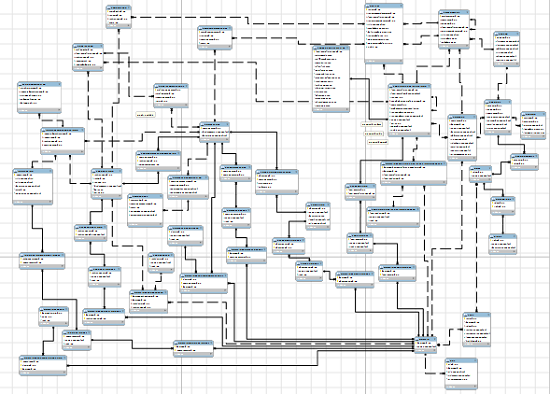
Диаграмма сущность-связь может быть достаточно большой, если вы работаете над сложным приложением. Некоторые диаграммы могут содержать сотни или даже тысячи таблиц.
Связи.
Второй шаг в проектировании баз данных – это выбор того, какие связи существуют между сущностями в вашей системе. Сейчас это может быть немного сложно для понимания, но, повторюсь еще раз, это не ракетостроение. С приобретением некоторого опыта и переосмысления выполненной работы вы будете завершать очередную модель базы данных верным или почти верным образом.
Итак. Я рассказал вам о связи один-ко-многим и я расскажу вам больше о связях в дальнейших частях этого руководства, поэтому сейчас я больше не буду останавливаться на этом. Просто запомните, что решение о том, какие связи будут иметь ваши сущности – важная часть проектирования баз данных и эти связи отображаются в диаграмме сущность-связь.
Sql первичный ключ что это
Data types are a way to limit the kind of data that can be stored in a table. For many applications, however, the constraint they provide is too coarse. For example, a column containing a product price should probably only accept positive values. But there is no standard data type that accepts only positive numbers. Another issue is that you might want to constrain column data with respect to other columns or rows. For example, in a table containing product information, there should be only one row for each product number.
To that end, SQL allows you to define constraints on columns and tables. Constraints give you as much control over the data in your tables as you wish. If a user attempts to store data in a column that would violate a constraint, an error is raised. This applies even if the value came from the default value definition.
5.4.1. Check Constraints
A check constraint is the most generic constraint type. It allows you to specify that the value in a certain column must satisfy a Boolean (truth-value) expression. For instance, to require positive product prices, you could use:
As you see, the constraint definition comes after the data type, just like default value definitions. Default values and constraints can be listed in any order. A check constraint consists of the key word CHECK followed by an expression in parentheses. The check constraint expression should involve the column thus constrained, otherwise the constraint would not make too much sense.
You can also give the constraint a separate name. This clarifies error messages and allows you to refer to the constraint when you need to change it. The syntax is:
So, to specify a named constraint, use the key word CONSTRAINT followed by an identifier followed by the constraint definition. (If you don’t specify a constraint name in this way, the system chooses a name for you.)
A check constraint can also refer to several columns. Say you store a regular price and a discounted price, and you want to ensure that the discounted price is lower than the regular price:
The first two constraints should look familiar. The third one uses a new syntax. It is not attached to a particular column, instead it appears as a separate item in the comma-separated column list. Column definitions and these constraint definitions can be listed in mixed order.
We say that the first two constraints are column constraints, whereas the third one is a table constraint because it is written separately from any one column definition. Column constraints can also be written as table constraints, while the reverse is not necessarily possible, since a column constraint is supposed to refer to only the column it is attached to. ( PostgreSQL doesn’t enforce that rule, but you should follow it if you want your table definitions to work with other database systems.) The above example could also be written as:
It’s a matter of taste.
Names can be assigned to table constraints in the same way as column constraints:
It should be noted that a check constraint is satisfied if the check expression evaluates to true or the null value. Since most expressions will evaluate to the null value if any operand is null, they will not prevent null values in the constrained columns. To ensure that a column does not contain null values, the not-null constraint described in the next section can be used.
PostgreSQL does not support CHECK constraints that reference table data other than the new or updated row being checked. While a CHECK constraint that violates this rule may appear to work in simple tests, it cannot guarantee that the database will not reach a state in which the constraint condition is false (due to subsequent changes of the other row(s) involved). This would cause a database dump and restore to fail. The restore could fail even when the complete database state is consistent with the constraint, due to rows not being loaded in an order that will satisfy the constraint. If possible, use UNIQUE , EXCLUDE , or FOREIGN KEY constraints to express cross-row and cross-table restrictions.
If what you desire is a one-time check against other rows at row insertion, rather than a continuously-maintained consistency guarantee, a custom trigger can be used to implement that. (This approach avoids the dump/restore problem because pg_dump does not reinstall triggers until after restoring data, so that the check will not be enforced during a dump/restore.)
PostgreSQL assumes that CHECK constraints’ conditions are immutable, that is, they will always give the same result for the same input row. This assumption is what justifies examining CHECK constraints only when rows are inserted or updated, and not at other times. (The warning above about not referencing other table data is really a special case of this restriction.)
An example of a common way to break this assumption is to reference a user-defined function in a CHECK expression, and then change the behavior of that function. PostgreSQL does not disallow that, but it will not notice if there are rows in the table that now violate the CHECK constraint. That would cause a subsequent database dump and restore to fail. The recommended way to handle such a change is to drop the constraint (using ALTER TABLE ), adjust the function definition, and re-add the constraint, thereby rechecking it against all table rows.
5.4.2. Not-Null Constraints
A not-null constraint simply specifies that a column must not assume the null value. A syntax example:
A not-null constraint is always written as a column constraint. A not-null constraint is functionally equivalent to creating a check constraint CHECK ( column_name IS NOT NULL) , but in PostgreSQL creating an explicit not-null constraint is more efficient. The drawback is that you cannot give explicit names to not-null constraints created this way.
Of course, a column can have more than one constraint. Just write the constraints one after another:
The order doesn’t matter. It does not necessarily determine in which order the constraints are checked.
The NOT NULL constraint has an inverse: the NULL constraint. This does not mean that the column must be null, which would surely be useless. Instead, this simply selects the default behavior that the column might be null. The NULL constraint is not present in the SQL standard and should not be used in portable applications. (It was only added to PostgreSQL to be compatible with some other database systems.) Some users, however, like it because it makes it easy to toggle the constraint in a script file. For example, you could start with:
and then insert the NOT key word where desired.
In most database designs the majority of columns should be marked not null.
5.4.3. Unique Constraints
Unique constraints ensure that the data contained in a column, or a group of columns, is unique among all the rows in the table. The syntax is:
when written as a column constraint, and:
when written as a table constraint.
To define a unique constraint for a group of columns, write it as a table constraint with the column names separated by commas:
This specifies that the combination of values in the indicated columns is unique across the whole table, though any one of the columns need not be (and ordinarily isn’t) unique.
You can assign your own name for a unique constraint, in the usual way:
Adding a unique constraint will automatically create a unique B-tree index on the column or group of columns listed in the constraint. A uniqueness restriction covering only some rows cannot be written as a unique constraint, but it is possible to enforce such a restriction by creating a unique partial index.
In general, a unique constraint is violated if there is more than one row in the table where the values of all of the columns included in the constraint are equal. By default, two null values are not considered equal in this comparison. That means even in the presence of a unique constraint it is possible to store duplicate rows that contain a null value in at least one of the constrained columns. This behavior can be changed by adding the clause NULLS NOT DISTINCT , like
The default behavior can be specified explicitly using NULLS DISTINCT . The default null treatment in unique constraints is implementation-defined according to the SQL standard, and other implementations have a different behavior. So be careful when developing applications that are intended to be portable.
5.4.4. Primary Keys
A primary key constraint indicates that a column, or group of columns, can be used as a unique identifier for rows in the table. This requires that the values be both unique and not null. So, the following two table definitions accept the same data:
Primary keys can span more than one column; the syntax is similar to unique constraints:
Adding a primary key will automatically create a unique B-tree index on the column or group of columns listed in the primary key, and will force the column(s) to be marked NOT NULL .
A table can have at most one primary key. (There can be any number of unique and not-null constraints, which are functionally almost the same thing, but only one can be identified as the primary key.) Relational database theory dictates that every table must have a primary key. This rule is not enforced by PostgreSQL , but it is usually best to follow it.
Primary keys are useful both for documentation purposes and for client applications. For example, a GUI application that allows modifying row values probably needs to know the primary key of a table to be able to identify rows uniquely. There are also various ways in which the database system makes use of a primary key if one has been declared; for example, the primary key defines the default target column(s) for foreign keys referencing its table.
5.4.5. Foreign Keys
A foreign key constraint specifies that the values in a column (or a group of columns) must match the values appearing in some row of another table. We say this maintains the referential integrity between two related tables.
Say you have the product table that we have used several times already:
Let’s also assume you have a table storing orders of those products. We want to ensure that the orders table only contains orders of products that actually exist. So we define a foreign key constraint in the orders table that references the products table:
Now it is impossible to create orders with non-NULL product_no entries that do not appear in the products table.
We say that in this situation the orders table is the referencing table and the products table is the referenced table. Similarly, there are referencing and referenced columns.
You can also shorten the above command to:
because in absence of a column list the primary key of the referenced table is used as the referenced column(s).
You can assign your own name for a foreign key constraint, in the usual way.
A foreign key can also constrain and reference a group of columns. As usual, it then needs to be written in table constraint form. Here is a contrived syntax example:
Of course, the number and type of the constrained columns need to match the number and type of the referenced columns.
Sometimes it is useful for the “ other table ” of a foreign key constraint to be the same table; this is called a self-referential foreign key. For example, if you want rows of a table to represent nodes of a tree structure, you could write
A top-level node would have NULL parent_id , while non-NULL parent_id entries would be constrained to reference valid rows of the table.
A table can have more than one foreign key constraint. This is used to implement many-to-many relationships between tables. Say you have tables about products and orders, but now you want to allow one order to contain possibly many products (which the structure above did not allow). You could use this table structure:
Notice that the primary key overlaps with the foreign keys in the last table.
We know that the foreign keys disallow creation of orders that do not relate to any products. But what if a product is removed after an order is created that references it? SQL allows you to handle that as well. Intuitively, we have a few options:
Disallow deleting a referenced product
Delete the orders as well
To illustrate this, let’s implement the following policy on the many-to-many relationship example above: when someone wants to remove a product that is still referenced by an order (via order_items ), we disallow it. If someone removes an order, the order items are removed as well:
Restricting and cascading deletes are the two most common options. RESTRICT prevents deletion of a referenced row. NO ACTION means that if any referencing rows still exist when the constraint is checked, an error is raised; this is the default behavior if you do not specify anything. (The essential difference between these two choices is that NO ACTION allows the check to be deferred until later in the transaction, whereas RESTRICT does not.) CASCADE specifies that when a referenced row is deleted, row(s) referencing it should be automatically deleted as well. There are two other options: SET NULL and SET DEFAULT . These cause the referencing column(s) in the referencing row(s) to be set to nulls or their default values, respectively, when the referenced row is deleted. Note that these do not excuse you from observing any constraints. For example, if an action specifies SET DEFAULT but the default value would not satisfy the foreign key constraint, the operation will fail.
The appropriate choice of ON DELETE action depends on what kinds of objects the related tables represent. When the referencing table represents something that is a component of what is represented by the referenced table and cannot exist independently, then CASCADE could be appropriate. If the two tables represent independent objects, then RESTRICT or NO ACTION is more appropriate; an application that actually wants to delete both objects would then have to be explicit about this and run two delete commands. In the above example, order items are part of an order, and it is convenient if they are deleted automatically if an order is deleted. But products and orders are different things, and so making a deletion of a product automatically cause the deletion of some order items could be considered problematic. The actions SET NULL or SET DEFAULT can be appropriate if a foreign-key relationship represents optional information. For example, if the products table contained a reference to a product manager, and the product manager entry gets deleted, then setting the product’s product manager to null or a default might be useful.
The actions SET NULL and SET DEFAULT can take a column list to specify which columns to set. Normally, all columns of the foreign-key constraint are set; setting only a subset is useful in some special cases. Consider the following example:
Without the specification of the column, the foreign key would also set the column tenant_id to null, but that column is still required as part of the primary key.
Analogous to ON DELETE there is also ON UPDATE which is invoked when a referenced column is changed (updated). The possible actions are the same, except that column lists cannot be specified for SET NULL and SET DEFAULT . In this case, CASCADE means that the updated values of the referenced column(s) should be copied into the referencing row(s).
Normally, a referencing row need not satisfy the foreign key constraint if any of its referencing columns are null. If MATCH FULL is added to the foreign key declaration, a referencing row escapes satisfying the constraint only if all its referencing columns are null (so a mix of null and non-null values is guaranteed to fail a MATCH FULL constraint). If you don’t want referencing rows to be able to avoid satisfying the foreign key constraint, declare the referencing column(s) as NOT NULL .
A foreign key must reference columns that either are a primary key or form a unique constraint. This means that the referenced columns always have an index (the one underlying the primary key or unique constraint); so checks on whether a referencing row has a match will be efficient. Since a DELETE of a row from the referenced table or an UPDATE of a referenced column will require a scan of the referencing table for rows matching the old value, it is often a good idea to index the referencing columns too. Because this is not always needed, and there are many choices available on how to index, declaration of a foreign key constraint does not automatically create an index on the referencing columns.
More information about updating and deleting data is in Chapter 6. Also see the description of foreign key constraint syntax in the reference documentation for CREATE TABLE .
5.4.6. Exclusion Constraints
Exclusion constraints ensure that if any two rows are compared on the specified columns or expressions using the specified operators, at least one of these operator comparisons will return false or null. The syntax is:
Adding an exclusion constraint will automatically create an index of the type specified in the constraint declaration.
| Prev | Up | Next |
| 5.3. Generated Columns | Home | 5.5. System Columns |
Submit correction
If you see anything in the documentation that is not correct, does not match your experience with the particular feature or requires further clarification, please use this form to report a documentation issue.
How To Use Primary Keys in SQL
One of the valuable traits of relational databases is molding the data into a well-defined structure. This structure is achieved by using tables with fixed columns, following strictly defined datatypes, and ensuring that each row has the same shape. When you store data as rows in tables, it is equally important to be able to find them and refer to them without ambiguity. In Structured Query Language (SQL), this can be achieved with primary keys, which serve as identifiers for individual rows in the tables in the relational database.
In this tutorial, you’ll learn about primary keys and use a few different kinds to identify unique rows in database tables. Using some sample datasets, you’ll create primary keys on single columns and multiple columns, and autoincrement sequential keys.
Prerequisites
To follow this guide, you will need a computer running a SQL-based relational database management system (RDBMS). The instructions and examples in this guide were validated using the following environment:
- A server running Ubuntu 20.04, with a non-root user with administrative privileges and a firewall configured with UFW, as described in our initial server setup guide for Ubuntu 20.04.
- MySQL installed and secured on the server, as outlined in How To Install MySQL on Ubuntu 20.04. This guide was verified with a non-root MySQL user, created using the process described in Step 3.
- Basic familiarity with executing SELECT queries to retrieve data from the database as described in our How To SELECT Rows FROM Tables in SQL guide.
Note: Please note that many RDBMSs use their own unique implementations of SQL. Although the commands outlined in this tutorial will work on most RDBMSs and primary keys are a part of the SQL standard, some features are database-specific and thus the exact syntax or output may differ if you test them on a system other than MySQL.
You’ll also need an empty database in which you’ll be able to create tables demonstrating the use of primary keys. We encourage you to go through the following Connecting to MySQL and Setting up a Sample Database section for details on connecting to a MySQL server and creating the testing database used in examples throughout this guide.
Connecting to MySQL and Setting up a Sample Database
In this section, you will connect to a MySQL server and create a sample database so that you can follow the examples in this guide.
If your SQL database system runs on a remote server, SSH into your server from your local machine:
Then open up the MySQL server prompt, replacing sammy with the name of your MySQL user account:
Create a database named primary_keys :
If the database was created successfully, you’ll receive output like this:
To select the primary_keys database, run the following USE statement:
You will receive the following output:
After selecting the database, you can create sample tables within it. You’re now ready to follow the rest of the guide and begin working with primary keys in MySQL.
Introduction to Primary Keys
Data in a relational database is stored in tables with a particular, uniform structure of individual rows. The table definition describes what columns there are and what data types can be saved in individual columns. That alone is enough to store the information in the database and find it later using different filtering criteria by using the WHERE clause. However, this structure doesn’t guarantee the possibility of finding any single row unambiguously.
Imagine a database of all registered vehicles allowed to drive on public roads. The database would contain such information as the car brand, model, manufacture year, and paint color. However, if you were looking for a red Chevrolet Camaro made in 2007, you could find more than one. After all, car producers sell similar cars to multiple customers. That’s why registered cars have license plate numbers uniquely identifying each vehicle. If you looked up a car with a license plate of OFP857 , you could be sure this criterion will find only one car. That’s because, by law, plate numbers uniquely identify registered vehicles. In a relational database, such a piece of data is called a primary key.
Primary keys are unique identifiers found in a single column or a set of columns that can unambiguously identify every row in a database table. A few rules reflect the technical properties of primary keys:
- A primary key must use unique values. If the primary key consists of more than one column, the combination of values in these columns must be unique across the whole table. Since the key is meant to identify every row uniquely, it can’t appear more than once.
- A primary key must not contain NULL values.
- Each database table can use only one primary key.
The database engine enforces these rules, so you can rely on those properties being true if the primary key is defined on a table.
In addition to these technical properties, you must also consider the content of the data to decide what kind of data is a good choice for becoming a primary key. Natural keys are identifiers already present in the data set, while surrogate keys are artificial identifiers.
Some data structures have primary keys that naturally occur within the data set, such as license plate numbers in a car database or social security numbers in the directory of US citizens. Sometimes such identifiers are not a single value but a pair or a combination of several values. For example, in a local city directory of houses, just a street name or a street number, cannot identify a house uniquely. There can be multiple houses on a single street, and the same number can appear on multiple streets. But a pair of street names and numbers can be assumed to be a unique house identifier. Such naturally occurring identifiers are called natural keys.
However, often data can’t be uniquely characterized by the values of a single column or a small subset of columns. Then, artificial primary keys are created, for example, using a sequence of numbers or randomly generated identifiers like UUIDs. Such keys are called surrogate keys.
In the following sections, you’ll create natural keys based on a single column or multiple columns, and generate surrogate keys on tables where a natural key is not an option.
Creating a Primary Key on a Single Column
In many cases, a data set naturally contains a single column that can be used to identify rows in the table uniquely. In these cases, you can create a natural key to describe the data. Following the previous example of the database of registered cars, imagine a table with the following structure:
The first and second rows both describe a red Ford Mustang from 2018. By using only car make and model, you wouldn’t be able to identify the car uniquely. The license plate differs in both instances, providing a good unique identifier for every row in the table. Because a license plate number is already part of the data, using that as a primary key would create a natural key. If you created the table without using a primary key on the license_plate column, you would risk a duplicate or an empty plate appearing in the data set at some point in time.
Next, you’ll create a table resembling the one above with the license_plate column used as a primary key and the following columns:
- license_plate : This column holds the license plate number, represented by the varchar data type.
- brand : This column holds the brand of the car, expressed using the varchar data type with a maximum of 50 characters.
- model : This column holds the car’s model, expressed using the varchar data type with a maximum of 50 characters.
- color : This column holds the color, expressed using the varchar data type with a maximum of 20 characters.
- year : This column holds the year the car was made, expressed using the int data type to store numerical data.
To create the cars table, execute the following SQL statement:
The PRIMARY KEY clause follows the license_plate data type definition. When dealing with primary keys based on single columns, you can use the simplified syntax to create the key, writing PRIMARY KEY in the column definition.
If the following output prints, the table has been created:
Following that, load the table with the sample rows presented in the example above by running the following INSERT INTO operation:
The database will respond with the success message:
You can now verify, using the SELECT statement, that the newly created table contains the anticipated data and format:
The output will show a table similar to the one at the beginning of the section:
Next, you can verify whether the rules for the primary key are guaranteed by the database engine. Try inserting a car with a duplicate plate number by executing:
MySQL will respond with an error message, saying that the DEF456 license plate would result in a duplicate entry for the primary key:
Note: Under the hood, primary keys are implemented with unique indexes and share many properties with indexes you might create manually for other columns on the table. Most importantly, primary key indexes also improve the performance of querying the table against the column the index is defined on. To learn more about using indexes for that purpose, see the How to Use Indexes guide in this tutorial series.
You can now be sure that duplicate license plates are not allowed. Next, check whether it’s possible to insert a car with an empty license plate:
This time, the database will respond with another error message:
With these two rules enforced by the database, you can be sure that the license_plate identifies every row in the table uniquely. If you query the table against any license plate, you can expect a single row returned every time.
In the next section, you’ll learn how to use primary keys with multiple columns.
Creating a Primary Key on Multiple Columns
When one column is not enough to identify a unique row in the table, you can create primary keys that use more than one column.
For example, imagine a registry of homes where neither the street name nor the street number alone is enough to identify any individual house:
The street name Central Park West appears more than once in the table, and so does the street number 100 . However, no duplicate pairs of street names and street numbers are visible. In this case, while no single column could be a primary key, the pair of those two values can be used to identify each row in the table uniquely.
Next, you’ll create a table resembling the one shown above with the following columns:
- street_name : This column holds the name of the street where the house is located, represented by the varchar data type limited to 50 characters.
- street_number : This column holds the house’s street number, represented by the varchar data type. This column can store up to 5 characters. It doesn’t use numerical int data type because some street numbers might contain letters (for example, 200B ).
- house_owner : This column holds the name of the house’s owner, represented by the varchar data type limited to 50 characters.
- year : This column holds the year the house was built, represented by the int data type to store numerical values.
This time, the primary key will use both the street_name and street_number columns, rather than a single column. To do so, execute the following SQL statement:
This time, the PRIMARY KEY clause appears below the column definitions, unlike the previous example. The PRIMARY KEY statement is followed by parentheses with two column names inside: street_name and street_number . This syntax creates the primary key in the houses table spanning two columns.
If the following output prints, the table has been created:
Following that, load the table with the sample rows presented in the previous example by running the following INSERT INTO operation:
The database will respond with the success message:
You can now verify, using the SELECT statement, that the newly created table contains the anticipated data and format:
The output will show a table similar to the one at the beginning of the section:
Now, let’s verify if the database will allow inserting rows that duplicate street names and street numbers, but restrict duplicate full addresses from appearing in the table. Let’s start by adding another house on Park Avenue:
MySQL will respond with a success message since the address 8000 Park Avenue didn’t appear in the table previously:
A similar result will happen when you add a house on 8000 Main Street , repeating the street number:
Once again, this will insert a new row properly since the entire address doesn’t duplicate:
However, try adding another house on 100 5th Avenue using the INSERT statement below:
The database will respond with an error message, notifying you that there is a duplicate entry for the primary key for the pair of values 5th Avenue and 100 :
The database properly enforces the primary key rules, with the key defined on a pair of columns. You can be sure that the full address consisting of a street name and street number won’t get duplicated in the table.
In this section, you created a natural key with a pair of columns to identify every row in the house table uniquely. But it’s not always possible to derive primary keys from the dataset. In the next section, you’ll use artificial primary keys that don’t come directly from the data.
Creating a Sequential Primary Key
Until now, you’ve created unique primary keys using existing columns in the sample data sets. But in some cases, the data will inevitably duplicate, preventing any columns from being good unique identifiers. In these cases, you can create sequential primary keys using generated identifiers. When the data at your disposal requires you to devise new identifiers to identify rows uniquely, the primary keys created on those artificial identifiers are called surrogate keys.
Imagine a list of book club members—an informal gathering where anyone can join without showing a government-issued ID. There is a chance people with matching names will join the club at some point in time:
The names Bob Johnson and Jane Smith are repeated in the table. You need to use an additional identifier to be sure who is who, and it’s not possible to identify rows uniquely in that table in any way. If you kept the list of book club members on paper, you could keep auxiliary identifiers to help distinguish people with the same names among the group.
You can do a similar thing in a relational database by using an additional column holding generated, factless identifiers with the sole purpose of uniquely separating all rows in the table. Let’s call it member_id .
However, it would be a burden to come up with such an identifier whenever you wanted to add another book club member to the database. To solve this, MySQL provides a feature for auto-incremented numerical columns, where the database automatically provides the column value by an incrementing sequence of integers.
Let’s create a table resembling the one shown above. You’ll add an additional auto-incrementing column ( member_id ) to hold the automatically assigned number for each club member. That automatically assigned number will act as the primary key for the table:
- member_id : This column holds an auto-incremented, numerical identifier represented by the int data type.
- first_name : This column holds the first name of the club members, represented by the varchar data type limited to 50 characters.
- last_name : This column holds the last name of the club members, represented by the varchar data type limited to 50 characters.
To create the table, execute the following SQL statement:
While the PRIMARY KEY clause appears after the column type definition, just like a single column primary key, an additional attribute appears before it: AUTO_INCREMENT . It tells MySQL to auto-generate values for that column, if not explicitly provided, using a growing sequence of numbers.
Note: The AUTO_INCREMENT property for defining a column is specific to MySQL. Other databases often provide similar methods for generating sequential keys, but the syntax differs among engines. When in doubt, we encourage you to refer to the official documentation of your RDBMS.
If the following output prints, the table has been created:
Following that, load the table with the sample rows presented in the example above by running the following INSERT INTO operation:
The INSERT statement now includes the list of column names ( first_name and last_name ), which ensures the database knows that the member_id column is not supplied in the dataset, so the default value for it should be taken instead.
The database will respond with the success message:
Use the SELECT statement to verify the data in the newly created table:
The output will show a table similar to the one at the beginning of the section:
However, this time, the member_id column appears in the result and contains a sequence of numbers from 1 to 10 . With this column in place, duplicate rows for Jane Smith and Bob Johnson are no longer indistinguishable since each name is associated with a unique identifier ( member_id ).
Now, let’s verify if the database will allow adding another Tom Thompson to the list of club members:
MySQL will respond with a success message:
To check what numerical identifier was assigned to the new entry by the database, execute the SELECT query again:
There is one more row in the output:
A new row was automatically assigned number 11 in the member_id column through the AUTO_INCREMENT feature of the database.
If the data you are working with doesn’t have natural candidates for primary keys, and you don’t want to provide invented identifiers every time you add new data to the database, you can safely rely on sequentially generated identifiers as primary keys.
Conclusion
By following this guide, you learned what primary keys are and how to create the common types in MySQL to identify unique rows in database tables. You built natural primary keys, created primary keys spanning multiple columns, and used autoincrementing sequential keys where natural keys are not present.
You can use primary keys to shape the database structure further, ensuring data rows will be uniquely identifiable. This tutorial covered only the basics of using primary keys. To learn more about that, refer to the MySQL documentation on constraints. You can also check out our guides on Understanding SQL Constraints and How To Use Constraints in SQL.
If you’d like to learn more about different concepts around the SQL language and working with it, we encourage you to check out the other guides in the How To Use SQL series.
Thanks for learning with the DigitalOcean Community. Check out our offerings for compute, storage, networking, and managed databases.
Tutorial Series: How To Use SQL
Series Description
Structured Query Language — commonly known as SQL — is a language used to define, control, manipulate, and query data held in a relational database. SQL has been widely adopted since it was first developed in the 1970s, and today it’s the predominant language used to manage relational database management systems.
Ideal for managing structured data (data that can fit neatly into an existing data model), SQL is an essential tool for developers and system administrators in a wide variety of contexts. Also, because of its maturity and prevalence, candidates with SQL experience are highly sought after for jobs across a number of industries.
This series is intended to help you get started with using SQL. It includes a mix of conceptual articles and tutorials which provide introductions to various SQL concepts and practices. You can also use the entries in this series for reference while you continue to hone your skills with SQL.
Note: Please be aware that the tutorials in this series use MySQL in examples, but many RDBMSs use their own unique implementations of SQL. Although the commands outlined in this tutorial will work on most RDBMSs, the exact syntax or output may differ if you test them on a system other than MySQL.
Первичный ключ (PRIMARY KEY) в SQL
В SQL ограничение PRIMARY KEY используется для уникальной идентификации строк.
Ограничение PRIMARY KEY — это просто комбинация ограничений NOT NULL и UNIQUE. Это означает, что столбец не может содержать повторяющиеся значения, а также значения NULL .
Синтаксис создания первичного ключа:
Здесь столбец college_id имеет первичный ключ. Это означает, что значения этого столбца должны быть уникальными, а также не содержать значения NULL .
Примечание: Синтаксис создания первичного ключа может отличаться в некоторых СУБД.
Ошибка первичного ключа
Если мы попытаемся вставить нулевые или повторяющиеся значения в столбец с первичным ключом, то получим ошибку. Например: