How to setup SQL Server alerts and email operator notifications
Setting up a SQL Server alert to email an operator with a message is a multiple step process. You can setup database mail, define an operator and an alert, but still no email is being sent. So how do you send an alert to an operator?
Solution
Note: This solution involves restarting SQL Server Agent.
Setup SQL Server Database Mail
First setup database mail with a profile named SQLAlerts. The profile can be named anything, but in these instructions, the profile name SQLAlerts is referenced. If you wish to use a different profile name just substitute accordingly. For procedures in setting up database mail, see this post.
Define a SQL Server Operator
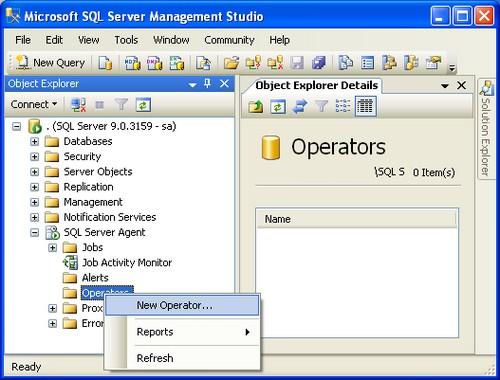
Connect to the SQL Server instance using Microsoft SQL Management Studio. Expand the SQL Server Agent tree and right click on Operators and select New Operator. as shown below.
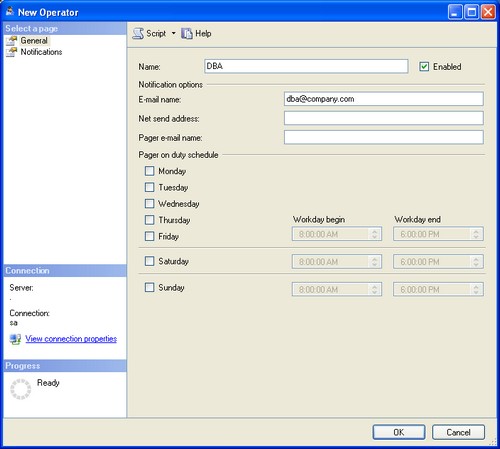
Specify an operator Name, E-mail name, and click OK
Setup SQL Server Agent Settings
Note: This step is often overlooked when creating a SQL Server alert for the first time. SQL Server Agent must be setup correctly for operators to receive an alert e-mail.
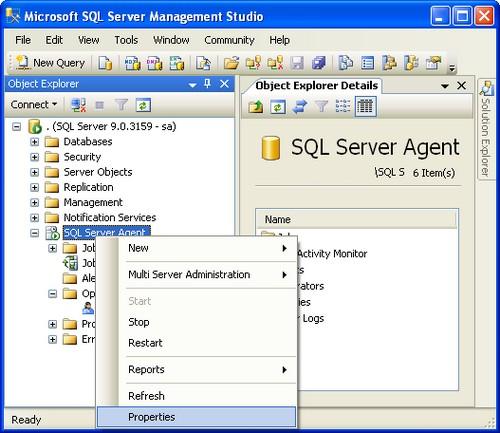
Right click SQL Server Agent and select Properties.
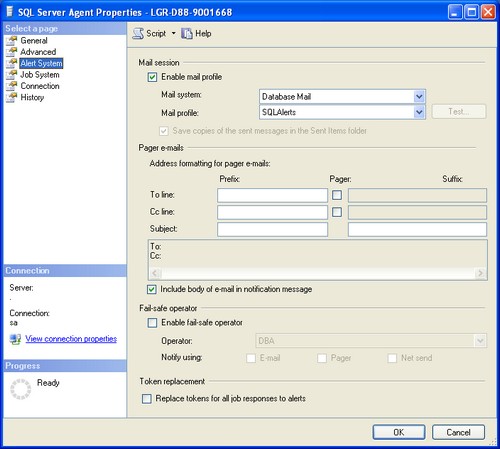
Select Alert System in the left pane and do the following:
- Check Enable mail profile
- Verify Mail system is Database Mail
- Verify Mail profile is SQLAlerts that we discussed above
- Check Include body of e-mail in the notification message
- Click OKto save settings.
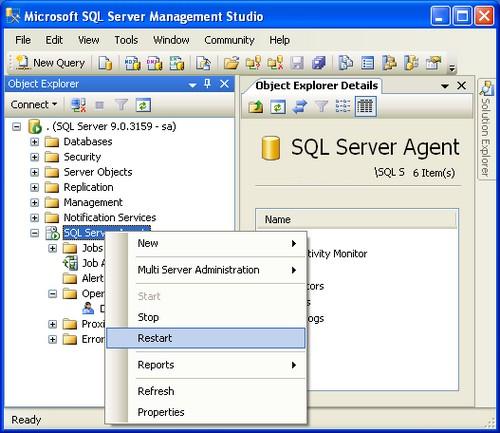
Restart SQL Server Agent to Activate Settings
Warning: Restarting SQL Server Agent will cancel any executing jobs, so this should be done when there is no activity.
Define a SQL Server Alert
This sample SQL Server alert will send an email when the TempDB database gets larger than 0 KB. Note: I am setting this to zero, so the alert can fire. Once verified that this works, you will need to update the setting to a number that makes sense for your environment or disable this alert.
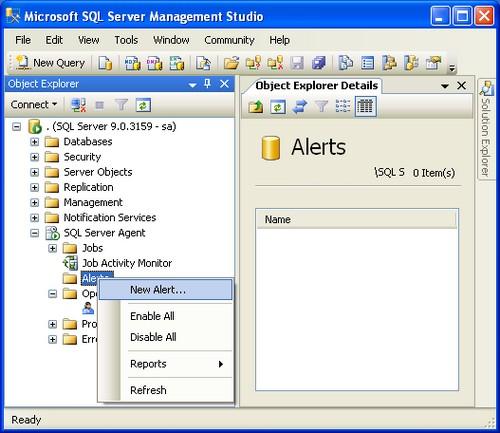
Right click Alerts and select New Alert.
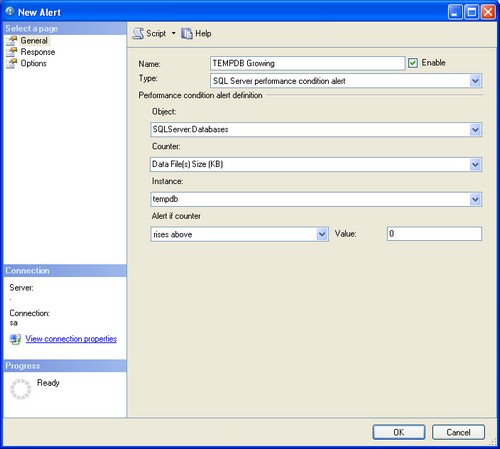
On the General pane specify:
- Name: TEMPDB Growing
- Type: SQL Server performance condition alert
- Object: SQLServer:Databases
- Counter: Data File(s) (KB)
- Instance: tempdb
- Alert if counter: rises above
- Value: 0
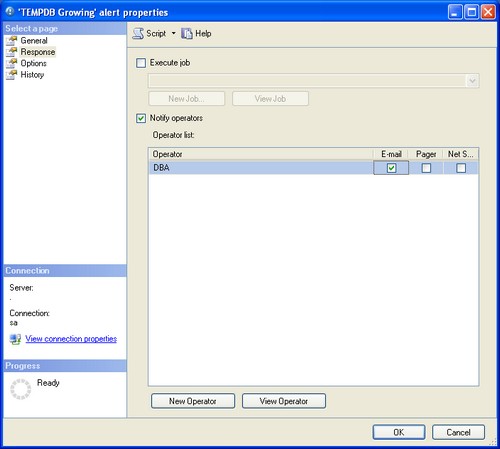
Click on the Response pane:
- Check Notify operators
- Check E-mail for the operator
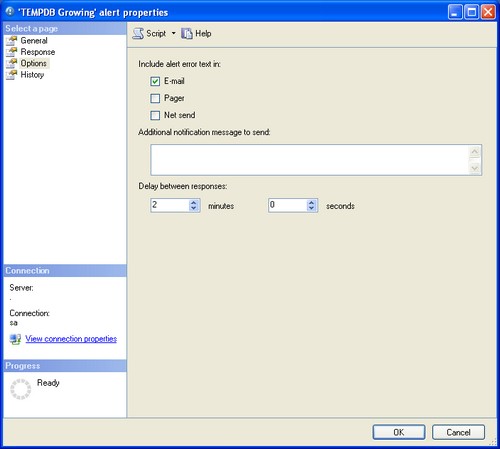
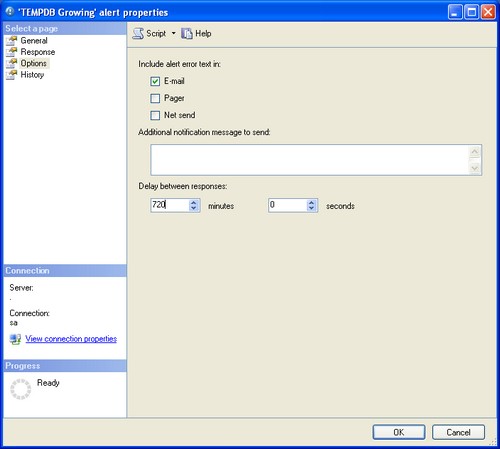
Click on the Options pane:
- For Include alert error text in select E-mail
- For Delay between responses enter 2 minutes
- Click OK
Verify SQL Server Alert is Working
The operator should receive an e-mail if not see the troubleshooting section.
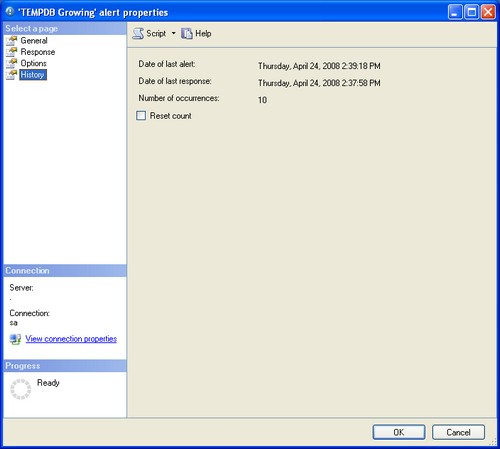
Open the Alert we just setup and click on the History page. The fields should be updated when the alert is triggered as shown below.
Disable the SQL Server Alert Test
To stop the Alert from being sent every two minutes, you have two options: disable the alert or provide a more appropriate size and response times.
To disable the SQL Server alert
- You an go to the General page for the alert and remove the checkmark from Enable and click OK
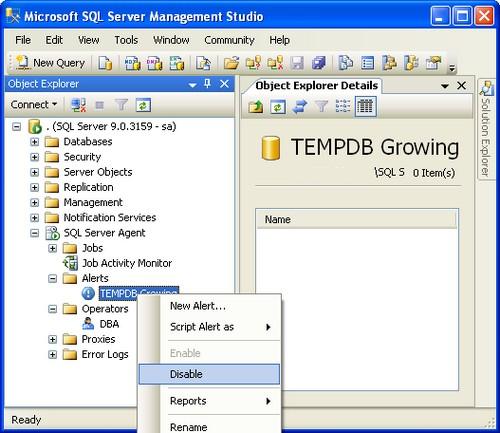
- Or you can right click on Alert name and select Disable as shown below
Change SQL Server Alert Settings
To change the settings do the following:
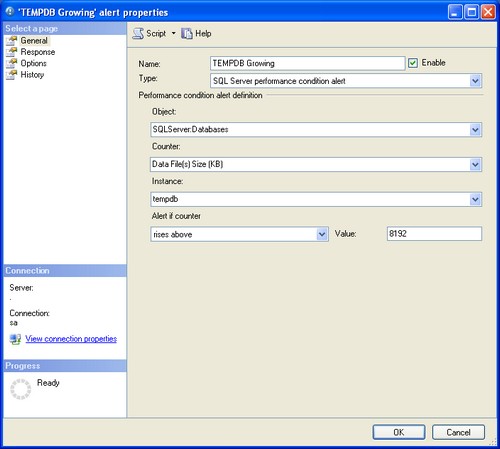
- Click on the General page
- Change the value to a value larger than the existing TEMPDB database file save. Note: the current file size is included in the e-mailed alert.
- Click on the Options page
- Change response to 720 minutes which is 12 hours or whatever value is suitable
- Click OK
Troubleshooting a SQL Server Alert
If the operator does not receive an e-mail:
- Test database mail by sending a test e-mail to the operator’s e-mail address.
- Make sure you restarted SQL Agent and it is running.
Next Steps
- Modify the alert to execute a job that captures all current connections using sp_who2 .
- Create alerts for other criteria you wished to monitor.
- Using SQL Server Management Studio, you can script the alert so you can easily create it in other instances. See this tip on how to create scripts.


About the author
 David Bird has years of IT Experience working as a DBA and programmer on Windows, UNIX, and mainframes.
Comments For This Article
Your article helped me a lot with automation of SQL Server maintenance jobs and alerts 🙂 Really helpful. Thank You.
Hello David — I would like to know if you could help me configure the database server, so that every time someone connects to the database and is different to a specific user send alert emails.
Thank you David, your post helped me.
�Excellent! Thanks for the walk-through.
take a look at this tip:
�I am facing below error while testing mail from sql server 2014.
Error ::� The mail could not be sent to the recipients because of the mail server failure. (Sending Mail using Account 4 (2019-03-04T20:41:27). Exception Message: Cannot send mails to mail server. (Failure sending mail.).
Please help, how to resolve this issue. I have configured all things properly.
I have one table licence in which start date and end date column. I want to send an email notification to that user before 7 days that licence is about expired. Can you please help me.
Excellent work! Thank you.
I have removed alert for job notification and have deleted job but it keeps sending in sql server 2014. How do I stop it?
I am trying to disable system notifications in sql server 2014 but it will not stop. I have deleted the job, operator and disabled db email. What else can I do to stop the notifications from sending to my email?
Thanks! Nice and simple explanation.
THANK A LOT FOR THIS NICE TIP.
Thanks for your excellent post.
I need a help for you. I’m trying to test the SQL Server mail but I can’t configured production SMTP mail information so is it possible to send the mail configuration for some mail drop folder on local system? So that I can go to the maildrop folder and check the mail sent from the SQL SERVER
Still working for SQL server 2012. Thanks!
Thank you for the post.
I have done everything but still not getting emails. What have I overlooked? I can send a test email.
My question is if you do not restart the SQL Server Agent and have the ‘Test’ alert run what would the result be? Will the history section of the alert properties still fill up and not receive an error? Is restarting the SQL Server Agent crucial?
Thanks, well explained, very useful
i want to put some querires on these settings it that possiblet
Thank You so much David , this post was very useful to me .
this step by step help me configure my first MS Sql Server Email Alert. Thanks for wonderful Work .
Thank you David. Excellent and still relevent in 2014! Cheers! 🙂
Sr thank you very much!.
hello, for the example alert you mention above instead of putting the value to be a set number of the size, can we enter a percent for example 10%
i would like to get alert it when tempdb data file size rises above 10% above its current size.
I have done all of these things and still cannot get the operator notification either via jobs or alerts to work. I don’t have any trouble on our SQL 2008 servers. Can anyone point out anything I may be overlooking.
Thanks a lot sir.
I have all of this working with the Alerts but when a Maintenance Plan runs it will not send out an email.
Good one. But if I have to modify the text (body/subject). How can I do that.
I have gone through the steps to set up the operator, but when I go to the SQL Server Agent properties and go to the Alert System page, I enable the maile profile, select Database Mail, but then the profile I created is not listed. I have tried restarting and it doesn’t change anything. What do I need to do to fix this?
Thank you David. Excellent guide and still relevent in 2012! Cheers! 🙂
The delimiter is a semi-colon (;) but the length is limited to 256 characters.
Can we have a multiple email ids configured as one operator? If so, what is the delimiter between the emails ids?
Good article, thanks.
I have a job with notifications when it fails.
When the job fails, I receive an email, but it only says:
JOB RUN: ‘test1’ was run on 4/16/2012 at 10:35:00 AM
DURATION: 0 hours, 0 minutes, 1 seconds
STATUS: Failed
MESSAGES: The job failed. The Job was invoked by Schedule 15 (prog). The last step to run was step 1 (step1).
How more detail about the error could be sent by email?
Thanks in advance.
Hi does anyone know how to alert for when a job gets disabled? Please advise. Thanks
3.7. Предупреждения MS Sql Server
Предупреждения (Alert или я еще люблю говорить Тревога) позволяют контролировать работу вашего сервера. Вы можете создавать тревоги на определенные события сервера (ошибки данных, ошибки запросов, ошибки или удачные выполнения работ и т.д.) и направлять сообщения определенным операторам. Когда мы создавали работы, то для них автоматически создаются тревоги, если указан оператор, который должен получать информацию об удачном или не удачном выполнении работы.
Благодаря тревогам, администратор может сидеть в нескольких тысячах километров от SQL сервера. Если произойдет внештатная ситуация, то администратор получит e-mail сообщение и сможет подключиться к серверу и исправить ошибку. Без тревоги, администратору пришлось бы постоянно контролировать работу сервера и наблюдать за большим количеством параметров.
Планировщики, как и работы, выполняются сервисом SQL Service Agent, поэтому он должен быть запущен, желательно, чтобы он запускался автоматически после загрузки ОС.
3.7.1. Создание сообщений
Для создания собственных сообщений (message) используется процедура SQL сервера sp_addmessage. В общем виде эта процедура выглядит следующим образом:
Параметров не так уж и много, поэтому давайте рассмотрим их, прежде чем напишем реальный пример:
- Номер (идентификатор) сообщения, который должен начинаться с 500001;
- Уровень критичности. К нему предъявляются такие же правила, как и у функции RAISERROR;
- Текст сообщения, максимальный размер которого 255 символов;
- Язык сообщения. По умолчанию используется нулевое значение и язык, установленный в системе;
- Нужно ли писать о событии в журнал сообщений Windows. Если в этом параметре указано true, то в журнал будет записано сообщение об ошибке. Если false, сообщение не обязательно будет записано в журнал, тут уже все зависит от того, как оно было сгенерировано;
- Если сообщение с указанным номером существует, то в этом параметре можно указать команду REPLACE. Это означает, что существующую ошибку с указанным номером надо заменить.
Давайте создадим свое сообщение:
Чуть позже мы увидим, как воспользоваться сообщениями.
Давайте рассмотрим, как можно удалять сообщения. Для этого используется процедура sp_dropmessage:
Процедуре передается два параметра: номер удаляемого сообщения и язык. Если язык не указан, то будут удалены сообщения для всех национальных языков, существующих в сообщении.
3.7.2. Создание предупреждения
Для создания предупреждения (alert) используется процедура sp_add_alert, которая выглядит следующим образом:
Рассмотрим доступные параметры этой процедуры:
- @name – имя тревоги, которое должно быть уникальным и по нему система будет в дальнейшем идентифицировать тревогу;
- @message_id – номер ошибки, на которую должно реагировать тревога. В MS SQL Server предопределено достаточно много ошибок, на которые вы можете создать тревоги. Чтобы увидеть их, просмотрите таблицу sysmessages в базу данных master:
В разделе 3.7.1 мы увидели, как создавать собственные сообщения ошибок.
- @severity – число от 1 до 25, определяющее уровень критичности торевоги. Если вы указали параметр @message_id, то параметр @severity должен быть равен нулю;
- @enabled – если параметр равен 1, то тревога является активной, иначе (если равно нулю) оно не будет генерироваться и операторы не получат уведомление;
- @delay_between_responses – задержка в секундах между событием и действием на это событие. В качестве действия может быть одно или более уведомлений на E-mail или пейджер оператора или выполнение определенной работы. По умолчанию задержки нет (значение 0) и действие произойдет сразу после генерации тревоги;
- @notification_message – в этом параметре вы можете задать дополнительный текст тревоги, которое будет добавлено к сообщению, отправляемому оператору;
- @include_event_description_in – параметр определяет, куда необходимо добавлять сообщение тревоги. В этом параметре можно указывать одно из следующих значений (или сумму):
- 0 – никуда;
- 1 – к e-mail сообщению;
- 2 – к сообщению на пейджер;
- 4 – к сообщению, отправляемому net send.
Например, если вы хотите, чтобы текст добавлялся к e-mail сообщению и к сообщению NET SEND, то необходимо указать число 5 (сумма чисел 1 и 4);
- @database_name – в этом параметре можно задать базу данных. Если этот параметр не задан, то сообщение будет генерироваться для всех баз данных;
- @job_id – позволяет задать идентификатор работы, которая должна выполняться в ответ на тревогу. Если этот параметр указан, то нельзя указывать @job_name;
- @job_name — позволяет задать имя работы, которая должна выполняться в ответ на тревогу. Если этот параметр указан, то нельзя указывать @job_id;
- @raise_snmp_trap – не используется;
- @performance_condition – тревоги могут создаваться для параметров производительности, например, генерация сообщения в случае превышения сервером загрузки в 90%. Если вы создаете такое сообщение, то в этом параметре вы можете указать параметр, условие и значение. В качестве параметра может использоваться объект производительности, счетчик производительности или имя экземпляра счетчика. В качестве условия могут быть знаки больше, меньше или равно. Значение – это числовое значение счетчика;
- @category_name – имя категории тревоги;
Процедура должна выполняться в базе данных msdb, потому что процедура принадлежит этой базе данных.
Давайте добавим собственное предупреждение или как уже много раз называл эту штуку — тревогу:
В данном примере мы создаем тревогу с названием ‘Тестовая тревога’, которая будет реагировать на сообщение с номером 60001. Сообщение с таким номером было создано нами в разделе 3.7.1.
Теперь посмотрим, как создать тревогу для уже существующих сообщений. В таблице sysmessages базы данных master я нашел сообщение с номером 9002, которое генерируется в случае, если файл журнала полный. Давайте рассмотрим, как с помощью тревоги и работы можно решить классическую задачу с увеличения файла базы данных и очисткой журнала.
Как мы уже знаем, файлы базы данных и файлы журналов могут увеличиваться бесконечно, но это далеко не всегда удобно. Многие администраторы хотят контролировать выделяемое сервером дисковое пространство, поэтому отказываются от автоматического увеличения. Для журнала транзакций можно не увеличивать размер файла, а уменьшать его очисткой. Получается, что наша задача отловить создать тревогу, которая будет реагировать на переполнение журнала и запускать работу очистки журнала. Это можно сделать следующим образом:
Теперь создадим работу, которая будет очищать журнал. Да, мы еще не рассматривали резервное копирование, которое необходимо для решения данной задачи и данная тема будет рассмотрена в 4-й главе. Если вы не знакомы с этими командами, то не обращайте внимания на операторы Transact-SQL. Вернитесь к ним после прочтения 4-й главы. Сейчас наша задача создать работу, а заодно лишний раз потренироваться и закрепить пройденный материал на практике. Итак, работу и два шага выполняющих резервирование и обрезание журнала вы можете увидеть в листинге 3.9.
Листинг 3.9. Создание работы из 2-х шагов резервирования журнала
Сообщение 9002 является критичным и генерируется, когда журнал уже полный и сервер не смог сохранить в нем информацию о транзакции. Если нет автоматического увеличения, то серверу негде будет хранить информацию о транзакции и такая транзакция откатывается, а значит, данные не будут сохранены. Так будет со всеми последующими транзакциями, пока в журнале не появиться свободное пространство, поэтому данный метод увеличения журнала нельзя назвать эффективным, потому что с момента переполнения журнала до момента освобождения пространства в журнале сервер будет доступен только для чтения. Именно поэтому, освобождением должна заниматься работа, которая должна выполняться мгновенно, без задержек и не ждите, пока в работу сервера не вмешается администратор, который в этот момент может спать.
Файл данных просто так обрезать не получиться. Вы же не можете просто так удалить все данные из таблиц и начать их заполнять с нуля. В этом случае, увеличение должно происходить, но все же может быть работа, которая будет делать увеличения с помощью Transact-SQL запроса и выделять пространства там, где прописано в сценарии администратором.
Обновление
Для обновления тревоги используется процедура sp_update_alert. У этой процедуры такие же параметры, как и у процедуры создания тревоги sp_add_alert. Общий вид достаточно большой, потому что содержит достаточно много параметров, и ради экономии места мы не будем рассматривать общий вид.
Для удаления тревоги используется процедура sp_delete_alert, которой нужно передать в качестве параметра только имя удаляемой тревоги, например, так:
Получение информации
Для получения информации о тревогах, используется процедура sp_help_alert, которая выглядит следующим образом:
У этой процедуры четыре параметра и все они являются не обязательными. Давайте рассмотрим каждый параметр:
- @alert_name – имя сообщения, информацию о котором, необходимо получить;
- @order_by – отсортировать список по определенному параметру;
- @alert_id – идентификатор сообщения, информацию которого необходимо определить;
- @category_name – имя категории.
Если выполнить процедуру sp_help_alert без параметров, то результатом будут все тревоги SQL сервера:
Результатом будет таблица, состоящая из полей, которые идентичны по имени и назначению параметрам, которые мы рассматривали у процедуры добавления тревоги sp_add_alert.
Отобразим тот же список, но отсортируем результирующий список по параметру message_id:
3.7.3. Создание уведомления
У нас есть тревога и есть сообщение. Для создания уведомления необходимо связать эти два объекта, чтобы в ответ на тревогу генерировалось сообщение и направлялось оператору. Такую связь можно назвать уведомлением и для его создания используется процедура sp_add_notification, которая выглядит следующим образом:
Здесь у нас три параметра:
- @alert_name – имя тревоги;
- @operator_name – имя оператора, который должен получать уведомление;
- @notification_message – метод, которым оператор будет получать уведомления об ошибке:
- 1 – на e-mail адрес;
- 2 – на пейджер;
- 4 – командой NET SEND.
Может быть несколько методов получения уведомления. Для этого в параметре @notification_message нужно указать сумму значений методов. Например, если нужно информировать оператора по e-mail и на пейджер, то в параметре @notification_message указываем значение 3 (1+2).
Примеры использования
Прежде чем создавать уведомление добавим оператора:
Чтобы наглядно увидеть результат работы, я задал IP адрес своего компьютера, чтобы получать NET SEND сообщение.
Следующий пример показывает, как создать уведомление, которое будет получать администратор для тревоги, созданной в разделе 3.7.2:
Одна тревога может направлять сообщения нескольким операторам. Следующий пример добавляет уведомление еще одного оператора для тревоги с именем ‘Тестовая тревога’:
Вот теперь вы можете увидеть результат работы на примере. Для этого необходимо сгенерировать сообщение с помощью функции RAISERROR (более подробно о RAISERROR мы поговорим в разделе 4.3.2):
В ответ на это, я получил NET SEND сообщение.
Если вы используете NET SEND сообщения, то убедитесь, что в вашей ОС запущен сервис Messenger, без которого отправка сообщения будет невозможной.
Обновление
Для обновления уведомления используется процедура sp_update_notification, которая выглядит следующим образом:
Параметры такие же, как и при создании уведомления sp_add_notification, только параметр @alert_name определяет тревогу, которую надо обновить, а параметр @operator_name определяет оператора. С помощью параметра и @notification_method можно задать новый метод уведомления.
Удаление
Для удаления уведомления используется процедура sp_delete_notification, которая в общем виде выглядит следующим образом:
Параметр @alert_name определяет тревогу, которую надо удалить, а параметр @operator_name определяет удаляемого оператора.
SQL Server Alerts
SQL Server alerts provide an elegant administrative tool to automatically notify pre-designated operators of server event occurrences. Organizations benefit quickly, as alerts make their DBAs more proactive to conditions requiring their attention.
You can enable automation of alert notification on the SQL Server 2000 platform using the SQLServerAgent service in Windows. This service scans through SQL Server event logs and compares each entry with the conditions specified by the alert specification. The service fires off an alert when it finds a match.
What is an Alert?
So, what is an alert? In SQL Server Books Online it is defined as “Errors and messages, or events, generated by Microsoft® SQL Server™ and entered into the Microsoft Windows® application log. SQL Server Agent reads the application log and compares events to alerts that you have defined. When SQL Server Agent finds a match, it fires an alert.”
In general, a database administrator can not control the events occurrence, but can control the response to those events with alerts instead. So using alerts is the way of automatic database server administration. Usually alerts are used for the following task types:
- Fatal hardware or software errors
- Abnormal termination of SQL Server
- High CPU utilization
- Syntax error in user transaction
- Other System control tasks
A reaction for the alert can perform one (or several)
- Execute a job
- Send an e-mail message
- Send a notification to a pager
- Notify a networked user
Let me try to define some other reasons for using alerts from DBA and database developer point of view for the process and sometimes for the application development.
In a lot of cases when a developer specifies a data transfer process or data transfer application inside a database, it is a good idea to utilize the full power of the SQL Server commands. For example: commands such BCP, truncate, usage of xp_cmdshell, and many others require more privileges than any regular user can have. And a lot of processes can be limited by user’s permission settings.
But some of those processes could be triggered by users running batch jobs or by users using a GUI application.
In the company I workfor we have multiple scheduled data transfer processes. Some of them are triggered by the users in an emergency or when a user defines specific conditions and should rerun process as of NOW. As a DBA I can not give the users an ability to run a process directly because, in most cases, the process requires full administrative rights. As you can see, alerts make for a good way to separate a task from the user and achieve a high level of operational security (See diagram 1)
It means that the job is running under SQL Server Agent account login and will have all the necessary privileges. There are a lot of uses for this type of processing. Besides the example described above, this same idea was used for one of my clients to load daily and weekly delivered files by data center personal. The front end was only used to trigger the process and subsequently show entries from the log file, refreshing a GUI screen every 20-30 seconds. The job was setup to be started based on an error in a specific database. A stored procedure was created to raise the specified error. The only privilege a user needed was to execute 2 stored procedures: one to raise an error and another to retrieve records from the log table. This way we have avoided any security compromises.
I recently faced a different kind of task. Usually all data transfer tasks were done by a time scheduling mechanism for the output processes to run. But one of the clients requested the data changes be submitted to them within 5 minutes after the change is complete via an FTP transfer. And not every change, but only certain ones based on some business logic. There were a few solutions to the problem:
- Setup a process to run every 5 minutes, which will check the data.
- Use a trigger for the process
The problem with solution 1 is that data changes may happen infrequently but the process verification will still be running every 5 minutes and driving CPU utilization up. Plus, if a client has multiple databases or a DBA needs to setup many similar processes then it would create many processes running every 5 minutes. Even if some of the processes will be combined together sequentially within one job, their separation should be considered when the running time for multiple sequential processes is longer than 5 minutes.
Solution 2 requires data changes depending on the successful ending of the data transfer process that making elapsed time for the data change much longer. And practically, those 2 processes should not depend on each other even they have logical dependency.
A decision was made to use a combination of triggers and alerts. Triggers will allow saving the history of the change in a table. The table can be a temporary permanent table that will be cleaned up every time either before or after the process is run. Or it can
keep historical data permanently. I choose the second way. The process logic is on the diagram 2.
Part 1 (top portion) shows the combination of 2 triggers for the process separation. Trigger 1 outputs data changes into permanent history table, making a limited number of logical decisions based on business rules. All this information becomes written in a table with historical data. If this table is generic for all similar processes for multiple databases then it can be in a separate centralized database. The history table required only a trigger for inserts. That trigger raises the alert number based on metadata for the row in the history table. The alert, in turn, starts an independent process represented by the middle part of the diagram( Part 2). Part 3, the bottom portion, is responsible for the FTP process.
As you can see the processes become separated, running independently, and the alert provides complete security for the data transfer process allowing use of SQL Server and Windows system specific functions and procedures without giving any special privileges to a user. To be able logically connect the parts of the process I used a standard name convention for every object based on an error number, while physically I can keep the parts in different databases and on different servers . For example, if I assign error number for the process 888888888 then alert name will include the number and can be alert_888888888. The job name job_888888888 and so on. Every specific object (including stored procedures) related to the process will have the error number as a part of a name.
Lets try to see the simple implementation of the process. It requires:
- trigger for a table
- Job with 1 step using a stored procedure that will be fired by an alert
- User error. It will fire the alert
- Alert. It will start a job with stored procedure
Assume that we have a table CUSTOMER.
Trigger for the process will be as follow.
Stored procedure p_email will send email when executed by a job.
Now, if you create job job_888888888 with the step step_1 using stored procedure p_email, error 888888888, alert alert_888888888, tide the error with the alert, and schedule job based on alert_888888888 each time trigger is fired email will be sent.
In reality the whole process is much more complicated but it is using the idea described above.
Conclusion
By using alerts for the client processing (not a system monitoring) better security with ability to use full SQL Server power and physical separation between two logically connected but physically independent processes can be achieved. This article shows only general design ideas that I was using for multiple processes very successfully. The actual implementation may vary based on each individual process scenario.
SQL Server Alerts: Soup to Nuts
In which Robyn Page and Phil Factor try to get to grips with the difficult subject of SQL Server Alerting, and give you enough detail to put effective alerting systems into your database.
To keep a database system running without hitches, you have to know of anything out of the ordinary that has happened. You need to know about events, error conditions, extreme loading, problems with the hardware, security issues, performance-related conditions, failed processes, rollbacks, deadlocks, long-lasting processes, ‘expensive’ cached query plans, and a range of other factors that could signal trouble. It is not enough to occasionally browse the error logs: you need to be notified.
“In a sense, a database
experiences discomfort
and pain”In a sense, a database experiences discomfort and pain. Any organism needs to feel pain in order to take action to do something about the cause of the pain. A database needs to react to ward off the possibility of failure, and the DBA must be able to respond as quickly as possible to signs of potential failure, or when actual failures occur. Alerts are provided to allow the programmer or administrator to react. If you are involved in supporting a high-availability server, you’ll know that the skill is in heading off problems at the first signs of trouble. To see those signs, you’ve got to be on the lookout for them, but you must ensure that they are drawn to your attention. Alerts provide the means to do this.
Terminology
A few terms before we start: an alert is defined as an automated response to an event. The term “event” in SQL Server is not particularly well-defined. In previous SQL Server versions, an event was anything that could be written to the SQL Server Error Log, and, in later versions, the Windows Application Event Log. Currently, an event seems to mean “any state or condition in SQL Server that can cause an alert”.
In any case, events that are generated by SQL Server are also, by default, written to the Microsoft Windows application log. The SQL Server Agent reads the application log and compares any events it finds there to alerts that you may have defined. When SQL Server Agent finds a match, it fires an alert.
You can define alerts, using SSMS, TSQL or SMO, to respond to:
- SQL Server events – based on the occurrence of specific errors, or errors of a specific severity, and so on.
- Performance conditions. – You might define a performance counter on a certain object and set an alert to be fired when a certain threshold condition is reached.
- Windows Management Instrumentation (WMI) events – an alert is raised when a specific SQL Server event occurs that is monitored by the WMI Provider for Server Events.
In the procedural world, you’d think of the alerting system as the place where you define call-backs to your code on various database conditions. In SQL Server, you define an alert to inform you of errors, events or conditions, so that you can take remedial action. Some events require investigation; some can be dealt with by a script. Others require both. SQL Server alerts can be set up to send a message, or to execute a script. The messages sent to an operator, or administrator, to inform them of an event are referred to as notifications.
Q: Structure or what? A: What
“The original design
was for a crude
but effective system”Alerts were a late arrival in the evolution of SQL Server. The original design was for a crude but effective system, based in SQL Server Agent, which simply read the SQL Server Error log (now it reads the Application log) and scanned for errors of a particular type or severity. Upon finding one, it could start a TSQL Job and send a message as a notification. This was useful, but provided little information that could be used to take preventative measures before an error happened.
When the means of monitoring SQL Server performance became more sophisticated, two separate notification systems were devised. One of these was based in the operating system, using Performance Monitor, and provided both notifications and command-line executables. The other one used the alerting service of SQL Server Agent, and provided for the triggering of TSQL-based Agent jobs as well as notifications. This latter system has the SQLServer counters, but not the general Operating system ones.
Finally, when WMI was introduced in SQL Server 2005, it seemed an obvious idea to allow the Alerting system to make WMI queries, so a fourth type of Alert was added. The WMI alerting system is comprehensive, and covers aspects that the previous systems missed, but is wildly complicated for a busy DBA to get to grips with.
SQL Server Event Alerts
Very often, the programmer is happy to present the end-user of the database with all error information. This is a bad idea. If, for example, the transaction log has run out of space, there isn’t much the end-user can do other than to phone the DBA, panic, or curse the IT department. A simple use of alerts is to allow the DBA or developer to receive a copy of any error that can appear in the error log, as pager alerts, emails, or SMS messages.
Defining Alerts
Events are generated by Microsoft SQL Server and, if they are flagged as being ‘logged’, are entered into the Microsoft Windows application log and SQL Server Error log. The SQL Server Agent, which is a separate application, reads the application log in order to see if any events that have been written there have been defined by you in an alert. If so, the Agent fires whichever alert defines the error in the most precise way. This means that a specialised alert that is triggered by an event with a particular error number will be chosen rather than a more general one that will fire if it is of a particular severity.
You can set up an alert from SSMS:
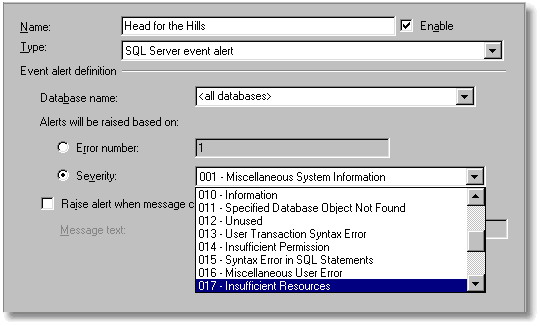
You can raise alerts based on the error number or the error severity. This means that it is pretty easy to define an alert that will fire on every error, for an error of the specified severity level, and give you an email notification.
A curiosity of the SQL Server Event Alerts is that you cannot configure an alert that fires on all events above a particular severity level. To get anywhere near providing a ‘catch-all’ alert, you need a performance alert, which we’ll come to. If you wish to stick to SQL Server Event alerts, you will need to create alerts for every severity level. This gets very boring to do via SSMS, and it is much easier to do in a script. However, it is a job that only needs to be done once for an application in order to get effective alerting for your ‘loggable’ errors.
You can then go on to create a more sophisticated alerting system, based on alerts that fire only on specific errors. When an error occurs, the alerting system selects the alert that covers the error, rather than one that fires on a type of error.
If you specify the Error number, then you can respond to very specific events, such as
an attempt to query the virtual table, DBLog without being a member of the sysadmin fixed server role or the db_owner fixed database role (9010). The full list of errors, in master.sysmessages, is imposing, and a quick glance through the documentation at the seven thousand odd events will convince you that adding an alert for every error would be impossible See Troubleshooting (SQL Server 2000) System Error Messages
Often, you will want to specify which database should be the source of events that you want the alert to respond to, rather than accept any events. You can even specify that the error must contain a particular string, such as a user associated with suspicious activity. (this would be useful for searching for a message such as Server user Phil_Factor is not a valid user in database ‘CreditCardDetails’ )
Sometimes, events will fire repeatedly over a short period of time. In this case, you may want to know that the event has occurred, but you may not want an alert for every event. To avoid getting repeated messages, you can specify a delay after the alert responds to an event, in which case SQL Server Agent waits for the delay specified before responding again, regardless of whether the event occurs during the delay. You can also disable, and re-enable an alert programmatically.
Logging Errors
SQL Server Agent takes these errors from the error log, so if follows that the errors must be logged in the first place. There is no way of attaching alerts to errors that aren’t logged. All error messages with a severity level from 19 through 25 are written to the error log automatically.
So, what if you want to log information messages, or messages of low severity? If you wish to have an alert on any errors that are of a severity less that 19, then you have to modify their entry in the sysmessages table to set them to be always logged. You do this using sp_alterMessage with the WITH_LOG option to set the dLevel column to 128 . If a message has been altered to be WITH_LOG, it is always subsequently written to the application log, however the error happens. Even if RAISERROR is executed without the WITH LOG option, the error that you have altered is written to the application log, and is therefore spotted by the alert. There are good reasons for wanting to do this, as it will then log, and optionally alert you to, syntax errors that are normally seen only by the end-user.
You can force any error that is triggered programmatically to be written to the error log by using the WITH LOG parameter with the RAISERROR command. So, with a user-defined error severity (9) you can log an incident, cause an alert to be fired, which in turn emails someone, or runs a job, simply by using RAISERROR. Naturally, because the job that responds to the alert can be run by the Agent under a different User, you do not need to assign unsafe permissions to the ordinary user. You can use xp_LogEvent if, as is likely, you do not want the user to see the error. (Only the Raiserror call can utilize the ‘PrintF’ formatting placeholders in the error messages, so logging the error with a formatted message using xp_logevent results in a literal recording of the message, string format identifiers and all.)
Error Severity Levels
Errors with the higher severity levels are something you need to know more about, especially if a user is going to phone you anyway after seeing a scary message in his application. The severity levels provide the best means of creating a general-purpose alerting system, supplemented by special alerts for common problems, such as TempDB running out of space.
Severity level 10 – 16 are generally generated though mistakes by users, problems in the TSQL scripts and stored procedures executed by users. A number of programming errors and input problems can cause this sort of error. The problem here is that they aren’t logged and it isn’t normally possible to get them logged. Severity levels from 17 (Insufficient Resources) and 18 (Nonfatal Internal Error Detected) are generated by resource or system errors; the user’s session is not interrupted. Severity levels from 17 through 19 require the attention of the DBA, who can then get more information by executing DBCC CHECKDB (database) to find out more about the extent of the damage. A severity level of 19 (SQL Server Error in Resource) will stop the current batch. Severity levels 20 (SQL Server Fatal Error in Current Process), 21 (SQL Server Fatal Error in Database dbid Processes), 22 (SQL Server Fatal Error Table Integrity Suspect), 23 (SQL Server Fatal Error: Database Integrity Suspect), 24 (Hardware Error) and 25 Indicate system problems. Errors messages with a severity level of 20 or higher are considered fatal errors and terminate the client connection. Errors messages in this range may affect all of the processes in the database, and may indicate that a database or object is damaged. These errors are fatal to the process running at the time. The process will record diagnostic information, and then terminate.
Tokens: passing information from alert to job
Tokens are extraordinarily important for creating anything but the very simplest alerting system. If you use an alert to fire a job, you then get a number of useful bits of information passed to the job, which can then be used to pass more information to whatever system you put in place to remedy the problem.
This information is provided to the job as macros or ‘Tokens’. Except for the WMI token, these have been in place since SQL Agent 7.0 and 2000.As these token are not well-known I’ll list them here:
Token
Description
(A-DBN)
The Database name is passed to the Job from the alert in this macro
(A-SVR)
The Server name is passed to the Job from the alert in this macro
(A-ERR)
The Error number is passed to the Job from the alert in this macro
(A-SEV)
The Error severity is passed to the Job from the alert in this macro
(A-MSG)
The Message text is passed to the Job from the alert in this macro (this will include the error number and severity as strings)
(DATE)
The Current date (in YYYYMMDD format).
(INST)
The Instance name. For a default instance, this token is empty.
(JOBID)
The Job ID
(MACH)
Computer name.
(MSSA)
Master SQLServerAgent service name.
(OSCMD)
Prefix for the program used to run CmdExec job steps.
(SQLDIR)
The directory in which SQL Server is installed. (By default, this value is C:\Program Files\Microsoft SQL Server\MSSQL.)
(STEPCT)
Step Count: A count of the number of times this step has executed (excluding retries). (Can be used by the step command to force termination of a multistep loop.)
(STEPID)
Step ID.
(SRVR)
The Server. Name of the computer running SQL Server. If the SQL Server instance is a named instance, this includes the instance name. This can be different from the server that was the source of the event
(TIME)
Current time (in HHMMSS format).
(STRTTM)
The time (in HHMMSS format) that the job began executing.
(STRTDT)
The date (in YYYYMMDD format) that the job began executing.
(WMI( property ))
WMI Property. For jobs that run in response to WMI alerts, the value of the property specified by property. For example, $(WMI(DatabaseName)) provides the value of the DatabaseName property for the WMI event that caused the alert to run.
Tokens are replaced at runtime like traditional Macros, before the job step is executed. They are, unfortunately, case-sensitive, and you get unexplained errors if you leave spaces around brackets. They need to be handled with care because, if you are not aware of them, then they can cause unintended chaos in your code. They are notoriously hard to debug with anything more sophisticated than a ‘PrintF’. I usually write the results of the macro substitution to a table, before executing them as SQL, just to check that all is well.
As tokens are strings, you need to use special macros to ensure that they execute. Actually, you now have to use them even if you don’t think you need them. This is why the ESCAPE_NONE macro is provided.
SQL Server Agent Escape Macros
Escape Macros
Description
$(ESCAPE_SQUOTE( token_name ))
Escapes single quotation marks (‘) in the token replacement string. Replaces one single quotation mark with two single quotation marks.
$(ESCAPE_DQUOTE( token_name ))
Escapes double quotation marks (“) in the token replacement string. Replaces one double quotation mark with two double quotation marks.
$(ESCAPE_RBRACKET( token_name ))
Escapes right brackets (]) in the token replacement string. Replaces one right bracket with two right brackets.
$(ESCAPE_NONE( token_name ))
Replaces token without escaping any characters in the string. This macro is provided to support backward compatibility in environments where token replacement strings are only expected from trusted users. For more information, see “Updating Job Steps to Use Macros,” later in this topic.
Be warned: in SQL Server 2005, these tokens are disabled ‘for security reasons’. Before you use these tokens, you must enable their use by right-clicking SQL Server Agent in Object Explorer, selecting Properties, and on the Alert System page, selecting ‘Replace tokens for all job responses to alerts‘.
In SQL Server 2005, the SQL Server Agent job step token syntax has changed. Now, an escape macro must now accompany all tokens used in job steps, or else those job steps will fail (see http://msdn2.microsoft.com/en-us/library/ms175575.aspx) . It is therefore best to write all tokens with escape macros around them so as to be backward-compatible. An example should make that clear.
Here is a job step that writes any error passed to it from a SQL Server event, and includes the full text of the error, with the severity and error number, so you can put it into your database application’s own private log. You’ll see that it includes the database and server as well, just in case you aggregate these messages into an enterprise-wide report.
SQL Server Performance Alerts
It is not just errors and events that can trigger alerts. You can specify an alert that will fire in response to a particular performance condition. In this case, you specify which performance measure the alert should monitor, a threshold for the alert, and the behavior of the counter that will trigger the alert. To define a performance alert, in SSMS, you set the:
- ‘Object’ or type of performance measure to be monitored.
- ‘Counter’, or attribute of the measure to be monitored.
- Specific ‘instance’ (if any) of the attribute to be monitored.
- The threshold for the alert (a number)
- The behavior that produces the alert (e.g. ‘falls below’, ‘becomes equal to’, or ‘rises above’ a number specified for performance condition counter.
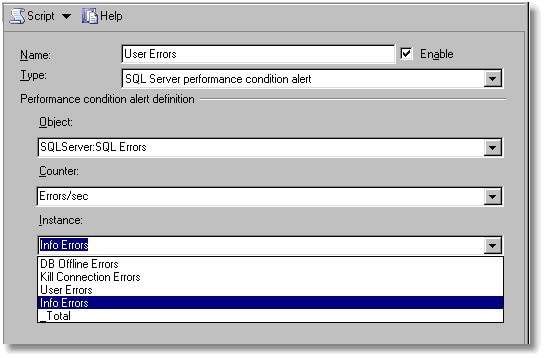
By way of example, if you wanted to set an alert to occur on ‘SQLServer:Locks’ (object) when the Lock Requests/sec (counter), the number of new locks and lock conversions per second requested from the lock manager, exceeds 10, then you would choose ‘rises above’ (behaviour) and specify 10 (threshold) as the value.
You might want to set an alert to occur when ‘SQLServer:Transactions’ (object), ‘Free Space in TempDB (kb)‘ (counter) ‘falls below’ (behaviour) 200 (threshold) so you can see the cause, such as a long-running process holding a temporary table or a process creating multiple ‘permanent temporary’ tables (see the excellent Troubleshooting Insufficient Disk Space in tempdb)
Another obvious alert is one that warns of an error being written to the error log. This uses SQLServer:SQL Errors object, with the Errors/Sec counter with the User Errors instance. This will fire an alert for all SQLServer errors.
There are a number of ‘objects’ on which performance alerts can be set:
- SQLServer:Access Methods
- SQLServer:Backup Device
- SQLServer:Broker Activation
- SQLServer:Broker Statistics
- SQLServer:Broker / DBM Transport
- SQLServer:Buffer Manager
- SQLServer:Buffer Node
- SQLServer:Buffer Partition
- SQLServer: Catalog Metadata
- SQLServer:CLR
- SQLServer:Cursor Manager by Type
- SQLServer:Cursor Manager Total
- SQLServer:Database Mirroring
- SQLServer:Databases
- SQLServer:ExecStatistics
- SQLServer:General Statistics
- SQLServer:Latches
- SQLServer:Locks
- SQLServer:Memory Manager
- SQLServer:Plan Cache
- SQLServer:SQL Errors
- SQLServer:SQL Statistics
- SQLServer:Transactions
- SQLServer:User Settable
- SQLServer:Wait Statistics
The number of individual counters within these objects is just too many to list. If you take just one of these objects (SQLServer:General Statistics ) you’ll see:
- Counters for Active Temp Tables
- Event Notifications Delayed Drop
- HTTP Authenticated Requests
- Logical Connections
- Logins/sec
- Logouts/sec
- Mars Deadlocks
- Non-atomic yield rate
- Processes blocked
- SOAP Empty Requests
- SOAP Method Invocations
- SOAP Session Initiate Requests
- SOAP Session Terminate Requests
- SOAP SQL Requests
- SOAP WSDL Requests
- Temp Tables Creation Rate
- Temp Tables For Destruction
- Trace Event Notifications Queue
- Transactions
- User Connections
Faced with the huge variety of event counters that can be used to fire alerts, there really is no alternative but to leap headfirst into Books Online. Be assured, that there are counters for every imaginable conditions and some that are unimaginable.
A curious behavior of some of these alerts is that the alerts often fire continuously (every twenty seconds) even when the counter is no longer at the specified level. I take the precaution of disabling, and then re-enabling the counter in the associated job if this happens. It is difficult to reconcile this with the documentation and I’m curious as to why this happens.
Windows Management Instrumentation alerts
The WMI alert provides far more information than is possible by using the previous types. Be warned, though, that you need to allow plenty of time to get WMI alerts working. This is not for the faint-hearted.
SQL Server Agent can, in SQL Server 2005, raise alerts after the occurrence of Windows Management Instrumentation (WMI) events. SQL Server Agent can respond to SQL Server WMI events, as well as to WMI events raised by the operating system and other WMI providers. SQL Agent can even be persuaded to respond to remote WMI events but Microsoft does not encourage this.
There are a vast host of WMI variables that are available as alerts. These are to be found documented as “Trace Events for Use with Event Notifications”. These WMI variables are what the Agent uses as a mechanism for accessing WMI tokens.>
To create a WMI alert, you must specify the WMI namespace that is provided to query for events. Each instance of SQL Server 2005 has its own WMI namespace, which defaults to:
\\.\root\Microsoft\SqlServer\ServerEvents\instance_name.The instance_name defaults to MSSQLSERVER in a default installation of SQL Server.
To create a WMI event, you need to specify the WMI variable that will be used. WMI variables are accessed by a variety of SQL syntax called ‘Windows Management Instrumentation Query Language’ (WQL). SQL Server Agent submits a WQL request, receives WMI events, and runs a job in response to the event. Several Service Broker objects are involved in processing the notification message, but the WMI Event Provider handles the details of creating and managing these objects. Because of the underlying use of Service Broker, it must be enabled in msdb as well as in the database you are monitoring, before you can hope for SQL Server Agent to receive WMI events.
A WQL query references the event to set up the WMI Alert, using “SELECT * FROM <my_event>” syntax. To make this work, one must configure SQL Server Agent to “Replace tokens for all job responses to alerts” By checking the appropriate box. (Microsoft say that this is a security precaution).