Microsoft System CLR Types for SQL Server 2012 Install and Uninstall (PowerShell)
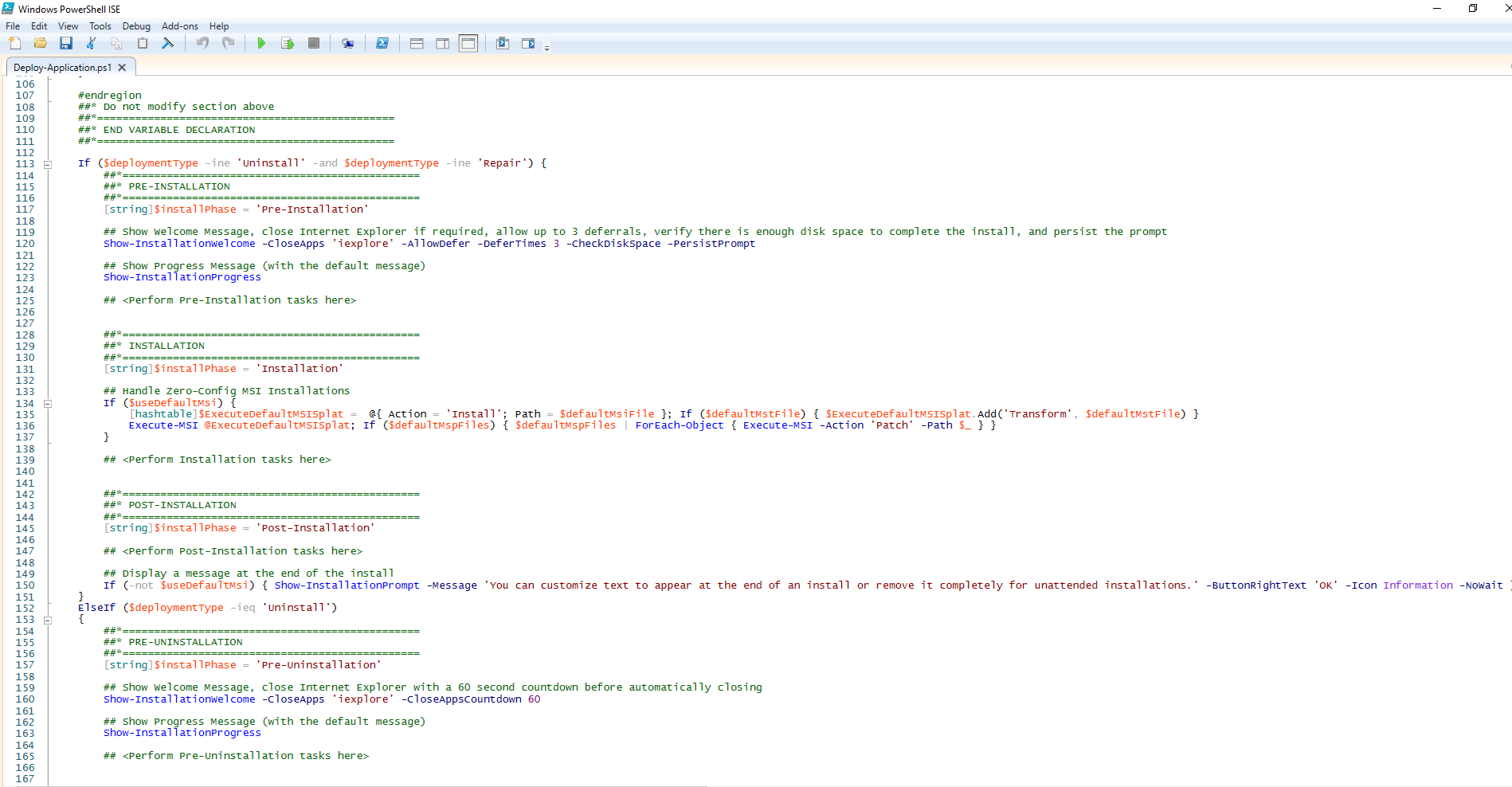
This article will serve as an informative guide and give you a clear understanding of how to perform silent or interactive installs and uninstalls of Microsoft System CLR Types for SQL Server 2012 using the Powershell App Deployment Toolkit. The PowerShell App Deployment Toolkit can be used to replace your WiseScript, VBScript and Batch wrapper scripts with one versatile, re-usable and extensible tool. This tool is an absolute must for Microsoft Endpoint Manager Configuration Manager (MEMCM) / (SCCM) Administrators or anyone who is responsible for packaging and deploying software.
How to Install Microsoft System CLR Types for SQL Server 2012 Using the PowerShell App Deployment Toolkit
- Download the Powershell App Deployment Toolkit 3.8.4:
- Download the zip file to a folder created at (C:\Downloads)
- OpenWindows PowerShell by Right-Clicking on Windows PowerShell and selecting Run as Administrator
- Enter the following command to remove the Zone.Identifier:
- Unblock-File -Path C:\Downloads\PSAppDeployToolkit_v3.8.4.zip
- Enter the following command to extract the contents of the zip file:
- Expand-Archive -Path C:\Downloads\PSAppDeployToolkit_v3.8.4.zip -DestinationPath C:\Downloads\PADT
- Enter the following commands to copy the AppDeployToolkit & Files folders to “C:\Downloads\SQLSysClrTypes2012”:
- Copy-Item -Path «C:\Downloads\PADT\Toolkit\AppDeployToolkit» -Destination «C:\Downloads\SQLSysClrTypes2012\AppDeployToolkit» -Recurse
- Copy-Item -Path «C:\Downloads\PADT\Toolkit\Files» -Destination «C:\Downloads\SQLSysClrTypes2012\Files»
- We also need to create two additional directories called x86 & x64
- New-Item «C:\Downloads\ SQLSysClrTypes2012\Files\x86″ -ItemType Directory
- New-Item «C:\Downloads\ SQLSysClrTypes2012\Files\x64″ -ItemType Directory
You should now see the AppDeploymentToolkit folder with files & the Files directory with empty x86 & x64 folders at “C:\Downloads\SQLSysClrTypes2012“
- Navigate to: https://download.microsoft.com/download/F/3/C/F3C64941-22A0-47E9-BC9B-1A19B4CA3E88/ENU/x86/SQLSysClrTypes.msi
- Download &Copy the SQLSysClrTypes.msi to “C:\Downloads\SQLSysClrTypes2012\Files\x86\”
- Navigate to: https://download.microsoft.com/download/F/3/C/F3C64941-22A0-47E9-BC9B-1A19B4CA3E88/ENU/x64/SQLSysClrTypes.msi
- Download &Copy the SQLSysClrTypes.msi to “C:\Downloads\SQLSysClrTypes2012\Files\x64\”
- Copy the PowerShell script below to “C:\Downloads\SQLSysClrTypes2012“ & name it Deploy-SQLSysClrTypes2012.ps1
Ok, all the hard work is done and now you can install or uninstall Microsoft System CLR Types for SQL Server 2012 using one single PowerShell script. Simply change the DeploymentType parameter to install or uninstall. Logging functionality is built-in automatically and you can view the log files under “C:\Windows\Logs\Software”.
Microsoft System CLR Types for SQL Server 2012 NonInteractive Install (PowerShell)
- OpenWindows PowerShell by Right-Clicking on Windows PowerShell and selecting Run as Administrator
- Change the directory to “C:\Downloads\SQLSysClrTypes2012”
- PS C:\Downloads\SQLSysClrTypes2012>
Microsoft System CLR Types for SQL Server 2012 Silent Install (PowerShell)
- OpenWindows PowerShell by Right-Clicking on Windows PowerShell and selecting Run as Administrator
- Change the directory to “C:\Downloads\SQLSysClrTypes2012“
- PS C:\Downloads\SQLSysClrTypes2012>
Microsoft System CLR Types for SQL Server 2012 Interactive Install (PowerShell)
- OpenWindows PowerShell by Right-Clicking on Windows PowerShell and selecting Run as Administrator
- Change the directory to “C:\Downloads\SQLSysClrTypes2012”
- PS C:\Downloads\SQLSysClrTypes2012>
How to Uninstall Microsoft System CLR Types for SQL Server 2012 Using the PowerShell App Deployment Toolkit
Microsoft System CLR Types for SQL Server 2012 NonInteractive Uninstall (PowerShell)
- OpenWindows PowerShell by Right-Clicking on Windows PowerShell and selecting Run as Administrator
- Change the directory to “C:\Downloads\SQLSysClrTypes2012“
- PS C:\Downloads\SQLSysClrTypes2012>
Microsoft System CLR Types for SQL Server 2012 Silent Uninstall (PowerShell)
- OpenWindows PowerShell by Right-Clicking on Windows PowerShell and selecting Run as Administrator
- Change the directory to “C:\Downloads\SQLSysClrTypes2012“
- PS C:\Downloads\SQLSysClrTypes2012>
Microsoft System CLR Types for SQL Server 2012 Interactive Uninstall (PowerShell)
- OpenWindows PowerShell by Right-Clicking on Windows PowerShell and selecting Run as Administrator
- Change the directory to “C:\Downloads\SQLSysClrTypes2012“
- PS C:\Downloads\SQLSysClrTypes2012>
Always make sure to test everything in a development environment prior to implementing anything into production. The information in this article is provided “As Is” without warranty of any kind.
Recent Posts
This article will serve as an informative guide and give you a clear understanding of how to perform silent or interactive installs and uninstalls of the DW Spectrum Client using the Powershell App.
This article will serve as an informative guide and give you a clear understanding of how to perform silent or interactive installs and uninstalls of ProfiCAD using the Powershell App Deployment.
Install SQL CLR types & Report Viewer 2012 on Sql 2008 server
I’m in the process of installing a client’s ASP.net site on a Windows Server 2003 box running Sql 2008.
The site uses Report Viewer 2012, but when I attempted to install it on the server, I got the message «CLR Types for Sql Server 2012» were missing.
Does anyone know if it be possible to install the 2012 CLR types alongside SQL 2008, and without Sql 2012?

4 Answers 4
“Microsoft® System CLR Types for Microsoft® SQL Server® 2012” can be downloaded at Microsoft® SQL Server® 2012 Feature Pack (direct links: X86 version, X64 version).
And it seems to have fixed the installation problem for us; the server we needed to install the Report Viewer 2012 on does not have SQL Server installed at all.
Here the solution to download the Microsoft® System CLR Types for Microsoft® SQL Server® 2012
Step 1 : Choose the below website link
Step 2 : In this link, you have to choose the «Install instructions» menu. Then, you need to troll down up to you have seen the content mentioned below.
Microsoft® System CLR Types for Microsoft® SQL Server® 2012 The SQL Server System CLR Types package contains the components implementing the geometry, geography, and hierarchy id types in SQL Server 2012. This component can be installed separately from the server to allow client applications to use these types outside of the server.
Note: This component also requires Windows Installer 4.5 X86 Package(SQLSysClrTypes.msi) X64 Package (SQLSysClrTypes.msi)
STEP 3 : You may download the file as you needed, along with these software if you’re looking for
Microsoft report viewer 2012, you follow this below website link to download it.
Microsoft system clr types for sql server 2012 что это
Watch videos, read documentation, and hear Chocolatey success stories from companies you trust.
Events
Find past and upcoming webinars, workshops, and conferences. New events have recently been added!
Courses
Step-by-step guides for all things Chocolatey! Earn badges as you learn through interactive digital courses.

Join the Chocolatey Team on our regular monthly stream where we discuss all things Community, what we do, how you can get involved and answer your Chocolatey questions.

Join the Chocolatey Team on our regular monthly stream where we put a spotlight on the most recent Chocolatey product releases. You’ll have a chance to have your questions answered in a live Ask Me Anything format.

Livestream from
Thursday, 06 October 2022We recently released our largest update to Chocolatey Central Management so far. Join Gary and Steph to find out more about Chocolatey Central Management and the new features and fixes we’ve added to this release.

Webinar Replay from
Wednesday, 30 March 2022At Chocolatey Software we strive for simple, and teaching others. Let us teach you just how simple it could be to keep your 3rd party applications updated across your devices, all with Intune!

Livestream from
Thursday, 9 June 2022Join James and Josh to show you how you can get the Chocolatey For Business recommended infrastructure and workflow, created, in Azure, in around 20 minutes.

Livestream from
Thursday, 04 August 2022Join Paul and Gary to hear more about the plans for the Chocolatey CLI in the not so distant future. We’ll talk about some cool new features, long term asks from Customers and Community and how you can get involved!

Livestreams from
October 2022For Hacktoberfest, Chocolatey ran a livestream every Tuesday! Re-watch Cory, James, Gary, and Rain as they share knowledge on how to contribute to open-source projects such as Chocolatey CLI.

Livestream from
Thursday, 03 November 2022Join Paul and Gary for this months Chocolatey product livestream where we look at the latest release of Chocolatey 1.2.0, Chocolatey Licensed Extension 5.0.0 and shine a spotlight on the new hook scripts functionality. This opens up so many possibilities for Chocolatey CLI users!

Livestream from
Tuesday, 29 November 2022Join Josh as he adds the ability to manage Chocolatey GUI config and features with the Chocolatey Ansible Collection.

Webinar from
Tuesday, 13 December 2022Join Gary, Paul, and Maurice as they introduce and demonstrate how to use Chocolatey! Questions will be answered live in an Ask Me Anything format.
Microsoft Report Viewer 2012 Runtime is missing Microsoft System CLR Types for SQL Server 2012
In this article, we will solve the “Setup is missing an installation prerequisite: Microsoft System CLR Types for SQL Server 2012” issue that you may face when installing Microsoft Report Viewer 2012 Runtime.
- 1 Missing Microsoft System CLR Types for SQL Server 2012
- 1.1 Cause
- 1.2 Download CLR types for SQL Server 2012
Missing Microsoft System CLR Types for SQL Server 2012

The Microsoft Report Viewer 2012 Runtime download is completed succesfuly, but when I tried to install the downloaded package I got the below error:
Setup is missing an installation prerequisite:
– Microsoft System CLR Types for SQL Server 2012
Cause
You got “Setup is missing an installation prerequisite: Microsoft System CLR Types for SQL Server 2012″ because the “Microsoft System CLR Types for SQL Server 2012″ is not installed as a prerequisite for “Report Viewer 2012 Runtime“.
Download CLR types for SQL Server 2012
To can install “Report Viewer 2012 Runtime“, you must first download CLR Types for SQL Server 2012″ as a mandatory Microsoft report viewer 2012 runtime prerequisites.
Steps
- Download “ Microsoft System CLR Types for SQL Server 2012 ” from Microsoft® SQL Server® 2012 SP1 Feature Pack .

- Click Download > Select “ \x64\SQLSysClrTypes ” .

- Install “ Microsoft System CLR Types for SQL Server 2012 ” ( \x64\SQLSysClrTypes ).
- Rerun again the Report Viewer 2012 Run-time installer that would be installed successfully.
Conclusion
To be able to install Report Viewer 2012 Runtime, you must first download and install Microsoft System CLR Types for SQL Server 2012.