Введение в MS SQL Server и T-SQL
SQL Server является одной из наиболее популярных систем управления базами данных (СУБД) в мире. Данная СУБД подходит для самых различных проектов: от небольших приложений до больших высоконагруженных проектов.
SQL Server был создан компанией Microsoft. Первая версия вышла в 1987 году. А текущей версией является версия 2022, которая вышла в ноябре 2022 году и которая будет использоваться в текущем руководстве.
SQL Server долгое время был исключительно системой управления базами данных для Windows, однако начиная с версии 16 эта система доступна и на Linux.
SQL Server характеризуется такими особенностями как:
Производительность. SQL Server работает очень быстро.
Надежность и безопасность. SQL Server предоставляет шифрование данных.
Простота. С данной СУБД относительно легко работать и вести администрирование.
Центральным аспектом в MS SQL Server, как и в любой СУБД, является база данных. База данных представляет хранилище данных, организованных определенным способом. Нередко физически база данных представляет файл на жестком диске, хотя такое соответствие необязательно. Для хранения и администрирования баз данных применяются системы управления базами данных (database management system) или СУБД (DBMS). И как раз MS SQL Server является одной из такой СУБД.
Для организации баз данных MS SQL Server использует реляционную модель. Эта модель баз данных была разработана еще в 1970 году Эдгаром Коддом. А на сегодняшний день она фактически является стандартом для организации баз данных.
Реляционная модель предполагает хранение данных в виде таблиц, каждая из которых состоит из строк и столбцов. Каждая строка хранит отдельный объект, а в столбцах размещаются атрибуты этого объекта.
Для идентификации каждой строки в рамках таблицы применяется первичный ключ (primary key). В качестве первичного ключа может выступать один или несколько столбцов. Используя первичный ключ, мы можем ссылаться на определенную строку в таблице. Соответственно две строки не могут иметь один и тот же первичный ключ.
Через ключи одна таблица может быть связана с другой, то есть между двумя таблицами могут быть организованы связи. А сама таблица может быть представлена в виде отношения («relation»).
Для взаимодействия с базой данных применяется язык SQL (Structured Query Language). Клиент (например, внешняя программа) отправляет запрос на языке SQL посредством специального API. СУБД должным образом интерпретирует и выполняет запрос, а затем посылает клиенту результат выполнения.
Изначально язык SQL был разработан в компании IBM для системы баз данных, которая называлась System/R. При этом сам язык назывался SEQUEL (Structured English Query Language). Хотя в итоге ни база данных, ни сам язык не были впоследствии официально опубликованы, по традиции сам термин SQL нередко произносят как «сиквел».
В 1979 году компания Relational Software Inc. разработала первую систему управления баз данных, которая называлась Oracle и которая использовала язык SQL. В связи с успехом данного продукта компания была переименована в Oracle.
Впоследствии стали появляться другие системы баз данных, которые использовали SQL. В итоге в 1989 году Американский Национальный Институт Стандартов (ANSI) кодифицировал язык и опубликовал его первый стандарт. После этого стандарт периодически обновлялся и дополнялся. Последнее его обновление состоялось в 2011 году. Но несмотря на наличие стандарта нередко производители СУБД используют свои собственные реализации языка SQL, которые немного отличаются друг от друга.
Выделяются две разновидности языка SQL: PL-SQL и T-SQL. PL-SQL используется в таких СУБД как Oracle и MySQL. T-SQL (Transact-SQL) применяется в SQL Server. Собственно поэтому в рамках текущего руководства будет рассматриваться именно T-SQL.
В зависимости от задачи, которую выполняет команда T-SQL, он может принадлежать к одному из следующих типов:
DDL (Data Definition Language / Язык определения данных). К этому типу относятся различные команды, которые создают базу данных, таблицы, индексы, хранимые процедуры и т.д. В общем определяют данные.
В частности, к этому типу мы можем отнести следующие команды:
CREATE : создает объекты базы данных (саму базу даных, таблицы, индексы и т.д.)
ALTER : изменяет объекты базы данных
DROP : удаляет объекты базы данных
TRUNCATE : удаляет все данные из таблиц
DML (Data Manipulation Language / Язык манипуляции данными). К этому типу относят команды на выбору данных, их обновление, добавление, удаление — в общем все те команды, с помощью которыми мы можем управлять данными.
К этому типу относятся следующие команды:
SELECT : извлекает данные из БД
UPDATE : обновляет данные
INSERT : добавляет новые данные
DELETE : удаляет данные
DCL (Data Control Language / Язык управления доступа к данным). К этому типу относят команды, которые управляют правами по доступу к данным. В частности, это следующие команды:
What are SQL Server and T-SQL
SQL Server the most popular database management systems (DBMS) in the world. This DBMS is suitable for a variety of projects: from small applications to large highly loaded projects.
SQL Server was created by Microsoft. The first version was released in 1987. And the current version is version 16, which was released in 2016 and will be used in the current manual.
SQL Server has long been exclusively a database management system for Windows, but since version 16, this system is available on Linux.
SQL Server is characterized by such features as:
- Performance. SQL Server works very fast.
- Reliability and security. SQL Server provides data encryption.
- Simplicity. It is relatively easy to work and administer with this DBMS.
SQL SERVER IS ONE OF THE MOST POPULAR DATABASE MANAGEMENT SYSTEMS (DBMS)
The central aspect in MS SQL Server, as in any DBMS, is the database. A database is a storage of data organized in a certain way. Often physically the database represents a file on a hard disk though such conformity is not obligatory. For storage and administration of databases, database management system (DBMS) or DBMS is used. And just MS SQL Server is one of such DBMS.
MS SQL Server uses a relational model for database organization. This database model was developed back in 1970 by Edgar Codd. And to date, it is actually a standard for the organization of databases.
The relational model assumes data storage in the form of tables, each of which consists of rows and columns. Each row stores a separate object, and the columns contain the attributes of that object.
To identify each row within a table, the primary key is used. One or more columns can be used as a primary key. Using the primary key, we can refer to a certain row in the table. Accordingly, two rows cannot have the same primary key.
Through the keys, one table can be linked to another, i.e. links can be organized between two tables. And the table itself can be represented as a “relation”.
SQL (STRUCTURED QUERY LANGUAGE) IS USED FOR INTERACTION WITH THE DATABASE
The client (for example, an external program) sends a query in SQL language through a special API. The DBMS properly interprets and executes the query and then sends the execution result to the client.
Originally SQL language has been developed in company IBM for system of databases which was called System/R. Thus language itself was called SEQUEL (Structured English Query Language). Although as a result neither the database nor the language itself were not subsequently officially published, traditionally the term SQL is often pronounced as a “sequel”.
In 1979, Relational Software Inc. developed the first database management system, called Oracle, which used the SQL language. Due to the success of this product, the company was renamed Oracle.
Subsequently, other database systems that used SQL began to appear. As a result, in 1989, the American National Standards Institute (ANSI) codified the language and published its first standard. Since then, the standard has been periodically updated and supplemented. The last update took place in 2011. But despite the presence of the standard, it is not uncommon for DBMS manufacturers to use their own SQL language implementations, which differ slightly from each other.
THERE ARE TWO TYPES OF SQL LANGUAGE: PL-SQL AND T-SQL
PL-SQL is used in such DBMS as Oracle and MySQL. T-SQL (Transact-SQL) is used in SQL Server. That’s why in the current tutorial it will be considered T-SQL.
Depending on the task the T-SQL command executes, it can belong to one of the following types:
- DDL (Data Definition Language). This type includes various commands that create a database, tables, indexes, stored procedures, etc. In general, the data is defined.
In particular, we can refer to this type of commands as follows:
- CREATE: creates database objects (the database itself, tables, indexes, etc.).
- ALTER: changes the database objects
- DROP: deletes database objects
- TRUNCATE: deletes all data from tables
2. DML (Data Manipulation Language). This type includes commands to select data, update, add, delete them — in general, all those commands with which we can manage data.
This type includes the following commands:
- SELECT: retrieves data from the database.
- UPDATE: updates data
- INSERT: adds new data
- DELETE: deletes data
3. DCL (Data Control Language). This type refers to commands that control access rights to data. In particular, these are the following commands:
- GRANT: grants rights to access the data
- REVOKE: revokes data access rights
MS SQL SERVER 2017 INSTALLATION
MS SQL Server is available in various versions. First of all, it is MS SQL Server Enterprise — full release, aimed at using in real projects. It is used on various hosting and database servers. However, it is available only in the paid version (not counting the trial period) and costs quite decent money.
For simple applications may also suffice and release Express: it is free. Besides it has advantage — it can be put as a real server and used in real tasks, however it has the reduced functionality in comparison with the full version.
And also there is MS SQL Server Developer Edition. It is a full-featured release, which contains all functionality, as well as the full version of MS SQL Server Enterprise, only targeted only for development needs. At the same time, this version can not be used for deployment as a real server on real projects. However, to study all the mechanics of MS SQL Server, this version is the best option, so this version we will use.
So, let us install MS SQL Server 2017 Developer Edition. For this purpose we will go to my.visualstudio.com. You may need a Microsoft account to access it. In this case you need to login with a Microsoft account.
We leave English as the default language and download the entire iso file. Since the downloaded file has the extension .iso, then after the download we unpack it and run the installer program. We will see the installation wizard window:
Here we select the first item “New SQL Server stand-alone installation or add features to an existing installation“. Next, using a sequence of steps, we will need to set the installation options.
Let’s click to the item “Product Key”. At this stage, you need to enter the key, or specify one of the free issues. Here we specify the “Developer” release and proceed to the new step by clicking the Next button.
Next, the license agreement will have to be accepted. And then we snap to the “Feature Selection” step. At this stage you are offered to select the components to be installed. Here we mark all the components, taking into account the amount of free memory:
Depending on the selected components, the number of installation steps increases, where any settings need to be made. In my case all components are selected. So in the future we will consider the case when all the components are selected.
Next, on the step “Instance Configuration” we will need to specify the name and ID of the running SQL Server entity.
For the name, specify the Default instance option, and for the ID, set MSSQLSERVER. This will be the name of the instance that we can use to reach the server from external applications.
Then click the next two steps with the default options to “Database Engine Configuration“. Using the Add Current User button here, we will add the current user as the server administrator.
On the next step of “Analysis Services Configuration” we will also add the current user as an administrator for the Analysis Services feature:
The next two steps are to leave the default settings. And then on the step “Distributed Replay Controller” we will similarly add the current user.
On all subsequent steps leave the default settings and on the last screen for installation click the Install button:
After some time MS SQL Server will be installed.
So, we have installed SQL Server 2017 and assigned the identifier “MSSQLSERVER” to it. It should be noted that before connecting to it, you should make sure that it is running. To do this, you can open the service window. If it is not running, we can run it there in the service panel and then we can work with it.
INSTALLING SQL SERVER MANAGEMENT STUDIO
For convenient database management and various options and settings in MS SQL Server we will install a special administration tool called SQL Server Management Studio (SSMS). You can use this tool to create databases and their tables, write and execute database queries and much more.
To install SSMS, go to docs.microsoft.com. Closer to the bottom of the page we will find links to versions for different locales. Download the English version (or you can choose the localized version in any other language if you want).
Despite the fact that this version of SSMS has the number 17, it also applies to MS SQL Server 2016 and even earlier versions of the server.
After downloading, let’s run the SSMS installation program:
To install, click on the Install button.
After installation we will find SQL Server Management Studio in the Start menu among installed programs in Microsoft SQL Server Tools 2017.
Okay, let’s run the SQL Server Management Studio. First, we will be asked to connect to the right server.
In the “Server name” field, select “Browse for more…” from the drop-down list. And a window will open where you will need to select the desired server:
In my case, the local computer has two servers, the Express release and the Developer release. But by name I can understand that the first item represents Express and therefore I need to select the second item. If there is only one Express release installed on the local computer, then I don’t have to select that release.
After you select a server, its name will be displayed in the “Server name” field. And then you will need to click on the Connect button to connect to it:
And after successful connection the program will open the server content — all its databases and other components:
Что такое MS SQL Server и чем она отличается от других СУБД
Веб-ресурсы содержат огромное количество данных – от учетных записей пользователей до контента, опубликованного на страницах. То же относится к «облачным» приложениям вроде CRM, программ для бухучета, складского учета и пр. Везде используется один способ хранения информации – база данных. И этой базой необходимо как-то управлять.
Сегодня мы поговорим об одной из самых популярных систем управления реляционными базами данных – MS SQL Server.
Что такое MS SQL Server
Чтобы упростить работу с такими хранилищами данных и повысить эффективность их применения, создаются специализированные системы управления. Одной из наиболее популярных является разработка от Microsoft – SQL Server. Первый релиз платформы опубликован еще в 1989 году, а последняя версия выпущена в 2019 году (проект продолжает развиваться).
- Тесная интеграция с операционной системой Windows.
- Высокая производительность, отказоустойчивость.
- Поддержка многопользовательской среды.
- Расширенные функции резервирования данных.
- Работа с удаленным подключением.
Каждый выпуск включает в себя несколько специализированных редакций. Это снижает сложность внедрения и затраты на процесс разработки собственных решений, адаптированных для «узких» задач. При написании программного кода активно используется интеграция с продуктами Microsoft, например, с платформой Visual Studio.
Прямые конкуренты на рынке – Oracle Database, PostgreSQL. Первый проект коммерческий, он создан для поддержки крупных компаний, поэтому сопоставим по возможностям с MS SQL Server. Второй же распространяется на бесплатной основе и не «блещет» функциональностью, хотя весьма популярен среди многих разработчиков (аналог от Oracle MySQL).
Что такое СУБД
Появление таких продуктов позволило объединить разное понимание БД (баз данных) со стороны пользователей и системных администраторов. Неискушенные в технических деталях люди «видят» таблицы как некий перечень данных с колонками и строками. Системный подход включает файлы с табличными данными, связанными друг с другом согласно определенному алгоритму.
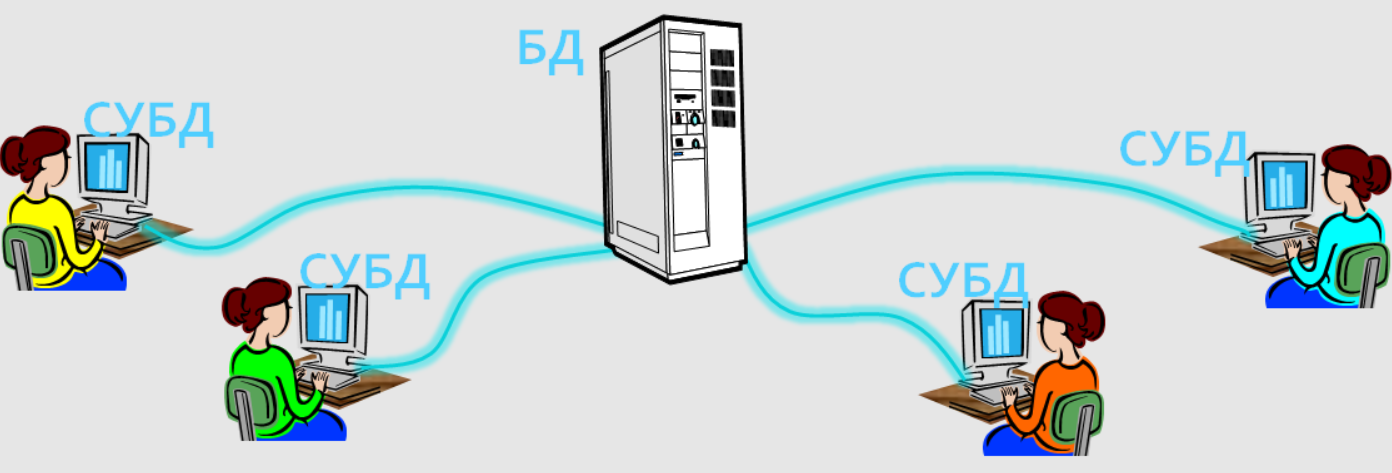
Функции базы данных:
- Постоянное хранение информации.
- Поиск по ключевым критериям.
- Чтение и редактирование по запросу.
Клиентами БД являются прикладные программы, их интерфейс, различные интерактивные модули сайтов вроде калькуляторов и онлайн-редакторов. Но есть еще один компонент системы – СУБД. Он предназначен для ручного доступа к информации и позволяет извлекать данные на диск, работать с ними в памяти сервера, в том числе с применением структурированного языка SQL.
Всего различают три типа БД – клиент-серверные, файл-серверные и встраиваемые. MS SQL Server относится к первой категории. Плюс система является реляционной, т.е. адаптированной для хранения данных без избыточности, с минимальными рисками появления аномалий и нарушения целостности внутренних таблиц.
Расширения языка SQL
Язык SQL представляет собой стандарт, унифицирующий обработку данных всеми реляционными базами данных. Такой подход упрощает перекрестные обращения, дает возможность переходить на «иную платформу» без серьезных переделок проекта. Но здесь нужно учитывать, что в каждой БД имеется собственный язык, который называется диалектом (расширением).
- Transact-SQL (T-SQL) – применяется в MS SQL Server.
- PL/SQL (Procedural Language/Structured Query Language) – аналог от Oracle.
- PL/pgSQL (Procedural Language/PostGres Structured Query Language) – язык используется в PostgreSQL.
Обычно от выбранной СУБД зависит, какой язык предстоит использовать (или от навыков человека, который будет администрировать систему). Синтаксис конструкций у них сильно различается, как и формат обращения ко встроенным функциям, поэтому чаще всего тип БД для проекта выбирается раз и навсегда.
Инсталляция MS SQL Server
Подготовительный шаг – скачать установочный пакет SQL Server Enterprise с официальной страницы сайта Microsoft. После нажатия на кнопку «Бесплатная пробная версия» будет предложено выбрать вариант EXE или Azure («облако») и внести свои анкетные данные, при сохранении которых начнется загрузка инсталляционного файла.
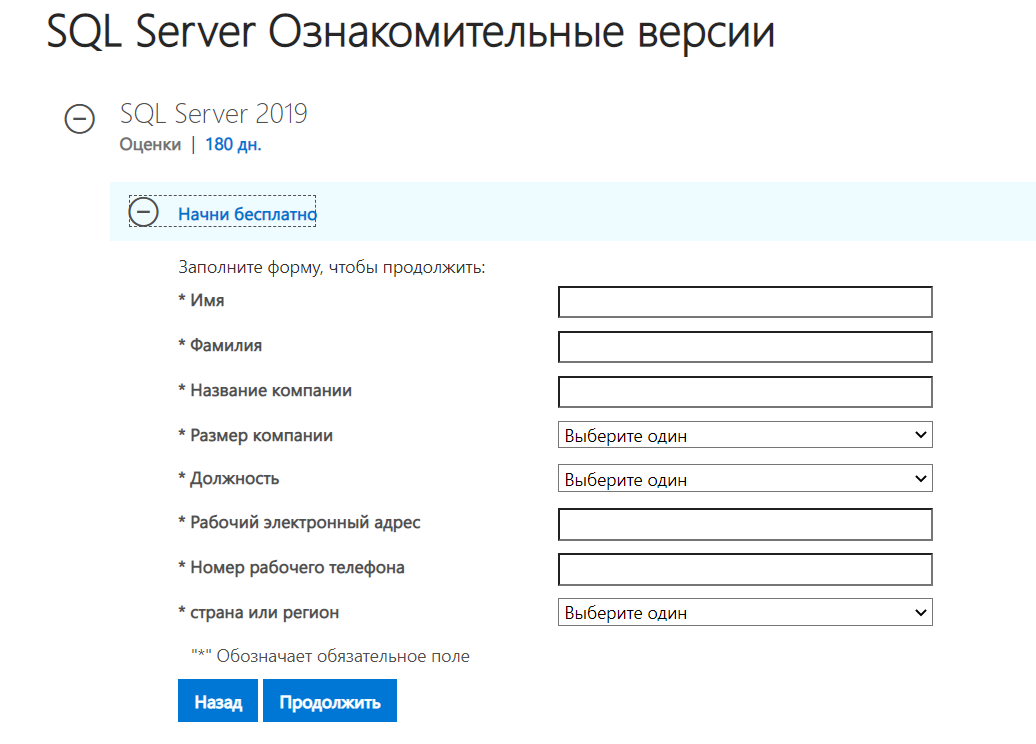
Перед запуском установщика нужно создать учетную запись пользователя. Она пригодится для авторизации на сервере при запросе доступа с клиентских компьютеров (даже при условии, что ПК будет один и тот же).
- В поиске набрать команду lusrmgr.msc и нажать Enter.
- Создать нового пользователя и задать ему пароль доступа.
- Сохранить изменения и перезагрузить компьютер.
Рекомендуется в имени и пароле использовать только буквы латиницы и цифры, кириллица будет привносить риски локальных сбоев из-за особенностей обработки. Теперь можно запускать файл с дистрибутивом MS SQL Server. Программа предложит 3 варианта действий: базовая инсталляция с настройками «по умолчанию», выборочный режим или скачивание файлов «на потом».
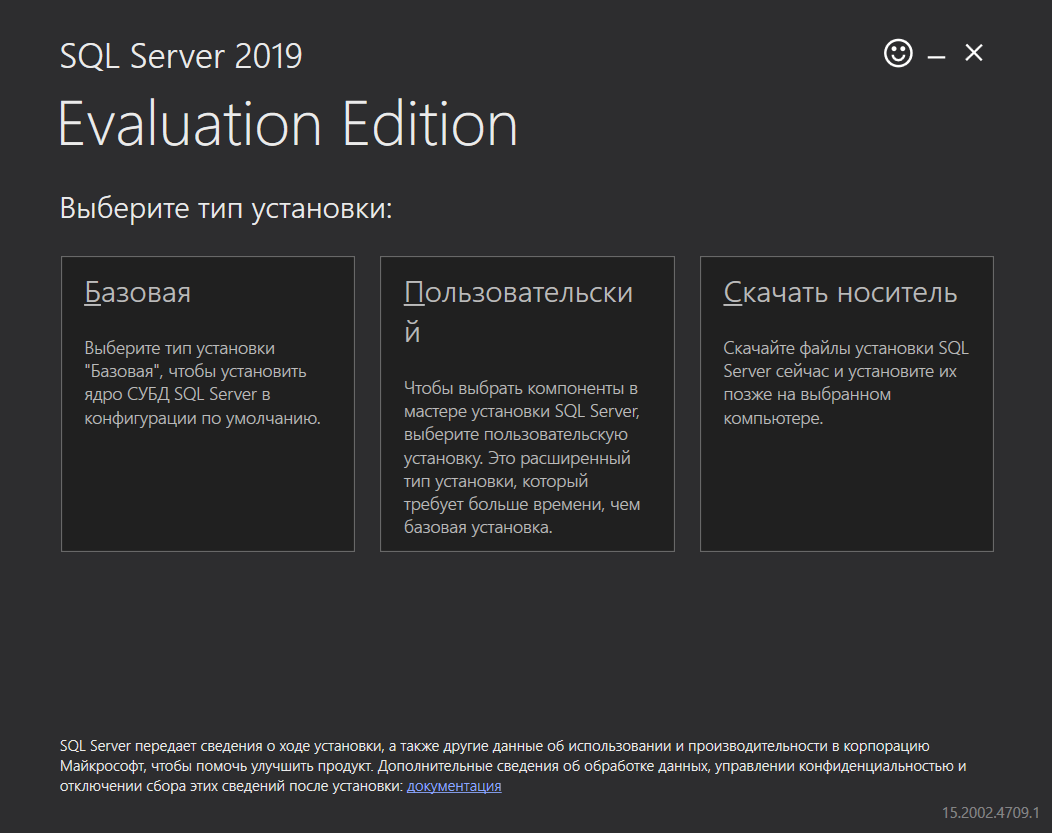
В большинстве случаев выбирается первый пункт, при нажатии на который предлагается прочитать и подтвердить лицензионное соглашение. На следующем шаге система позволяет вручную выбрать каталог для установки или согласиться с предложенным значением. Остается нажать на кнопку «Установить» и дождаться завершения процесса.
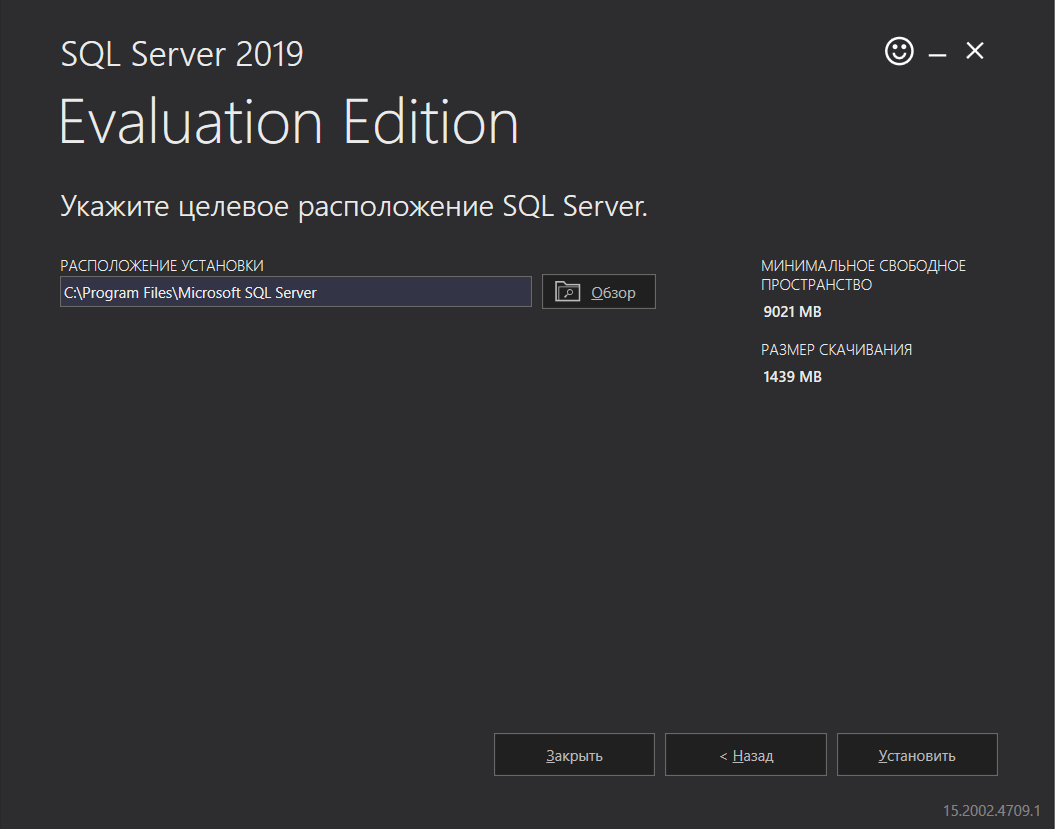
Файлы в основном скачиваются с официального сервера, поэтому понадобится стабильный доступ к интернету. Такой подход обеспечивает установку последнего релиза и проверку легитимности всех модулей (отсутствие вредоносного ПО). Последнее окно сообщает об успешном завершении, после которого можно сразу подключаться к серверу.
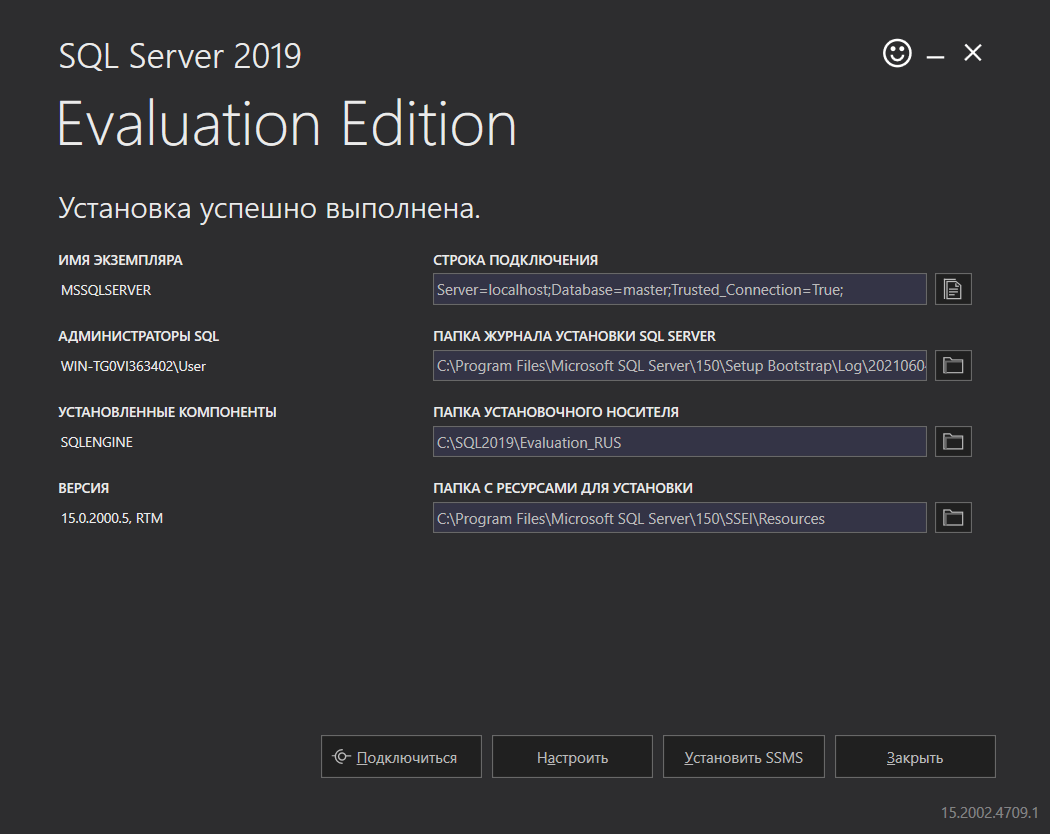
Зачем нужен SQL Server Management Studio
Для удобства администрирования также понадобится SQL Server Management Studio (SSMS). Он представляет собой интегрированную среду для управления инфраструктурой БД и поддерживает любые ее варианты – от локальной до Azure. В него встроены инструменты настройки, наблюдения и редактирования экземпляров баз данных.
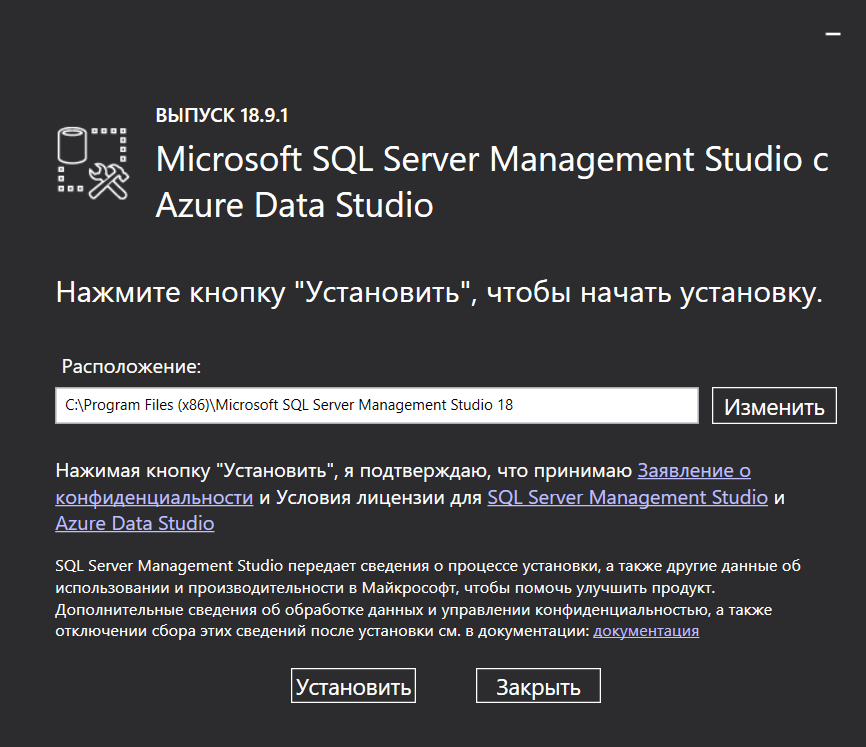
- Нажать кнопку «Установить SSMS» в окне инсталлятора SQL Server.
- Произойдет автоматическое перенаправление на официальную страницу продукта.
- Скачать последний релиз программного обеспечения на компьютер.
- Запустить инсталлятор и нажать кнопку «Установить».
Программные пакеты приложения также загружаются напрямую из интернета, поэтому требуется стабильный доступ к сети. После завершения установки будет запрошена перезагрузка компьютера. Все, система полностью готова к эксплуатации и созданию первой базы данных.
Хостинг-провайдеры обычно предлагают предустановленный комплект поддержки баз данных на SQL Server. Он не всегда последней версии, зато наверняка работоспособен в рамках как панели управления, так и публикуемых веб-ресурсов. Пользователю фактически предлагается сразу начать с создания БД – запрашивается всего лишь ее название, имя пользователя и пароль.
SQL vs T-SQL: Understanding the Differences
SQL and T-SQL both see heavy use in the database and data science industries. But what exactly are they? These two query languages are very similar, both in name and in what they can do, so the distinction between them can be difficult to understand.
In this post, we’re going to: define what Standard SQL and T-SQL are, investigate the differences between them, provide examples of each, and summarize which you should be learning and why.
- Define what Standard SQL and T-SQL are
- Investigate the differences between them
- Provide examples of each
- Summarize which you should be learning and why
What is Standard SQL?
Standard SQL, usually referred to simply as «SQL,» is a type of programming language called a query language. Query languages are used for communicating with a database.
SQL is used for adding, retrieving, or updating data stored in a database. It is used across many different types of databases. Meaning, if you learn the basics of SQL, you will be in a good position for a career in data.
Databases and the data stored within them are a core part of how many companies operate. An easy example is with a retailer that might store order or customer information in a database. SQL is a programming language that allows the company to work with that data.
What is T-SQL?
T-SQL, which stands for Transact-SQL and is sometimes referred to as TSQL, is an extension of the SQL language used primarily within Microsoft SQL Server. This means that it provides all the functionality of SQL but with some added extras.
You can think of it a bit like a SQL dialect — it’s very similar to regular SQL, but it has a few extras and differences that make it unique.
Despite the clear and rigid specifications of standard SQL, it does allow for database companies to add their own extensions to set them apart from other products. T-SQL is an example of this for Microsoft SQL Server databases — T-SQL is central to the software and runs most operations within it.
Most major database vendors offer their own SQL language extensions for their own products, and T-SQL is one of the most widely-used examples of these (because Microsoft SQL server is popular).
Put simply: when you are writing queries within Microsoft SQL Server, you are effectively using T-SQL. All applications that communicate with SQL Server, regardless of the application’s user interface, do so by sending T-SQL statements to the server.
However, in addition to SQL Server, other database management systems (DBMS) also support T-SQL. Another Microsoft product, Microsoft Azure SQL Database, supports most features of T-SQL.
T-SQL has been designed to make working with those databases that support it easier and more efficient.
What is the difference between SQL and T-SQL?
Now we have covered the basics of both, let’s take a look at the main differences:
Difference #1
The obvious difference is in what they are designed for: SQL is a query language used for manipulating data stored in a database. T-SQL is also a query language, but it’s an extension of SQL that is primarily used in Microsoft SQL Server databases and software.
Difference #2
SQL is open-source. T-SQL is developed and owned by Microsoft.
Difference #3
SQL statements are executed one at a time, also known as «non-procedural.» T-SQL executes statements in a «procedural» way, meaning that the code will be processed as a block, logically and in a structured order.
There are advantages and disadvantages to each approach, but from a learner perspective, this difference isn’t too important. You’ll be able to get and work with the data you want in either language, it’s just that the way you go about doing that will vary a bit depending on which language you’re using and the specifics of your query.
Difference #4
On top of these more general differences, SQL and T-SQL also have some slightly different command key words. T-SQL also features functions that are not part of regular SQL.
An example of this is how in we select the top X number of rows. In standard SQL, we would use the LIMIT keyword. In T-SQL, we use the TOP keyword.
Both of these commands do the same thing, as we can see in the examples below. Both queries will return the top ten rows in the users table ordered by the age column.
SQL Example
T-SQL Example
Difference #5
Finally, and as referenced before, T-SQL offers functionality that does not appear in regular SQL. One example is the ISNULL function. This will replace NULL values coming from a specific column. The below would return an age of “0” for any rows that have a value of NULL in the age column.
(There are ways of doing this in standard SQL too, of course, but the commands are slightly different.)
These are just a couple of code differences to give you an idea of how the two compare, but of course, there are many more. You can learn more about SQL commands with our extensive guide. And of course, Microsoft has documentation for working with T-SQL.
Which is better to learn?
If you want to work with databases in any way, or if you’re seeking a data job, learning SQL is a necessity.
As T-SQL is an extension of SQL, you will need to learn the basics of SQL before starting. If you learn T-SQL first, you will end up picking up knowledge of standard SQL anyway.
With most things, which you choose to learn should depend on what you are trying to achieve. If you are going to be working with Microsoft SQL server, then it is worth learning more about T-SQL. If you are a beginner looking to get started in using databases, then begin with learning about SQL.
If you’d like to learn more about this topic, check out Dataquest’s interactive Introduction to SQL and Databases course, and our SQL Fundamentals that help you master these skills in around 2 months.
About the author
Daniel Clark
Daniel Clark is a data visualization journalist at the Times of London. In his free time, he enjoys running and watching football.