MySQL функция EXTRACT
MySQL функция EXTRACT извлекает детали из даты.
Синтаксис
Синтаксис MySQL функции EXTRACT:
Параметры или аргументы
date — дата или значение даты и времени, из которой будет извлечена часть даты.
unit — единичный тип интервала, например DAY, MONTH, MINUTE, HOUR и т.д. Это может быть один из следующих вариантов:
| unit | Версия MqSQL | Совместимость |
|---|---|---|
| MICROSECOND | 4.1.1 | |
| SECOND | 3.2.3 | |
| MINUTE | 3.2.3 | |
| HOUR | 3.2.3 | |
| DAY | 3.2.3 | |
| WEEK | 5 | |
| MONTH | 3.2.3 | |
| QUARTER | 5 | |
| YEAR | 3.2.3 | |
| SECOND_MICROSECOND | 4.1.1 | |
| MINUTE_MICROSECOND | 4.1.1 | |
| MINUTE_SECOND | 4.1.1 | |
| HOUR_MICROSECOND | 4.1.1 | |
| HOUR_SECOND | 4.1.1 | |
| HOUR_MINUTE | 3.2.3 | |
| DAY_MICROSECOND | 4.1.1 | |
| DAY_SECOND | 3.2.3 | |
| DAY_MINUTE | 3.2.3 | |
| DAY_HOUR | 3.2.3 | |
| YEAR_MONTH | 3.2.3 |
Примечание
- См. также функции YEAR, QUARTER, MONTH, WEEK, DAY, HOUR, MINUTE, SECOND и MICROSECOND.
Применение
Функция EXTRACT может использоваться в следующих версиях MySQL:
- MySQL 5.7, MySQL 5.6, MySQL 5.5, MySQL 5.1, MySQL 5.0, MySQL 4.1, MySQL 4.0, MySQL 3.23
Пример
Рассмотрим примеры MySQL функции EXTRACT, чтобы понять, как использовать функцию EXTRACT в MySQL.
Например:
Oracle EXTRACT
The Oracle EXTRACT() function extracts a specific component (year, month, day, hour, minute, second, etc.,) from a datetime or an interval value.
Syntax
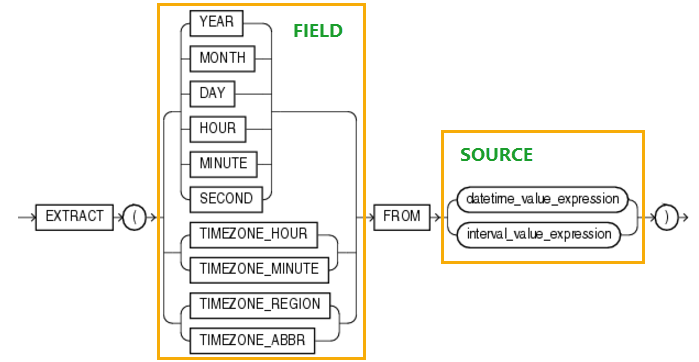
The following illustrates the syntax of the Oracle EXTRACT() function:
Arguments
The Oracle EXTRACT() function accepts two arguments:
1) field
The field argument specifies the component to be extracted.
2) source
The source argument is a DATE , an INTERVAL, or a TIMESTAMP value from which a field is extracted.
The following table illustrates which fields you can extract from which value type.
| Value Type | Available Fields |
|---|---|
| DATE | YEAR, MONTH, DAY |
| INTERVAL YEAR TO MONTH | YEAR, MONTH |
| INTERVAL DAY TO SECOND | DAY, HOUR, MINUTE, SECOND |
| TIMESTAMP | YEAR, MONTH, DAY, HOUR, MINUTE, SECOND |
Note that the EXTRACT() function will return UNKNOWN if the combination of field and source result in ambiguity.
Return value
The EXTRACT() function returns the value of the field of the source.
Examples
A) Extracting fields from DATE values
You can extract YEAR, MONTH, DAY from a DATE value by using the EXTRACT() function.
The following example extracts the value of the YEAR field from a DATE value.
In this example, we used the TO_DATE() function to convert a date literal to a DATE value.
Here is the result
Similarly, you can extract the values of other fields as shown below:
Extracting month from a date:
Extracting day from a date:
To extract values of HOUR, MINUTE, and SECOND fields, you use TO_CHAR() function.
For example, to extract hour, minute, and second of a current system date, you use the following statement:
B) Extracting fields from INTERVAL YEAR TO MONTH values
For the INTERVAL YEAR TO MONTH, you can extract only YEAR and MONTH fields.
Suppose you have the following interval:
It is 5 years 2 months.
To extract the value of the year field, you use the following statement:
The following example extracts the value of the month field from the interval:
Here is the result:
C) Extracting fields from INTERVAL DAY TO SECOND values
For an INTERVAL DAY TO SECOND, you can extract DAY, HOUR, MINUTE, and SECOND as shown in the following example:
Extract day from an interval
Extract hour from an interval
Extract minute from an interval
Extract second from an interval
D) Extracting fields from TIMESTAMP values
You can extract YEAR, MONTH, DAY, HOUR, MINUTE, and SECOND from a TIMESTAMP value as shown in the following examples:
Extracting year from a timestamp:
Extracting month from a timestamp:
Extracting day from a timestamp:
Extracting hour from a timestamp:
Extracting minute from a timestamp:
Extracting second from a timestamp:
E) Extracting date components from table data
See the following orders table from the sample database:
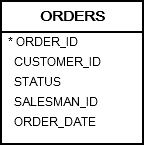
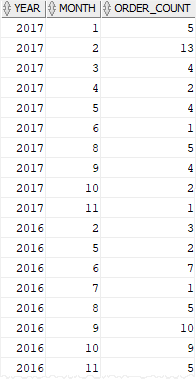
The following statement uses the EXTRACT() function to extract the year and month from the order date and return the number of order per month:
F) Extracting date from user input
The following statement attempts to extract the year, month, and day from a date that user inputs:
However, Oracle issue an error:
To fix this error, you need to convert the input date to a date value using the TO_DATE function. Suppose that the format of the input date is YYYYMMDD :
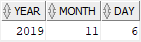
And when you enter the input date as 20191126 , the output is as follows:
In this tutorial, you have learned how to use the Oracle EXTRACT() function to extract the value of a specified field of a date-time value.
EXTRACT() Examples – MySQL
In MySQL, you can use the EXTRACT() function to extract parts from a date. For example, you can extract the year part, the month part, or the day part, etc. You can also extract parts from the time component, such as minutes, seconds, microseconds, etc.
This article contains examples to demonstrate.
Syntax
The syntax goes like this:
Where unit is the date part that you want to extract, and date is the date value to extract that part from.
See the table at the bottom of this article for a list of valid unit specifiers.
Example 1
Here’s an example to demonstrate the function’s basic usage.
Example 2 – More Date Parts
Here I extract the various date parts from a date.
Example 3 – Extracting Time Parts
Here I extract various time parts from a date.
Example 4 – Combining Unit Specifiers
You can also combine unit specifiers, like this:
This example returns everything from the hours part to the microseconds part.
A Database Example
Here’s an example of extracting the year and month from a column in a database:
Current Date/Time
Here, I extract the month part from a date generated with the CURDATE() function.
In this example I extract the hour part from the current date and time (which is generated with the NOW() function).
Expected Values
The following table shows the valid unit values and their expected format.
Oracle / PLSQL: EXTRACT Function
This Oracle tutorial explains how to use the Oracle/PLSQL EXTRACT function with syntax and examples.
Description
The Oracle/PLSQL EXTRACT function extracts a value from a date or interval value.
Syntax
The syntax for the EXTRACT function in Oracle/PLSQL is:
- You can only extract YEAR, MONTH, and DAY from a DATE.
- You can only extract TIMEZONE_HOUR and TIMEZONE_MINUTE from a timestamp with a time zone datatype.
Returns
The EXTRACT function returns a numeric value when the following parameters are provided: YEAR, MONTH, DAY, HOUR, MINUTE, SECOND, TIMEZONE_HOUR, TIMEZONE_MINUTE, TIMEZONE_REGION, TIMEZONE_MINUTE.
The EXTRACT function returns a VARCHAR2 when TIMEZONE_REGION or TIMEZONE_ABBR parameters are provided (because the time zone name or abbreviation information is returned).
Applies To
The EXTRACT function can be used in the following versions of Oracle/PLSQL:
- Oracle 12c, Oracle 11g, Oracle 10g, Oracle 9i
Example
Let’s look at some Oracle EXTRACT function examples and explore how to use the EXTRACT function in Oracle/PLSQL.