Как в sql не равно
The usual comparison operators are available, as shown in Table 9.1.
Table 9.1. Comparison Operators
| Operator | Description |
|---|---|
| datatype < datatype → boolean | Less than |
| datatype > datatype → boolean | Greater than |
| datatype <= datatype → boolean | Less than or equal to |
| datatype >= datatype → boolean | Greater than or equal to |
| datatype = datatype → boolean | Equal |
| datatype <> datatype → boolean | Not equal |
| datatype != datatype → boolean | Not equal |
<> is the standard SQL notation for “ not equal ” . != is an alias, which is converted to <> at a very early stage of parsing. Hence, it is not possible to implement != and <> operators that do different things.
These comparison operators are available for all built-in data types that have a natural ordering, including numeric, string, and date/time types. In addition, arrays, composite types, and ranges can be compared if their component data types are comparable.
It is usually possible to compare values of related data types as well; for example integer > bigint will work. Some cases of this sort are implemented directly by “ cross-type ” comparison operators, but if no such operator is available, the parser will coerce the less-general type to the more-general type and apply the latter’s comparison operator.
As shown above, all comparison operators are binary operators that return values of type boolean . Thus, expressions like 1 < 2 < 3 are not valid (because there is no < operator to compare a Boolean value with 3 ). Use the BETWEEN predicates shown below to perform range tests.
There are also some comparison predicates, as shown in Table 9.2. These behave much like operators, but have special syntax mandated by the SQL standard.
Table 9.2. Comparison Predicates
datatype BETWEEN datatype AND datatype → boolean
Between (inclusive of the range endpoints).
2 BETWEEN 1 AND 3 → t
2 BETWEEN 3 AND 1 → f
datatype NOT BETWEEN datatype AND datatype → boolean
Not between (the negation of BETWEEN ).
2 NOT BETWEEN 1 AND 3 → f
datatype BETWEEN SYMMETRIC datatype AND datatype → boolean
Between, after sorting the two endpoint values.
2 BETWEEN SYMMETRIC 3 AND 1 → t
datatype NOT BETWEEN SYMMETRIC datatype AND datatype → boolean
Not between, after sorting the two endpoint values.
2 NOT BETWEEN SYMMETRIC 3 AND 1 → f
datatype IS DISTINCT FROM datatype → boolean
Not equal, treating null as a comparable value.
1 IS DISTINCT FROM NULL → t (rather than NULL )
NULL IS DISTINCT FROM NULL → f (rather than NULL )
datatype IS NOT DISTINCT FROM datatype → boolean
Equal, treating null as a comparable value.
1 IS NOT DISTINCT FROM NULL → f (rather than NULL )
NULL IS NOT DISTINCT FROM NULL → t (rather than NULL )
datatype IS NULL → boolean
Test whether value is null.
datatype IS NOT NULL → boolean
Test whether value is not null.
‘null’ IS NOT NULL → t
datatype ISNULL → boolean
Test whether value is null (nonstandard syntax).
datatype NOTNULL → boolean
Test whether value is not null (nonstandard syntax).
boolean IS TRUE → boolean
Test whether boolean expression yields true.
true IS TRUE → t
NULL::boolean IS TRUE → f (rather than NULL )
boolean IS NOT TRUE → boolean
Test whether boolean expression yields false or unknown.
true IS NOT TRUE → f
NULL::boolean IS NOT TRUE → t (rather than NULL )
boolean IS FALSE → boolean
Test whether boolean expression yields false.
true IS FALSE → f
NULL::boolean IS FALSE → f (rather than NULL )
boolean IS NOT FALSE → boolean
Test whether boolean expression yields true or unknown.
true IS NOT FALSE → t
NULL::boolean IS NOT FALSE → t (rather than NULL )
boolean IS UNKNOWN → boolean
Test whether boolean expression yields unknown.
true IS UNKNOWN → f
NULL::boolean IS UNKNOWN → t (rather than NULL )
boolean IS NOT UNKNOWN → boolean
Test whether boolean expression yields true or false.
true IS NOT UNKNOWN → t
NULL::boolean IS NOT UNKNOWN → f (rather than NULL )
The BETWEEN predicate simplifies range tests:
is equivalent to
Notice that BETWEEN treats the endpoint values as included in the range. BETWEEN SYMMETRIC is like BETWEEN except there is no requirement that the argument to the left of AND be less than or equal to the argument on the right. If it is not, those two arguments are automatically swapped, so that a nonempty range is always implied.
The various variants of BETWEEN are implemented in terms of the ordinary comparison operators, and therefore will work for any data type(s) that can be compared.
The use of AND in the BETWEEN syntax creates an ambiguity with the use of AND as a logical operator. To resolve this, only a limited set of expression types are allowed as the second argument of a BETWEEN clause. If you need to write a more complex sub-expression in BETWEEN , write parentheses around the sub-expression.
Ordinary comparison operators yield null (signifying “ unknown ” ), not true or false, when either input is null. For example, 7 = NULL yields null, as does 7 <> NULL . When this behavior is not suitable, use the IS [ NOT ] DISTINCT FROM predicates:
For non-null inputs, IS DISTINCT FROM is the same as the <> operator. However, if both inputs are null it returns false, and if only one input is null it returns true. Similarly, IS NOT DISTINCT FROM is identical to = for non-null inputs, but it returns true when both inputs are null, and false when only one input is null. Thus, these predicates effectively act as though null were a normal data value, rather than “ unknown ” .
To check whether a value is or is not null, use the predicates:
or the equivalent, but nonstandard, predicates:
Do not write expression = NULL because NULL is not “ equal to ” NULL . (The null value represents an unknown value, and it is not known whether two unknown values are equal.)
Some applications might expect that expression = NULL returns true if expression evaluates to the null value. It is highly recommended that these applications be modified to comply with the SQL standard. However, if that cannot be done the transform_null_equals configuration variable is available. If it is enabled, PostgreSQL will convert x = NULL clauses to x IS NULL .
If the expression is row-valued, then IS NULL is true when the row expression itself is null or when all the row’s fields are null, while IS NOT NULL is true when the row expression itself is non-null and all the row’s fields are non-null. Because of this behavior, IS NULL and IS NOT NULL do not always return inverse results for row-valued expressions; in particular, a row-valued expression that contains both null and non-null fields will return false for both tests. In some cases, it may be preferable to write row IS DISTINCT FROM NULL or row IS NOT DISTINCT FROM NULL , which will simply check whether the overall row value is null without any additional tests on the row fields.
Boolean values can also be tested using the predicates
These will always return true or false, never a null value, even when the operand is null. A null input is treated as the logical value “ unknown ” . Notice that IS UNKNOWN and IS NOT UNKNOWN are effectively the same as IS NULL and IS NOT NULL , respectively, except that the input expression must be of Boolean type.
Some comparison-related functions are also available, as shown in Table 9.3.
Table 9.3. Comparison Functions
num_nonnulls ( VARIADIC «any» ) → integer
Returns the number of non-null arguments.
num_nonnulls(1, NULL, 2) → 2
num_nulls ( VARIADIC «any» ) → integer
Returns the number of null arguments.
num_nulls(1, NULL, 2) → 1
| Prev | Up | Next |
| 9.1. Logical Operators | Home | 9.3. Mathematical Functions and Operators |
Submit correction
If you see anything in the documentation that is not correct, does not match your experience with the particular feature or requires further clarification, please use this form to report a documentation issue.
Как используется оператор SQL Not Equal?

Программирование и разработка
Оператор SQL not equal представлен как <>. Этот оператор позволяет вам выбирать строки из базы данных, которые не соответствуют определённому условию. Оператор! = Используется в операторе WHERE. Оператор! = Может использоваться вместо <> в некоторых экземплярах SQL.
Как использовать оператор SQL Not Equal
Вы когда-нибудь хотели выбрать строки, в которых содержимое поля не равно определённому значению? Вам повезло, потому что в SQL есть оператор, созданный для этой цели.
Вы можете выбирать строки в зависимости от того, не равны ли одно или несколько значений их полей определённому значению.
В этом руководстве мы поговорим об использовании оператора SQL not equal. Мы обратимся к примеру, который поможет вам начать работу.
SQL Not Equal
Оператор SQL не равно <>. Вы должны указать это в инструкции WHERE. Это позволяет вам выбирать строки, в которых содержимое определённого столбца не совпадает с указанным вами значением. Вы также можете использовать! = Как оператор неравенства в некоторых версиях SQL.
Давайте посмотрим на типичный запрос в SQL:
SELECT * from names
WHERE …stuff goes here
Оператор SQL SELECT просматривает имена столбцов из указанной вами таблицы (в данном случае это имена). Предложение SQL WHERE — это то место, где будет использоваться наше условное выражение для оператора not equal.
В традиционном стандарте SQL ISO символ, обозначающий «не равно», — <>. В других версиях можно использовать! =. Если вы не уверены, что использовать, придерживайтесь стандарта, так как он наверняка работает. Думаю, что выражение bang equal было создано, потому что оно похоже на то, как другие языки программирования представляют предложение not equal.
Пример SQL Not Equal
Мы собираемся создать таблицу под названием «имена». Мы собираемся добавить несколько записей в эту таблицу. Затем мы будем использовать символ неравенства для запроса данных из таблицы:
CREATE TABLE names (
id INTEGER PRIMARY KEY AUTOINCREMENT,
name VARCHAR(128) NOT NULL
);
INSERT into names VALUES (1, «Christina»);
INSERT into names VALUES (2, «Ashleigh»);
INSERT into names VALUES (3, «Sarah»);
INSERT into names VALUES (4, «Tad»);
INSERT into names VALUES (5, «Dustin»);
INSERT into names VALUES (6, «Elissa»);
INSERT into names VALUES (7, «Kelly»);SELECT * from names
WHERE name <> «Christina» AND id != 7;
Я использовал и <>, и! =, Чтобы показать, что оба работают в этом случае. Я использую sqlite3 в песочнице Repl.it для размещения этой базы данных. Ваш опыт может отличаться, если вы используете другой редактор кода или среду песочницы SQL.
Набор результатов из нашего оператора SQL показывает:
Наш запрос возвращает все записи, в которых «name» не равно «Christina». «Id» не должен быть равен 7, чтобы запись была возвращена. Ты сделал это! Вот как вы используете оператор сравнения не равно в SQL.
Вывод
Вы можете выбрать строки из базы данных, содержимое которых не соответствует определённому значению, с помощью оператора SQL not equal. В большинстве версий SQL оператор «не равно» — это знак «меньше», за которым следует знак «больше» (<>).
Восклицательный знак, за которым следует знак равенства (! =), Доступен как оператор неравенства в некоторых версиях SQL. Этот оператор позволяет сравнить два выражения, чтобы увидеть, не равны ли они друг другу.
SQL Not Equal To (!=) Operator for Beginners
In SQL, the not equal to operator ( != ) compares the non-equality of two expressions. That is, it tests whether one expression is not equal to another expression.
If either or both operands are NULL , NULL is returned.
SQL also has another not equal to operator ( <> ), which does the same thing. Which one you use may depend on your DBMS, which one you’re the most comfortable using, and perhaps also whether your organisation has any coding conventions that dictate which one should be used.
Source Table
Imagine our database contains the following table. This is the table we will use for the examples on this page.
Example
If we wanted to return a list of all owners that do not have an OwnerId of 3 , we could do this:
Our query uses the not equal to operator ( != ) to test whether the OwnerId column is not equal to 3 . The query returns all owners except owner number 3.
Strings
When comparing with a string value, use quotes around the string. For example, if we wanted to get information about all owners whose first name is not Homer, we could do the following:
Multiple Conditions
If you have multiple conditions, you can use multiple operators (whether both the same operators or different).
Once you start using more conditions, you should use parentheses to surround the conditions that you want to be evaluated first. If you don’t do this, you may find that you get unexpected results, due to the conditions being evaluated in an order that you didn’t intend.
Negating the Condition
If you use the NOT operator to negate the condition provided by the not equal to operator, you’ll end up getting the results of the equals ( = ) operator:
In this case, you’re better off just using the equals ( = ) operator, like this:
Of course, this itself could be negated with the NOT operator, which would then give us the same result that the not equal to ( != ) operator gives us:
NULL Values
You may have noticed that our original sample table contains a couple of NULL values in the Email column.
A column containing NULL means that it has no value. This is different to 0 or false , or even an empty string.
You can’t use the not equal to operator to compare against NULL . Actually, this may depend on your DBMS and its configuration. But for now, let’s look at what happens if I try to compare the Email column to NULL .
The way to test for non- NULL values is to use IS NOT NULL .
Therefore, we would need to rewrite the above statement as follows.
Now we get only those rows that aren’t NULL in the Email column.
If you’re interested, see SQL Server ANSI_NULLS Explained to see how you can change the way NULL values are treated in SQL Server.
SQL Not Equal Operator introduction and examples

This article explores the SQL Not Equal comparison operator (<>) along with its usage scenarios.
Introduction
We must have used comparison operators in mathematics in the early days. We use these operators to compare different values based on the conditions. For example, we might compare the performance of two authors based on a number of articles. Suppose Raj wrote 85 articles while Rajendra wrote 100 articles. We can say that-
The total number of articles written by Rajendra > (Greater than) the total number of articles written by Raj.
We can have the following comparison operators in SQL.
Greater than to equals to
Less than or equals to
In the table above, we can see that there are two operators for Not Equal (<> and !=) . In this article, we will explore both operators and differences in these as well.
SQL Not Equal <> Comparison Operator
We use SQL Not Equal comparison operator (<>) to compare two expressions. For example, 10<>11 comparison operation uses SQL Not Equal operator (<>) between two expressions 10 and 11.
Difference between SQL Not Equal Operator <> and !=
We can use both SQL Not Equal operators <> and != to do inequality test between two expressions. Both operators give the same output. The only difference is that ‘<>’ is in line with the ISO standard while ‘!=’ does not follow ISO standard. You should use <> operator as it follows the ISO standard.
Let’s set up a sample table to explore SQL Not Equal operator.
To generate the test data, I used ApexSQL Generate as shown in the following screenshot.
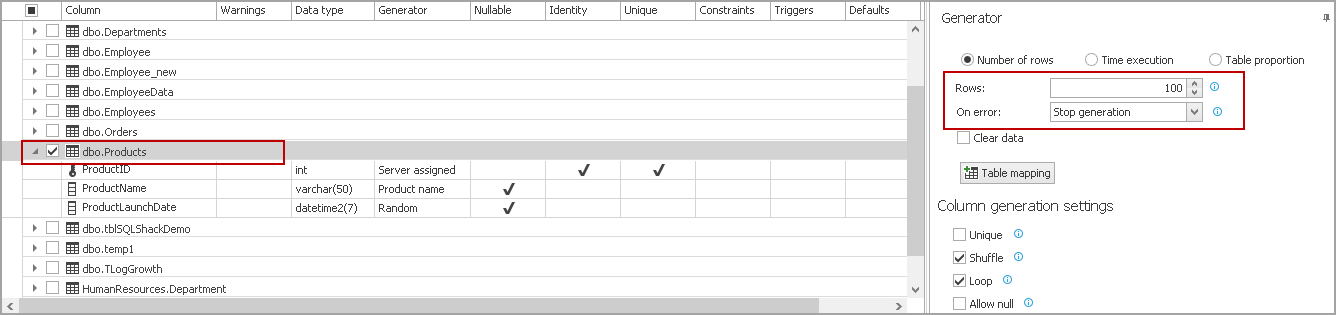
We can see sample data in the Products table.
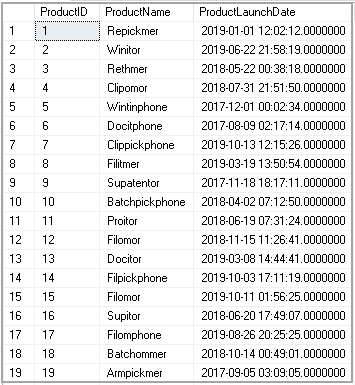
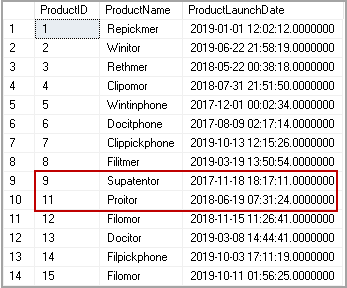
Example 1: Get all product details except ProductID 1
We are going to use SQL Not Equal operator <> to exclude ProductID 1 in the output.

As stated earlier, we can use != operator as well to get the same output.
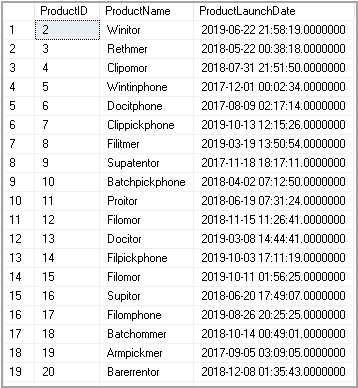
Example 2: Get a list of all product except those launched in the Year 2019
Suppose we want to get a list of products that launched except in the year 2019. We can use the following query using SQL Not Equal operator.
In the output, we can see all products except those launched in the Year 2019.
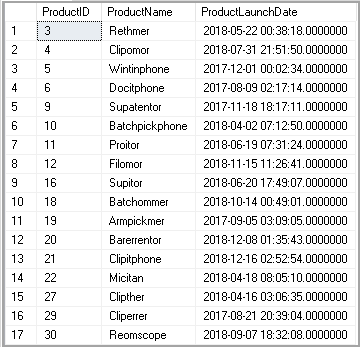
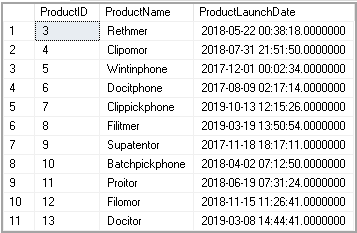
Example 3: Get a list of all products excluding a specific product
In previous examples, we used SQL Not Operator and specified a numerical value in the WHERE condition. Suppose we want to exclude a particular product from the output. We need to use string or varchar data type with a single quote in the where clause.
In the output, we do not have productID 10 as it gets excluded from the output.
If we do not specify the expression in a single quote, we get the following error message. It treats the expressions as a table column name without the single quote.
Msg 207, Level 16, State 1, Line 11 Invalid column name ‘Batchpickphone’.
Example 4: Specifying multiple conditions using SQL Not Equal operator
We can specify multiple conditions in a Where clause to exclude the corresponding rows from an output.
For example, we want to exclude ProductID 1 and ProductName Winitor (having ProductID 2). Execute the following code to satisfy the condition.
In the output, we do not have ProductID 1 and ProductID 2.
Example 5: SQL Not Equal operator and SQL Group By clause
We can use SQL Not Equal operator in combination with the SQL Group By clause. In the following query, we use SQL Group by on ProductLaunchDate column to get a count of products excluding the year 2019.
Performance consideration of SQL Not Equal operator
In this part, we will explore the performance consideration of SQL Not Equal operator. For this part, let’s keep only 10 records in the products table. It helps to demonstrate the situation quickly.
Execute the following query to delete products having ProductID>10.
We have the following records in the Products table.

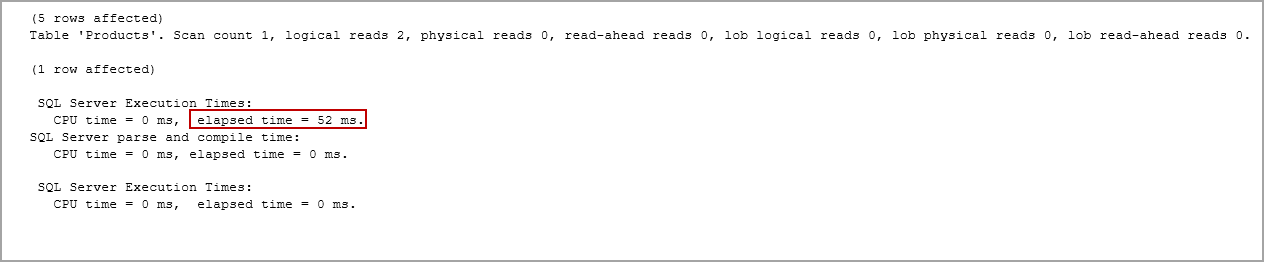
Let’s execute the following query with the following tasks.
- We use SET STATISTICS IO ON to show statistics of IO activity during query execution
- We use SET STATISTICS TIME to display the time for parse, compile and execute each statement in a query batch
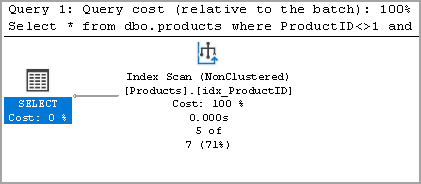
- Enable the Actual Execution plan to show the execution plan used to retrieve results for this query by the query optimizer
In the message tab, we can see the elapsed time for this query is 52 ms.
In the actual execution plan of this query, we can see SQL Not Equal predicates along with a Non-clustered index scan operator.
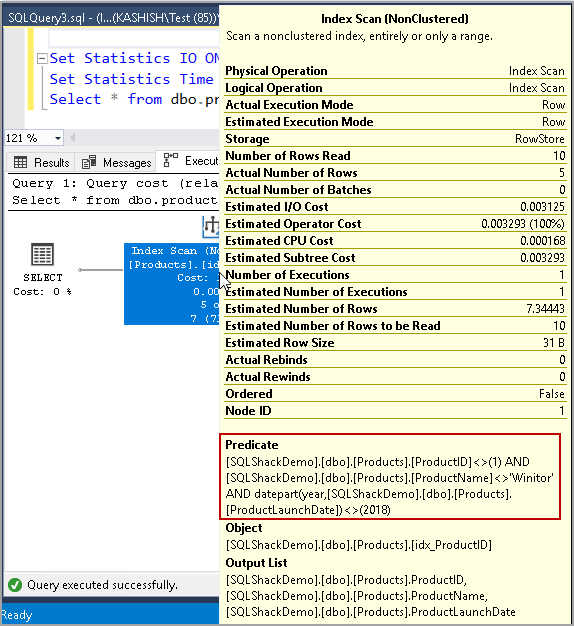
Let’s rewrite this query using IN operator. We get the same number of rows in this as well in comparison with a previous query using SQL Not Equal operator.
This time query took less time to return the same number of rows. It took only 1 ms while query with SQL Not Equal took 52 ms.

In the Actual Execution plan, it used Clustered Index Seek while SQL Not Equal used

In the property for the Clustered Index Seek, it uses an equality operator to produce a similar result set.
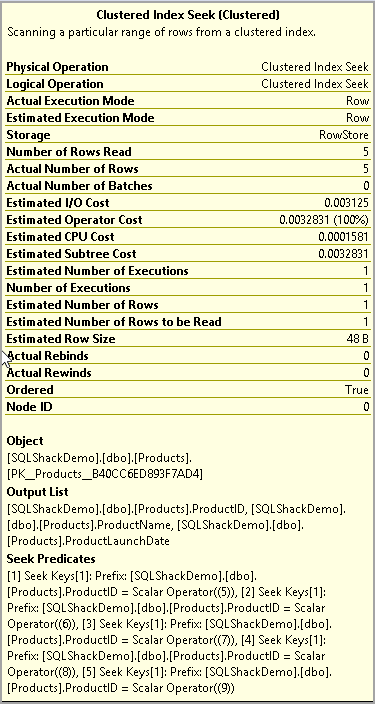
- Caution: We should use the Equality operator to get a better performance in comparison with the SQL Not Equal operator.
Conclusion
In this article, we explored SQL Not Operator along with examples. We also considered its performance implications in comparison with the Equality operators. You should try to use the Equality operator for better query performance. If you have any comments or questions, feel free to leave them in the comments below.
Hi! I am Rajendra Gupta, Database Specialist and Architect, helping organizations implement Microsoft SQL Server, Azure, Couchbase, AWS solutions fast and efficiently, fix related issues, and Performance Tuning with over 14 years of experience.
I am the author of the book «DP-300 Administering Relational Database on Microsoft Azure». I published more than 650 technical articles on MSSQLTips, SQLShack, Quest, CodingSight, and SeveralNines.
I am the creator of one of the biggest free online collections of articles on a single topic, with his 50-part series on SQL Server Always On Availability Groups.
Based on my contribution to the SQL Server community, I have been recognized as the prestigious Best Author of the Year continuously in 2019, 2020, and 2021 (2nd Rank) at SQLShack and the MSSQLTIPS champions award in 2020.