How to Change the SQL Server Name after Renaming the Windows Host
When we change the name of the windows machine on whom the SQL Server is running, the SQL server name does not reflect this change. We need to manually add the new server name and remove the old server name.
Example
We have changed the windows machine name from Ahsi-PC to Shashank but when we look for the SQL Server name it will give the old windows machine name. You can see this in the image below. The new name is listed in Object Exporer, but the old name appears on the right as the result of the query.
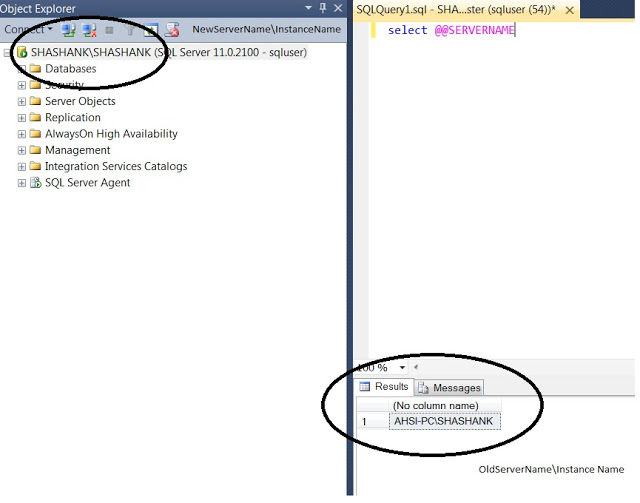
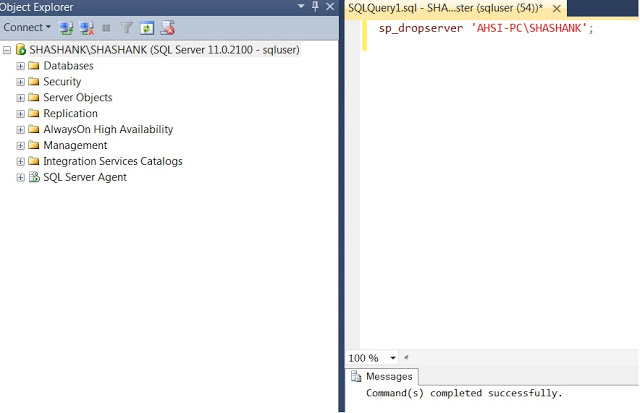
To correct this, we need to first run sp_dropserver ‘Old server Name’ in the master database.
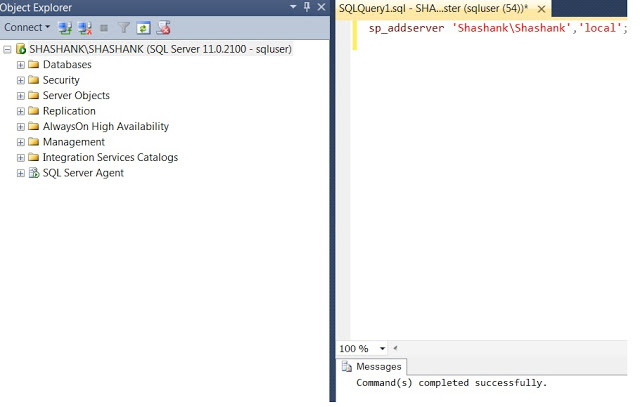
Next, we run sp_addserver ‘New server name’,’local’ in the master database. After running this, restart the SQL Server services.
Now check the new name of the instance by running select @@servername.
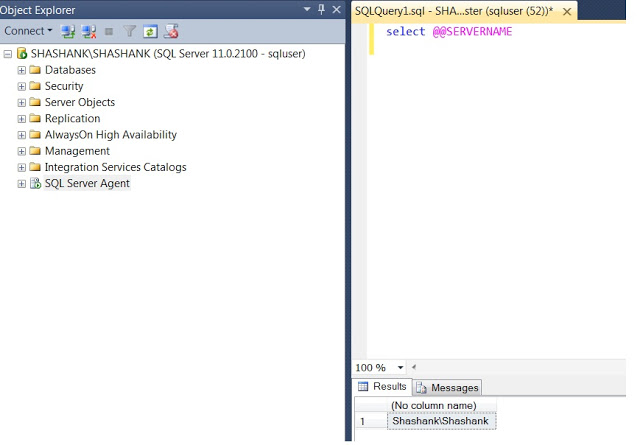
The SQL instance name has been changed and matches the windows name change.
The minimum rights required to perform this action are in the setupadmin server role.
Steps to change the server name for a SQL Server machine
In this tip we look at the steps within SQL Server you need to follow if you change the physical server name for a standalone SQL Server.
Solution
As you may know, the internal SQL Server name is based on the physical server name, but changing the physical server name does not update the metadata within SQL Server.
When connecting to SQL Server, we use the physical server name for the default instance and physical server name\INSTANCE Name for a named instance . If you change the physical server name , there is no need to re-install SQL Server to reset the physical server name . You can follow the below steps to update the SQL Server system metadata which stores the physical server name in sys.servers .
The below solution works for default and named SQL instances on a standalone machine (non-clustered). Also, you need to follow the steps for each SQL Server instance on the machine.
Pre Update Steps
Check for Remote Logins
- If remote logins exist you have to drop them first, if you do not drop the remote logins you will get the below error when executing the sp_dropserver stored procedure.
- You can run this query to get a list of remote logins that exist on the server.
Check for Replication
- SQL Server does not support renaming computers that are involved in replication. If the SQL Server is involved in replication you have to remove it first. If you do not remove replication, you will get the below error when updating SQL Server System metadata.
- You can run this query to see if replication is in place. If so, you could script out the settings first so you can recreate afterwards and then remove replication.
Check for Reporting Services
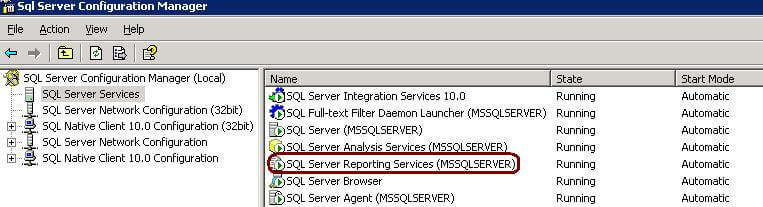
- If SQL Server Reporting Service is installed and configured, you have to first stop the Reporting Services service.
Check for Database Mirroring
- If database mirroring is enabled you have to remove mirroring and then re-establish mirroring once you have made the system metadata update.
Steps to rename SQL Server
- Execute the below commands for each instance on the machine.
- Restart the SQL Server services.
- Execute the below query in each instance to verify the updated system metadata.
Post Update Steps
- Add the remote logins using the sp_addremotelogin command.
- Reconfigure Replication if this was setup.
- Reconfigure Database Mirroring if this was setup.
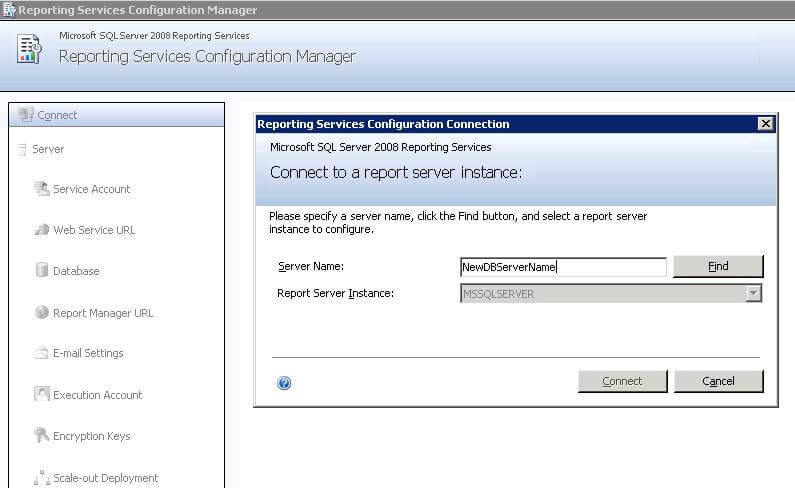
- Reconfigure Reporting Services if this was setup and connect to the new server name as shown below.
- If you also changed the Report Server computer name, you will have to edit the RSReportServer.config file and update the URLRoot setting. Do to this, open the RSWebApplication.config file and modify the ReportServerUrl setting to reflect the new server name.
Next Steps
- Change application connection strings pointing to the server
- Change linked servers pointing to the server


About the author
 Jugal Shah has 8+ years of extensive SQL Server experience and has worked on SQL Server 2000, 2005, 2008 and 2008 R2.
Comments For This Article
I am having hosting in that I placed my project details, but in that I want to change server name from other server to my own server how can I rectify pls reply.
Can someone please help me to change machine name for my sql instance. Actually i installed sql server with the name ÄG on server3 host. but somehow i can see machinename is different for my instance. Please check and let me know for the same. Thanks.
host_name() ServerName\InstanceName ServerName Windows_Name NetBIOS_Name InstanceName IsClustered
SERVER3 SERVER3\AG MS-CLUSTER2\AG MS-CLUSTER2 MS-CLUSTER2 AG 0
I have issue with SSRS Report Server Configuration Manager in the server.
I changed server name. Now report server connection not working. I tried to change server name in database tab but its seems disable.
Can you please suggest me steps to update server name.
What about SSIS rename ?, will it be changed automatically or do we need to change it manually? how to change it?
Nice article — do you know if this works for SQL 2014 and SQL 2016 versions (Standalone-mode, not clustered)?
I seem to remember that this didn’t work with the initial releases of SQL 2014 but I can’t recall the exact error message. there was nothing else running — just a blank, generic, simple install of SQL 2014 and the sp_dropserver and sp_addserver didn’t work as intended. I believe MSFT may be deprecating one or both of these in future releases.
If you have a maintenance plan and the server name changes, the maintenance plan connection string for «(Local server connection)» will be wrong and you can’t change it through the Maintenance Plan editor. For instance, you clone a virtual machine with a SQL Server that has a backup maint plan, and put the clone on the same network with a new name. The maint plan on the clone will continue to run backups on the original.
You can delete the maintenance plan and recreate it. Or you could do it in SQL with the queries below. It might be risky, but the worst that can happen is that you’ll have to delete and recreate it.
Hi — How can I change name on SQL Server Configuration Manager as well?
It looks like sys.databases is_subscribed column isn’t used looks like it will always return a «0» output. Just an FYI.
Actually we got one requirement from client i.e uninstall old sql server instance (suppose ABCD\XYZ) and new named instance install on ABCD server.
so for above requirement what i did.
then sp_addserver ‘ABCD\PQR’,local
then i fired below command
select @@servername it is showing new server instance name like ABCD\PQR
i am able to coonect with new server and every thing is fine. in my server there is no remote logins,replication nothing.
But what is the problem in configuration manager it is showing old name only i.e Sql server(XYZ)
how i am changing that one.
please help me if you have any solution.
Question about rename reporting server, after rename server name, on the scale out deployment screen in Reporting services configuration Manager, will the servername there changed automatically?
We are using standard edition, and we only need one server listed there.
The above queries will only help if you have your server name changed and not the instance name.That’s needed when the server name has changed (so ServerOld\SQL01 to ServerNew\SQL01). You cannot in any way change the name of a named instance (short of uninstalling the whole thing and reinstalling with a new name).
I kind of got into same situation and have to uninstall and re-install for new named instance in SQL 2012.
I Just did exaclty same with named instance, to change to diffrent but the instance name changed internally , when i execture [email protected]@serverproperty and servername it got the changed name but , the original connection still using the old name.
Actually we got one requirement from client i.e uninstall old sql server instance (suppose ABCD\XYZ) and new named instance install on ABCD server.
so for above requirement what i did.
then sp_addserver ‘ABCD\PQR’,local
then i fired below command
select @@servername it is showing new server instance name like ABCD\PQR
i am able to coonect with new server and every thing is fine. in my server there is no remote logins,replication nothing.
But what is the problem in configuration manager it is showing old name only i.e Sql server(XYZ)
how i am changing that one.
please help me if you have any solution.
I see in my rsreportserver.config the <UrlRoot> </UrlRoot> is empty, the same as <ReportServerUrl>
</ReportServerUrl>.
For my case , we have both reporting service and database engine that hosts report databases on the same server.
We changed the physical computer name, then I changed the sql server name by using sp_dropserver and addserver.
The step I am missing is next step after above changes. If you can tell me next step, that would be helpful.
How to Change SQL Server Instance Name?
Changing SQL Server Instance name is not a routine task. Although, sometimes we get requirements to change SQL Instance name. There are multiple scenarios in which we need to rename SQL Server Instance like:
- If you have changed database server name then we should change SQL Server Instance name as well.
- If you have cloned a database server from DBSERVER1 to DBSERVER2. Here, SQL Server installed on DBSERVER1 will be copied with same name to DBSERVER2. You need to change the SQL Server instance name on DBSERVER2.
- Naming convention is not met.
Please keep in mind that we cannot change complete name of SQL Server named instance. Suppose you have installed a named instance SERVERNAME\DBInstance1 on your server. If you want to rename this named instance then we can only change first part of this name i.e. SERVERNAME. You cannot change DBInstance1 so your named instance will look like DBSERVERNAME\DBInstance1 post name change.
Impact of Changing SQL Server Instance Name

We need to plan carefully before renaming any SQL Server Instance. Below is the list of possible impacts that you should go through while renaming SQL Server Instance name.
- Those domain users who are accessing or connecting to the SQL Server Instance as part of Windows group will not be able to connect to renamed instance of SQL Server. Make sure to update the Windows group to specify the new computer name to establish connectivity to the SQL Server instance.
- You would not be able to access reporting services after renaming the instance name. You should follow steps mentioned in attached article to rename SQL Server instance that is running with reporting services.
- If you have database mirroring on the SQL Server instance then you need to drop the mirroring and then reconfigure it post renaming the SQL Server Instance.
- Renaming SQL Server instance name does not support if your instance has replication, except when you use log shipping with replication.
- You can change the name of SQL Server instance on secondary server in log shipping if the primary server is permanently lost.
- If you have linked server configurations then it will be affected by the computer renaming operation. Use sp_addlinkedserveror sp_setnetname to update computer name references.
Rename SQL Server Instance
SQL Server instance name along with other system metadata stores in sys.servers system object. We need to update details in system metadata to reflect new name. Also i would suggest to not change SQL Server Instance name directly on your production server.
Suppose you have installed default instance of SQL Server in your database server. If you have changed the name of your database server then you need to update the name of default SQL Server instance as well in sys.servers system table. First, we need to drop the existing SQL Server instance name then we will add new name as per our choice. Follow below steps to change SQL Server instance name.
If you have installed a named instance on your database server then you can run below command to change SQL Server Instance name.
Note: Make sure to restart SQL Server services post running above commands to reflect these changes.
You can verify the changes by running below commands or by querying sys.servers system table. If you have not restarted SQL Server services then you might be getting older SQL Server instance name. So restart SQL Server service to apply new changes.
If you have remote logins on your database server then you might get error 15190 while running sp_dropserver command. Read below article to fix this issue and then proceed with the instance name change.
- Fix Error 15190: There are still remote logins for the server
I hope you like this article. Please follow our Facebook and on Twitter handle to get latest updates.
Как поменять имя сервера sql
Как переименовать SQL Server
По материалам статьи Брайен Найт на sqlservercentral.com » Renaming a SQL Server «
В этой статье Брайен предлагает несколько советов о том, как быстро изменить имя вашего SQL сервера и избежать некоторых типичных ошибок.
Переименование SQL Server 7.0
Для SQL Server 7.0 наиболее трудный сценарий переименования, так как Вы должны будете выполнить дополнительные шаги, которые Вам придётся принять на веру. После того, как Вы заменили имя и перезагрузили SQL Server, он будет жаловаться на неспособность запуститься. Обычно, после этого обращаются в службу поддержки Микрософт или отправляются с вопросами в форумы/конференции. Но, прежде чем Вы сделаете это, попробуйте выполнить установку повторно. Это страшно делать только первый раз. Программа установки Installshield сообщит, что она собирается внести изменения в вашу систему. Она заменит ключи системного реестра. После этого, перезагрузитесь еще один раз, и подсоединитесь в Query Analyzer к новому имени сервера. Выполните следующую команду:
sp_dropserver ‘old server name’
sp_addserver ‘new server name’
Наконец, удалите старую регистрацию сервера в Enterprise Manager, и на этом переименование можно считать завершённым.
Переименование SQL Server 2000
Для SQL Server 2000 всё намного проще. После того, как Вы замените имя сервера и перезагрузитесь, SQL Server автоматически обнаружит, что Вы заменили имя и зафиксирует это. Все, что Вы должны будете сделать, это присоединиться в Query Analyzer к новому имени сервера и выполнить следующие команды:
sp_dropserver ‘old server name’
sp_addserver ‘new server name’
Если не поможет, то попробуйте так: sp_addserver ‘new server name’, ‘local’
Удалите старую регистрацию сервера в Enterprise Manager, и на этом переименование можно считать завершённым.