SQL оператор JOINS
В этом учебном материале вы узнаете, как использовать SQL JOINS с синтаксисом и примерами.
Описание
SQL JOINS используются для извлечения данных из нескольких таблиц. SQL JOIN выполняется всякий раз, когда две или более таблицы перечислены в операторе SQL.
Существует 4 различных типа соединений SQL:
Итак, давайте обсудим синтаксис SQL JOIN, рассмотрим наглядные иллюстрации SQL JOINS и рассмотрим несколько примеров.
SQL INNER JOIN (простое соединение)
Скорее всего, вы уже писали SQL запрос, который использует SQL INNER JOIN. Это наиболее распространенный тип соединения SQL. INNER JOIN возвращает все строки из нескольких таблиц, где выполняется условие соединения.
Синтаксис
Синтаксис INNER JOIN в SQL:
Рисунок.
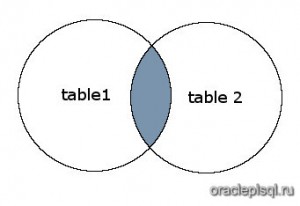
На этом рисунке SQL INNER JOIN возвращает затененную область:
SQL INNER JOIN будет возвращать записи, где пересекаются table1 и table2 .
Пример
Давайте рассмотрим пример использования INNER JOIN в запросе.
В этом примере у нас есть таблица customer и следующими данными:
| customer_id | first_name | last_name | favorite_website |
|---|---|---|---|
| 4000 | Justin | Bieber | google.com |
| 5000 | Selena | Gomez | bing.com |
| 6000 | Mila | Kunis | yahoo.com |
| 7000 | Tom | Cruise | oracle.com |
| 8000 | Johnny | Depp | NULL |
| 9000 | Russell | Crowe | google.com |
И таблица orders со следующими данными:
| order_id | customer_id | order_date |
|---|---|---|
| 1 | 7000 | 2019/06/18 |
| 2 | 5000 | 2019/06/18 |
| 3 | 8000 | 2019/06/19 |
| 4 | 4000 | 2019/06/20 |
| 5 | NULL | 2019/07/01 |
Выполним следующий SQL оператор:
Будет выбрано 4 записи. Вот результаты, которые вы должны получить:
| customer_id | order_id | order_date |
|---|---|---|
| 4000 | 4 | 2019/06/20 |
| 5000 | 2 | 2019/06/18 |
| 7000 | 1 | 2019/06/18 |
| 8000 | 3 | 2019/06/19 |
В этом примере будут возвращены все строки из таблиц customers и orders , в которых совпадают значения поля customer_id в обоих таблицах.
Строки, где значение customer_id равен 6000 и 9000 в таблице customers , будут опущены, поскольку они не существуют в обеих таблицах. Строка, в которой значение order_id равно 5 из таблицы orders , будет опущена, поскольку customer_id со значением NULL не существует в таблице customers .
SQL LEFT OUTER JOIN
Другой тип соединения называется LEFT OUTER JOIN. Этот тип соединения возвращает все строки из таблиц с левосторонним соединением, указанным в условии ON, и только те строки из другой таблицы, где объединяемые поля равны (выполняется условие соединения).
Синтаксис
Синтаксис для LEFT OUTER JOIN в SQL:
В некоторых базах данных ключевое слово OUTER опущено и записывается просто как LEFT JOIN.
Рисунок
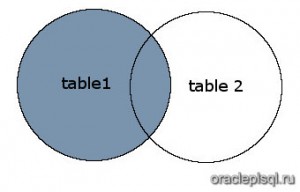
На этом рисунке SQL LEFT OUTER JOIN возвращает затененную область:
SQL LEFT OUTER JOIN возвращает все записи из table1 и только те записи из table2 , которые пересекаются с table1 .
Пример
Теперь давайте рассмотрим пример, который показывает, как использовать LEFT OUTER JOIN в операторе SELECT.
Используя ту же таблицу customers , что и в предыдущем примере:
| customer_id | first_name | last_name | favorite_website |
|---|---|---|---|
| 4000 | Justin | Bieber | google.com |
| 5000 | Selena | Gomez | bing.com |
| 6000 | Mila | Kunis | yahoo.com |
| 7000 | Tom | Cruise | oracle.com |
| 8000 | Johnny | Depp | NULL |
| 9000 | Russell | Crowe | google.com |
И таблицу orders со следующими данными:
| order_id | customer_id | order_date |
|---|---|---|
| 1 | 7000 | 2019/06/18 |
| 2 | 5000 | 2019/06/18 |
| 3 | 8000 | 2019/06/19 |
| 4 | 4000 | 2019/06/20 |
| 5 | NULL | 2019/07/01 |
Введите следующий SQL оператор:
Будет выбрано 6 записей. Вот результаты, которые вы получите:
| customer_id | order_id | order_date |
|---|---|---|
| 4000 | 4 | 2019/06/20 |
| 5000 | 2 | 2019/06/18 |
| 6000 | NULL | NULL |
| 7000 | 1 | 2019/06/18 |
| 8000 | 3 | 2019/06/19 |
| 9000 | NULL | NULL |
Этот пример LEFT OUTER JOIN вернул бы все строки из таблицы customers и только те строки из таблицы orders , в которых объединенные поля равны.
Если значение customer_id в таблице customers не существует в таблице orders , все поля таблицы orders будут отображаться как NULL в наборе результатов. Как вы можете видеть, строки, где customer_id равен 6000 и 9000, будут включены в LEFT OUTER JOIN, но поля order_id и order_date отображают NULL.
SQL RIGHT OUTER JOIN JOIN
Другой тип соединения называется SQL RIGHT OUTER JOIN. Этот тип соединения возвращает все строки из таблиц с правосторонним соединением, указанным в условии ON, и только те строки из другой таблицы, где объединяемые поля равны (выполняется условие соединения).
Синтаксис
Синтаксис для RIGHT OUTER JOIN в SQL:
В некоторых базах данных ключевое слово OUTER опущено и записывается просто как RIGHT JOIN.
Рисунок
На этом рисунке SQL RIGHT OUTER JOIN возвращает затененную область:
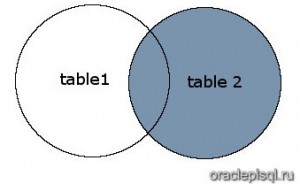
SQL RIGHT OUTER JOIN возвращает все записи из table2 и только те записи из table1 , которые пересекаются с table2 .
Пример
Теперь давайте рассмотрим пример, который показывает, как использовать RIGHT OUTER JOIN в операторе SELECT.
| customer_id | first_name | last_name | favorite_website |
|---|---|---|---|
| 4000 | Justin | Bieber | google.com |
| 5000 | Selena | Gomez | bing.com |
| 6000 | Mila | Kunis | yahoo.com |
| 7000 | Tom | Cruise | oracle.com |
| 8000 | Johnny | Depp | NULL |
| 9000 | Russell | Crowe | google.com |
И таблицу orders со следующими данными:
| order_id | customer_id | order_date |
|---|---|---|
| 1 | 7000 | 2019/06/18 |
| 2 | 5000 | 2019/06/18 |
| 3 | 8000 | 2019/06/19 |
| 4 | 4000 | 2019/06/20 |
| 5 | NULL | 2019/07/01 |
Введите следующий SQL оператор:
Будет выбрано 5 записей. Вот результаты, которые вы должны получить:
| customer_id | order_id | order_date |
|---|---|---|
| NULL | 5 | 2019/07/01 |
| 4000 | 4 | 2019/06/20 |
| 5000 | 2 | 2019/06/18 |
| 7000 | 1 | 2019/06/18 |
| 8000 | 3 | 2019/06/19 |
Этот пример RIGHT OUTER JOIN вернул бы все строки из таблицы orders и только те строки из таблицы customers , где объединенные поля равны.
Если значение customer_id в таблице orders не существует в таблице customers , то все поля в таблице customers будут отображаться как NULL в наборе результатов. Как видите, строка, где order_id равен 5, будет включена в RIGHT OUTER JOIN, но в поле customer_id отображается NULL.
SQL FULL OUTER JOIN
Другой тип объединения называется SQL FULL OUTER JOIN. Этот тип объединения возвращает все строки из LEFT таблицы и RIGHT таблицы со значениями NULL в месте, где условие соединения не выполняется.
Синтаксис
Синтаксис для SQL FULL OUTER JOIN:
В некоторых базах данных ключевое слово OUTER опускается и записывается просто как FULL JOIN.
Рисунок
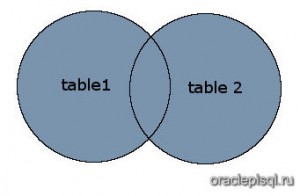
На этом рисунке SQL FULL OUTER JOIN возвращает затененную область:
SQL FULL OUTER JOIN возвращает все записи из таблиц table1 и table2 .
Пример
Давайте рассмотрим пример, который показывает, как использовать FULL OUTER JOIN в операторе SELECT.
Используя ту же таблицу customers , что и в предыдущем примере:
| customer_id | first_name | last_name | favorite_website |
|---|---|---|---|
| 4000 | Justin | Bieber | google.com |
| 5000 | Selena | Gomez | bing.com |
| 6000 | Mila | Kunis | yahoo.com |
| 7000 | Tom | Cruise | oracle.com |
| 8000 | Johnny | Depp | NULL |
| 9000 | Russell | Crowe | google.com |
И таблицу orders со следующими данными:
| order_id | customer_id | order_date |
|---|---|---|
| 1 | 7000 | 2019/06/18 |
| 2 | 5000 | 2019/06/18 |
| 3 | 8000 | 2019/06/19 |
| 4 | 4000 | 2019/06/20 |
| 5 | NULL | 2019/07/01 |
Введите следующий SQL оператор:
SELECT customers.customer_id,
orders.order_id,
orders.order_date
FROM customers
FULL OUTER JOIN orders
ON customers.customer_id = orders.customer_id
ORDER BY customers.customer_id;
Будет выбрано 7 записей. Вот результаты, которые вы получите:
| customer_id | order_id | order_date |
|---|---|---|
| NULL | 5 | 2019/07/01 |
| 4000 | 4 | 2019/06/20 |
| 5000 | 2 | 2019/06/18 |
| 6000 | NULL | NULL |
| 7000 | 1 | 2019/06/18 |
| 8000 | 3 | 2019/06/19 |
| 9000 | NULL | NULL |
Это пример FULL OUTER JOIN будет возвращать все строки из таблицы orders и все строки из таблицы customers . Всякий раз, когда условие соединения не выполняется, значение NULL будет распространяться на эти поля в наборе результатов. Это означает, что если значение customer_id в таблице customers не существует в таблице orders , то все поля в таблице orders будут отображаться в наборе результатов как NULL Кроме того, если значение customer_id в таблице orders не существует в таблице customers , то все поля в таблице customers будут отображаться в наборе результатов как NULL.
Как видите, строки, где customer_id равен 6000 и 9000, будут включены, но поля order_id и order_date для этих записей содержат значение NULL. Строка, где order_id равен 5, также будет включена, но поле customer_id для этой записи имеет значение NULL.
Introduction to SQL JOINs
Seven different ways you can return data from two relational tables; excluding cross joins and self referencing joins:
- INNER JOIN
- LEFT JOIN
- RIGHT JOIN
- OUTER JOIN
- LEFT JOIN excluding INNER JOIN
- RIGHT JOIN excluding INNER JOIN
- OUTER JOIN excluding INNER JOIN
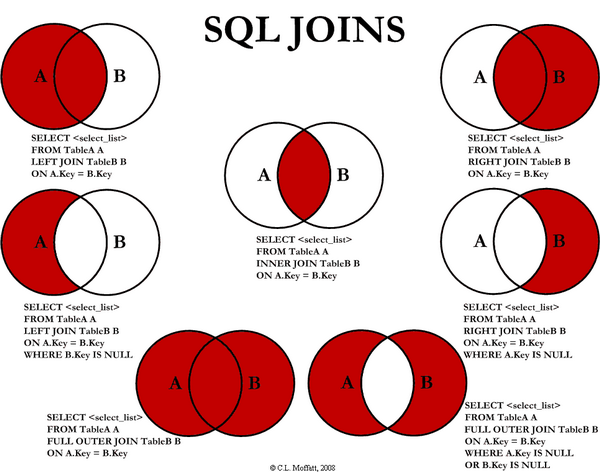
For the sake of this article, 5, 6, and 7 are LEFT EXCLUDING JOIN , RIGHT Excluding JOIN , and OUTER Excluding JOIN , respectively. Some may argue that 5, 6, and 7 are not really joining the two tables, but for simplicity, let’s refer to these as joins because you use a SQL join in each of these queries (but exclude some records with a WHERE clause).
INNER JOIN 
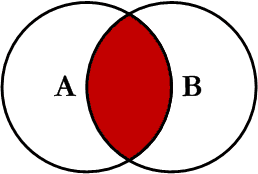
This is the simplest, most understood join and is the most common. This query will return all of the records in the left table ( Table_A ) that have a matching record in the right table ( Table_B ). This join is written as follows:
LEFT JOIN 
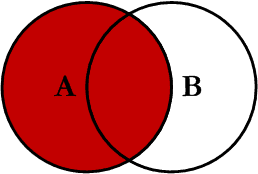
This query will return all of the records in the left table ( Table_A ) regardless if any of those records have a match in the right table ( Table_B ). It will also return any matching records from the right table. This join is written as follows:
RIGHT JOIN 
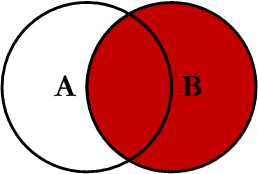
This query will return all of the records in the right table ( Table_B ) regardless if any of those records have a match in the left table ( Table_A ). It will also return any matching records from the left table. This join is written as follows:
OUTER JOIN 
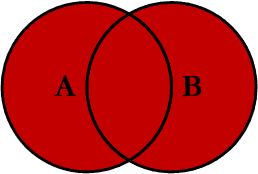
This Join can also be referred to as a FULL OUTER JOIN or a FULL JOIN . This query will return all of the records from both tables, joining records from the left table ( Table_A ) that match records from the right table ( Table_B ). This join is written as follows:
LEFT Excluding JOIN 
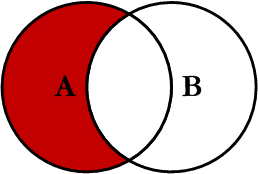
This query will return all of the records in the left table ( Table_A ) that do not match any records in the right table ( Table_B ). This join is written as follows:
RIGHT Excluding JOIN 
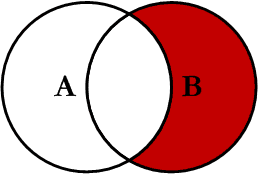
This query will return all of the records in the right table ( Table_B ) that do not match any records in the left table ( Table_A ). This join is written as follows:
OUTER Excluding JOIN 
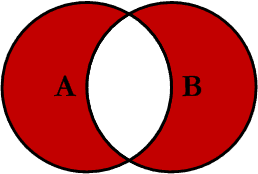
This query will return all of the records in the left table ( Table_A ) and all of the records in the right table ( Table_B ) that do not match. I have yet to have a need for using this type of join, but all of the others, I use quite frequently. This join is written as follows:
Examples
Suppose we have two tables, TABLE_A and TABLE_B . The data in these tables are shown below:
The results of the seven joins are shown below:
INNER JOIN
LEFT JOIN
RIGHT JOIN
OUTER JOIN
LEFT Excluding JOIN
RIGHT Excluding JOIN
OUTER Excluding JOIN
Conclusion
Note on the OUTER JOIN that the inner joined records are returned first, followed by the right joined records, and then finally the left joined records (at least, that’s how my Microsoft SQL Server did it; this, of course, is without using any ORDER BY statement).
Оператор INNER JOIN в SQL
Оператор INNER JOIN объединяет две таблицы на основе общего столбца и выбирает записи с совпадающими значениями в этих столбцах. Например:
Вот как работает этот код:

Здесь мы выбираем столбцы customer_id и first_name (из таблицы Customers) и столбец amount (из таблицы Orders). В результате получаем те строки, в которых есть совпадение между customer_id (таблицы Customers) и customer (таблицы Orders).
Синтаксис оператора INNER JOIN
Синтаксис оператора INNER JOIN следующий:
Оператор INNER JOIN с оператором WHERE
Вот пример использования оператора INNER JOIN с оператором WHERE :
Здесь мы объединяем две таблицы и выбираем строки, в которых сумма (amount) больше или равна 500.

Оператор INNER JOIN с псевдонимами
Мы можем использовать псевдонимы (оператор AS) с оператором INNER JOIN , чтобы сделать код короче и чище. Например:
Здесь мы выбираем общие строки между таблицами Categories и Products.

Оператор INNER JOIN с тремя таблицами
Мы также можем объединить более двух таблиц, используя оператор INNER JOIN . Например:
Что значит inner join в sql
A join is a query that combines rows from two or more tables, views, or materialized views. Oracle Database performs a join whenever multiple tables appear in the FROM clause of the query. The select list of the query can select any columns from any of these tables. If any two of these tables have a column name in common, then you must qualify all references to these columns throughout the query with table names to avoid ambiguity.
Join Conditions
Most join queries contain at least one join condition , either in the FROM clause or in the WHERE clause. The join condition compares two columns, each from a different table. To execute a join, Oracle Database combines pairs of rows, each containing one row from each table, for which the join condition evaluates to TRUE . The columns in the join conditions need not also appear in the select list.
To execute a join of three or more tables, Oracle first joins two of the tables based on the join conditions comparing their columns and then joins the result to another table based on join conditions containing columns of the joined tables and the new table. Oracle continues this process until all tables are joined into the result. The optimizer determines the order in which Oracle joins tables based on the join conditions, indexes on the tables, and, any available statistics for the tables.
A WHERE clause that contains a join condition can also contain other conditions that refer to columns of only one table. These conditions can further restrict the rows returned by the join query.
You cannot specify LOB columns in the WHERE clause if the WHERE clause contains the join condition. The use of LOBs in WHERE clauses is also subject to other restrictions. See Oracle Database SecureFiles and Large Objects Developer’s Guide for more information.
Equijoins
An equijoin is a join with a join condition containing an equality operator. An equijoin combines rows that have equivalent values for the specified columns. Depending on the internal algorithm the optimizer chooses to execute the join, the total size of the columns in the equijoin condition in a single table may be limited to the size of a data block minus some overhead. The size of a data block is specified by the initialization parameter DB_BLOCK_SIZE .
Band Joins
A band join is a special type of nonequijoin in which key values in one data set must fall within the specified range (“band”) of the second data set. The same table can serve as both the first and second data sets.
Database SQL Tuning Guide for more information on band joins
Self Joins
A self join is a join of a table to itself. This table appears twice in the FROM clause and is followed by table aliases that qualify column names in the join condition. To perform a self join, Oracle Database combines and returns rows of the table that satisfy the join condition.
Cartesian Products
If two tables in a join query have no join condition, then Oracle Database returns their Cartesian product . Oracle combines each row of one table with each row of the other. A Cartesian product always generates many rows and is rarely useful. For example, the Cartesian product of two tables, each with 100 rows, has 10,000 rows. Always include a join condition unless you specifically need a Cartesian product. If a query joins three or more tables and you do not specify a join condition for a specific pair, then the optimizer may choose a join order that avoids producing an intermediate Cartesian product.
Inner Joins
An inner join (sometimes called a simple join ) is a join of two or more tables that returns only those rows that satisfy the join condition.
Outer Joins
An outer join extends the result of a simple join. An outer join returns all rows that satisfy the join condition and also returns some or all of those rows from one table for which no rows from the other satisfy the join condition.
To write a query that performs an outer join of tables A and B and returns all rows from A (a left outer join ), use the LEFT [ OUTER ] JOIN syntax in the FROM clause, or apply the outer join operator (+) to all columns of B in the join condition in the WHERE clause. For all rows in A that have no matching rows in B, Oracle Database returns null for any select list expressions containing columns of B.
To write a query that performs an outer join of tables A and B and returns all rows from B (a right outer join ), use the RIGHT [ OUTER ] JOIN syntax in the FROM clause, or apply the outer join operator (+) to all columns of A in the join condition in the WHERE clause. For all rows in B that have no matching rows in A, Oracle returns null for any select list expressions containing columns of A.
To write a query that performs an outer join and returns all rows from A and B, extended with nulls if they do not satisfy the join condition (a full outer join ), use the FULL [ OUTER ] JOIN syntax in the FROM clause.
You cannot compare a column with a subquery in the WHERE clause of any outer join, regardless which form you specify.
You can use outer joins to fill gaps in sparse data. Such a join is called a partitioned outer join and is formed using the query_partition_clause of the join_clause syntax. Sparse data is data that does not have rows for all possible values of a dimension such as time or department. For example, tables of sales data typically do not have rows for products that had no sales on a given date. Filling data gaps is useful in situations where data sparsity complicates analytic computation or where some data might be missed if the sparse data is queried directly.
join_clause for more information about using outer joins to fill gaps in sparse data
Oracle Database Data Warehousing Guide for a complete discussion of group outer joins and filling gaps in sparse data
Oracle recommends that you use the FROM clause OUTER JOIN syntax rather than the Oracle join operator. Outer join queries that use the Oracle join operator (+) are subject to the following rules and restrictions, which do not apply to the FROM clause OUTER JOIN syntax:
You cannot specify the (+) operator in a query block that also contains FROM clause join syntax.
The (+) operator can appear only in the WHERE clause or, in the context of left-correlation (when specifying the TABLE clause) in the FROM clause, and can be applied only to a column of a table or view.
If A and B are joined by multiple join conditions, then you must use the (+) operator in all of these conditions. If you do not, then Oracle Database will return only the rows resulting from a simple join, but without a warning or error to advise you that you do not have the results of an outer join.
The (+) operator does not produce an outer join if you specify one table in the outer query and the other table in an inner query.
You cannot use the (+) operator to outer-join a table to itself, although self joins are valid. For example, the following statement is not valid:
However, the following self join is valid:
The (+) operator can be applied only to a column, not to an arbitrary expression. However, an arbitrary expression can contain one or more columns marked with the (+) operator.
A WHERE condition containing the (+) operator cannot be combined with another condition using the OR logical operator.
A WHERE condition cannot use the IN comparison condition to compare a column marked with the (+) operator with an expression.
If the WHERE clause contains a condition that compares a column from table B with a constant, then the (+) operator must be applied to the column so that Oracle returns the rows from table A for which it has generated nulls for this column. Otherwise Oracle returns only the results of a simple join.
In previous releases of Oracle Database, in a query that performed outer joins of more than two pairs of tables, a single table could be the null-generated table for only one other table. Beginning with Oracle Database 12 c , a single table can be the null-generated table for multiple tables. For example, the following statement is allowed in Oracle Database 12 c :
In this example, B , the null-generated table, is outer-joined to two tables, A and D . Refer to SELECT for the syntax for an outer join.
Antijoins
An antijoin returns rows from the left side of the predicate for which there are no corresponding rows on the right side of the predicate. It returns rows that fail to match ( NOT IN ) the subquery on the right side.
Semijoins
A semijoin returns rows that match an EXISTS subquery without duplicating rows from the left side of the predicate when multiple rows on the right side satisfy the criteria of the subquery.
Semijoin and antijoin transformation cannot be done if the subquery is on an OR branch of the WHERE clause.