What is SQL Server? Introduction, History, Types, Versions
SQL Server is a relational database management system (RDBMS) developed by Microsoft. It is primarily designed and developed to compete with MySQL and Oracle database. SQL Server supports ANSI SQL, which is the standard SQL (Structured Query Language) language. However, SQL Server comes with its own implementation of the SQL language, T-SQL (Transact-SQL).
T-SQL is a Microsoft propriety Language known as Transact-SQL. It provides further capabilities of declaring variable, exception handling, stored procedure, etc.
SQL Server Management Studio (SSMS) is the main interface tool for SQL Server, and it supports both 32-bit and 64-bit environments.
In this tutorial, you will learn:
Version History of SQL Server
- Microsoft and Sybase released version 1.0 in 1989.
- However, the partnership between these two ended in the early 1990s.
- Microsoft maintained ownership rights to the name SQL Server.
- Since the 1990s, subsequent versions of SQL Server have been released including SQL Server 2000, 2005, 2008, 2012, 2014, 2016, 2017, and 2019.
SQL Server Editions
Following are the popular editions/types of SQL server:
SQL Server Enterprise: It is used in the high end, large scale and mission Critical business. It provides High-end security, Advanced Analytics, Machine Learning, etc.
SQL Server Standard: Itis suitable for Mid-Tier Application and Data Marts. It includes basic reporting and analytics.
SQL Server WEB: It is designed for a low total-cost-of-ownership option for Web hosters. It provides scalability, affordability, and manageability capabilities for small to large scale Web properties.
SQL Server Developer: It is similar to an enterprise edition for the non-production environment. It is mainly used for build, test, and demo.
SQL Server Express: It is for small scale applications and free to use.
MS SQL Server as Client-Server Architecture
Let’s have a look at the below early morning conversation between Mom and her Son, Tom.


Brainstorm:
Ask your brain…. “Can you map, who is CLIENT and who the SERVER is?”
The most certain reply would be – “I am pretty smart in that and…. Son is a CLIENT as he is requesting for a cup of coffee and Mother, who is CAPABLE of preparing coffee, is a SERVER.”
Here, Tom is requesting his mother, a cup of coffee. Finally, mom does some processing with Milk, coffee, sugar and prepare coffee to serve it hot.
Analogy: MS SQL SERVER architecture.
A CLIENT is an application that sends requests to the MS SQL SERVER installed on a given machine. The SERVER is capable of processing input data as requested. Finally, respond with PROCESSED OUTPUT DATA as a result.
Key Components and Services of SQL Server
Below are the main components and services of SQL server:
Database Engine: This component handle storage, Rapid transaction Processing, and Securing Data.
SQL Server: This service starts, stops, pauses, and continues an instance of Microsoft SQL Server. Executable name is sqlservr.exe.
SQL Server Agent: It performs the role of Task Scheduler. It can be triggered by any event or as per demand. Executable name is sqlagent.exe.
SQL Server Browser: This listens to the incoming request and connects to the desired SQL server instance. Executable name is sqlbrowser.exe.
SQL Server Full-Text Search: This lets user running full-text queries against Character data in SQL Tables.Executable name is fdlauncher.exe.
SQL Server VSS Writer: This allows backup and restoration of data files when the SQL server is not running.Executable name is sqlwriter.exe.
SQL Server Analysis Services (SSAS): Provide Data analysis, Data mining and Machine Learning capabilities. SQL server is integrated with R and Python language for advanced analytics. Executable name is msmdsrv.exe.
SQL Server Reporting Services (SSRS): Provides reporting features and decision-making capabilities. It includes integration with Hadoop. Executable name is ReportingServicesService.exe.
SQL Server Integration Services (SSIS): Provided Extract-Transform and Load capabilities of the different type of data from one source to another. It can be view as converting raw information into useful information. Executable name is MsDtsSrvr.exe.
SQL Server Instances
SQL Server allows you to run multiple services at a go, with each service having separate logins, ports, databases, etc. These are divided into two:
- Primary Instances
- Named Instances
There are two ways through which we may access the primary instance. First, we can use the server name. Secondly, we can use its IP address. Named instances are accessed by appending a backslash and instance name.
For example, to connect to an instance named xyx on the local server, you should use 127.0.0.1\xyz. From SQL Server 2005 and above, you are allowed to run up to 50 instances simultaneously on a server.
Note that even though you can have multiple instances on the same server, only one of them must be the default instance while the rest must be named instances. One can run all the instances concurrently, and each instance runs independent of the other instances.
Importance of SQL Server Instances
The following are the advantages of SQL Server instances:
1. For installation of different versions on one machine
You can have different versions of SQL Server on a single machine. Each installation works independently from the other installations.
2. For cost reduction
Instances can help us reduce the costs of operating SQL Server, especially in purchasing the SQL Server license. You can get different services from different instances, hence no need for purchasing one license for all services.
3. For maintenance of development, production and test environments separately
This is the main benefit of having many SQL Server instances on a single machine. You can use different instances for development, production and test purposes.
4. For reducing temporary database problems
When you have all services running on a single SQL Server instance, there are high chances of having problems with the problems, especially problems that keep on recurring. When such services are run on different instances, you can avoid having such problems.
5. For separating security privileges
When different services are running on different SQL Server instances, you can focus on securing the instance running the most sensitive service.
6. For maintaining a standby server
A SQL Server instance can fail, leading to an outage of services. This explains the importance of having a standby server to be brought in if the current server fails. This can easily be achieved using SQL Server instances.
Sql server: универсальный язык запросов
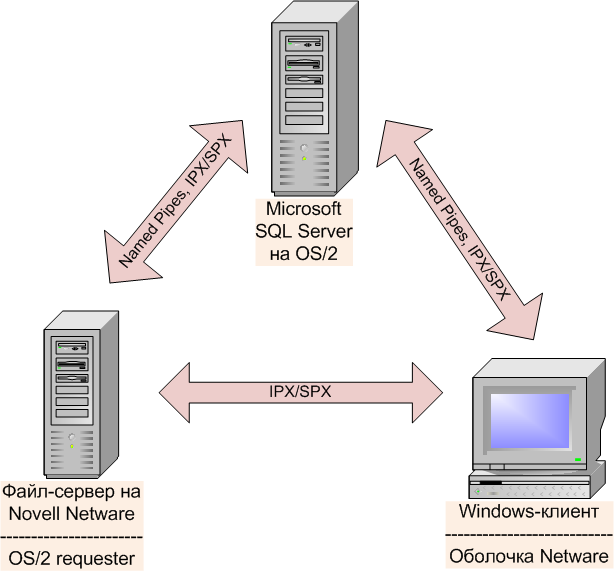
Прежде всего, необходимо определение. Что такое Sql server? Системы управления реляционными базами данных позволяют работать с базами данных, хранящимися на сервере.
Такие службы работают по принципу клиент-сервер.
То есть основная база данных храниться на сервере, в то время как пользователь оперирует клиентским приложением, формирующим запросы для работы с её частями.
Содержание:
Работа SQL-служб основывается на структурированном языке запросов (structured query language), откуда, собственно и название.
Особенность подобного языка в том, что он прост в освоении. Даже люди без специальных знаний в области программирования могут легко освоить его.
В свое время именно это обстоятельство обеспечило программному обеспечению с поддержкой SQL лидирующие позиции на рынке.
Где, зачем и кому нужны SQL-серверы?
Сфера применения современных SQL серверов настолько широка, что для ее освещения понадобится отдельный материал.
Кратко можно сформулировать так: работа большинства интернет-ресурсов сложно представима без использования SQL-серверов.
Простота в освоении и неограниченные возможности обеспечили технологиям на основе SQL широкое распространение.
Sql server: яркие представители вида
Наиболее широкое распространение получили три наименования SQL-служб: MS SQL Server, SQLlite и MySQL.
Каждая служба ориентирована для разных потребностей, однако все они в полной мере обладают универсальностью и простотой SQL-серверов.
Рассмотрим подробнее каждого представителя.
Microsoft SQL Server
Мощный промышленный инструмент для работы с базами данных. Используется в основном большими корпорациями.
Частные программисты и небольшие организации предпочитают пользоваться инструментами, распространяемыми по другой модели.
Инструментарий Microsoft sql server позволяет организовать работу множества клиентов с базами данных.
Главное условие – наличие хорошего серверного оборудования.
Использование такого обеспечения не всегда оправдано, порой для решения поставленных целей больше подходят небольшие встраиваемые библиотеки или более простые службы.
MySQL

Не менее мощный, но более узкоспециализированный инструмент для работы с базами данных. Применяется в основном на веб-серверах.
Данная система управления базами данных ориентирована на использование в качестве внешнего сервера, к которому обращаются клиенты и приложения.
Но существуют сборки и для использования в качестве внутреннего сервера.
MySQL распространяется как бесплатно (по лицензии GPL), так и в платных сборках с заказным функционалом.
Первое обстоятельство позволяет СУБД (Система управления базами данных) динамично развиваться.
На основе MySQL выросло множество других СУБД, среди которых MariaDB, Drizzle и Percona DB.
SQLlite
Собственно, это даже не полноценная система управления базами данных, а небольшая библиотека для встраивания в программное обеспечение.
В основе её лежит тот же язык SQL, но предназначается она для использования внутри программы.
Основное применение – различные небольшие онлайн-игры и клиентские сервисы. SQLlite в них позволяет организовывать обращения программы-клиента к серверу.
Пользователь в этом процессе задействован мало.
Наиболее распространенные коды ошибок
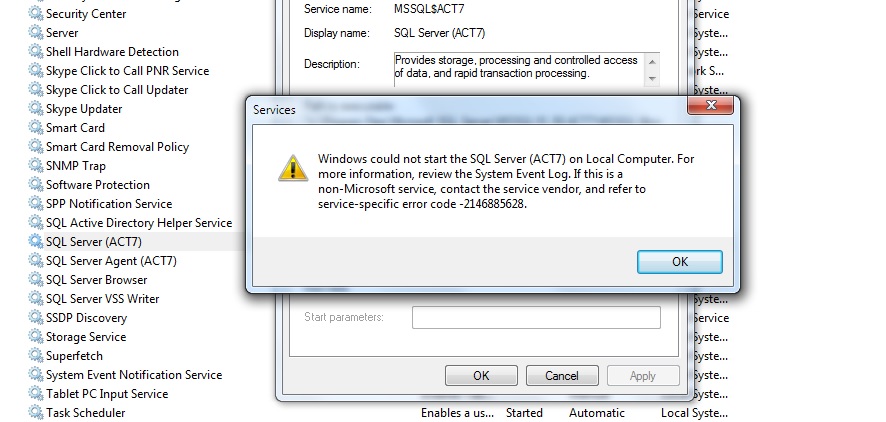
- sql server -2146885628
Возникает при неправильном запуске сервера. Для ее предотвращения нужно запускать SQL Server исключительно из SSCM (SQL Server Configuration Manager).
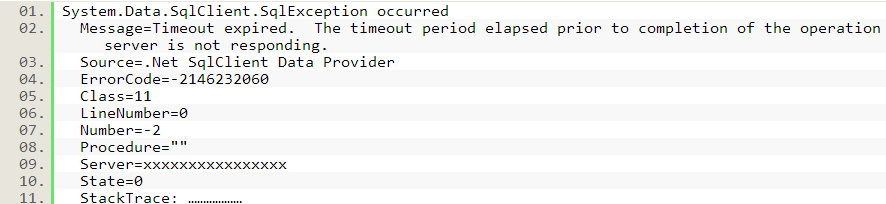
- sql server -2146232060
Ошибка возникает, когда не создана база ACT50. Для ее устранения достаточно создать одну из SQL Server, запустив CreateDB.sql. Вот так выглядит лог ошибки:
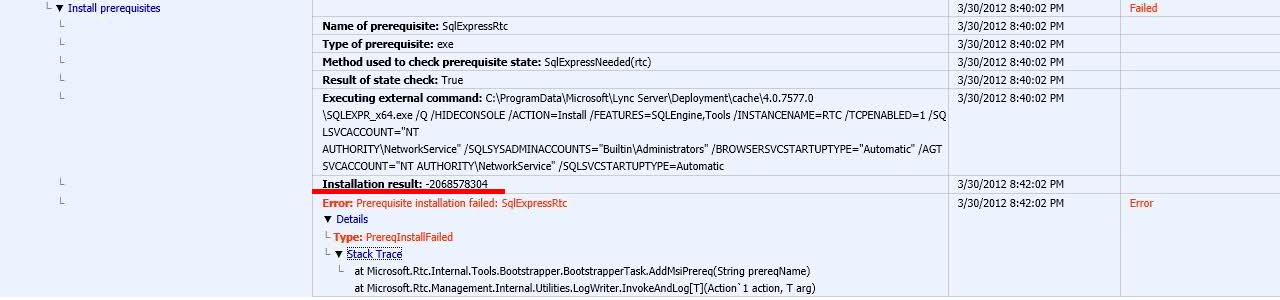
- sql server -2068578304
Ошибка возникает при установке SQL Server. Поможет удаление предыдущей версии SQL Server и установка при помощи Milestone installer.
- sql server -t272
Характерная проблема SQL Server 2012.
Возникает из-за того, что метод обработки значений в колонке идентифицирующих значений изменился.
В более ранних версиях каждое значение обрабатывалось отдельно, в SQL server 2012 и более новых версиях подобные значения обрабатываются пакетами.
Пакет значений кэшируется и вызывается по запросу, пока в кэш не будет помещен новый пакет значений.
Перезапуск сервера, оставшиеся в кэше теряются, что приводит к скачку значений после загрузки сервера.
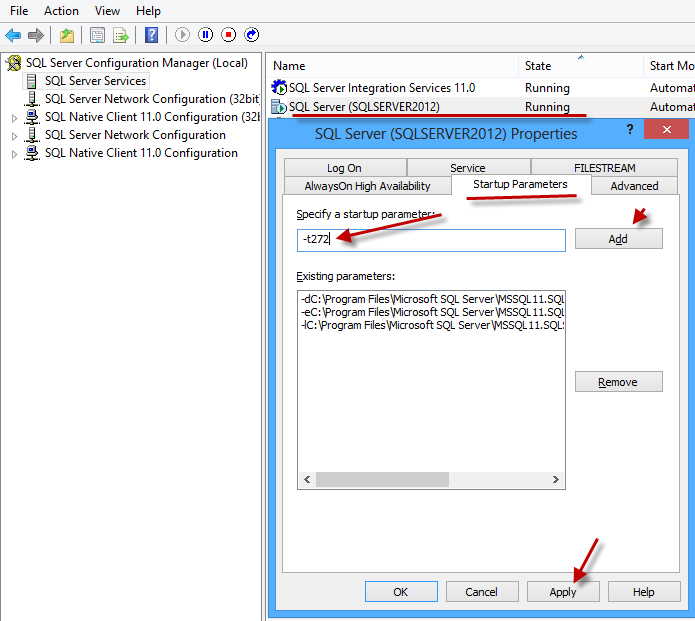
Для устранения значка придется прописать параметр «-t272» в качестве начального. Для этого потребуется:
- Открыть менеджер конфигурации SQL Server Configuration Manager (SSCM);
- В правой части выбрать пункт «SQL Services»;
- В левой части экрана правый клик на «SQL Server (SQLSERVER2012)»;
- В выпадающем меню пункт «Prorties»;
- В окне свойств вкладка «Startup Parameters»;
- В строке ввода напечатать –t272 и нажать «Add»;
- Подтвердить изменения кнопкой «Apply».
Провести проверку поможет оператор языка sql update, позволяющий обновить значение в определенной колонке.
- sql server -2147467259
Ошибка возникает, когда к файлу MDB поступает обращение с неизвестного сервера. Для преодоления проблемы необходимо прописать имя сервера, которому нужен доступ. Синтаксис такой:

- sql -922
Код 922 проблему авторизации DB2. Скорее всего, произошел конфликт имен планов. Текущий план имеет неверное название или вовсе не идентифицирован.
What is Microsoft SQL Server and What is it Used For?
What is Microsoft SQL Server and What is it Used For?
Modern business operations are completely different from the past. Today, many businesses around the world leverage technology to improve efficiency and increase speed. Businesses are also more concerned about how they handle, store, and use their data. When choosing the technology that will suit their circumstances, business managers will consider some factors. Availability, performance, and scalability will allow the business to make adjustments as it grows and as the industry evolves.
Microsoft SQL Server is one of the innovative technologies that have revolutionized the way businesses handle data. At any given time, your business will have data relating to suppliers, employees, customers, and other stakeholders. It is critically important that the information is easily accessible but remains safe from unauthorized access. Microsoft SQL Server is designed to help your businesses to achieve these goals. However, using the intelligent application also requires that you employ a certified expert to ensure that it is working properly around the clock.
What is SQL server and how is it applied in modern business?
The SQL Server is a relational database management system from Microsoft. The system is designed and built is to manage and store information. The system supports various business intelligence operations, analytics operations, and transaction processing. The information stored on the server is stored in the relational database. However, since the system is much more than a database, it also comprises of a management system. SQL stands for Structured Query Language, a computer language that manages and administers the server. There are many versions of the SQL server, each subsequent version being an improved model of its predecessor.
Microsoft SQL Server has numerous applications in the business world. The first and most obvious one is the database is used to store and manage information. However, businesses that hold sensitive customer information such as personal details, credit card information, and other confidential information will benefit from increased security. The system also allows the sharing of data files by computers in the same network, a factor that increased reliability. The SQL server is also used to increase the speed with which data is processed, allowing large operations to be executed with ease. With the information stored in the database, businesses will have a reliable backup system.
Why companies need professionals who are certified in this area
When systems do not function as expected, they will lead to downtime and loss of revenue. The same applies to SQL server in your organization. It is only by ensuring that the relational database works efficiently that your business will your company be able to enjoy the benefits of technology. That is why you should train professionals with the necessary certification to bring value to your company.
- Higher productivity – employees with the relevant certification will not only contribute more to the business but will also mentor other employees so that the overall productivity increases. In the end, your business is bound to benefit.
- Better risk mitigation – certified employees have the knowledge to identify, diagnose and respond to problems in good time. Regardless of the nature of the problem in the system, these employees will respond in good time to reduce unexpected downtime.
- Sustainable hiring – the fact that employees certified in SQL will take on more responsibilities means that they will advance faster in the job marketplace. When they are more engaged, they are more likely to stay in your company for a reasonable period.
- Increased business agility – if your business has tight timelines, a certified professional will help to develop features and applications that will bring about improvements. Most of these applications will be affordable to help the business save money.
Benefits of certifying an employee in SQL
There are several reasons why students who complete the necessary training and exams receive this certification.
The certification is proof that the employee has completed the required coursework and practical sessions. This means that they have the knowledge and experience to handle all the relevant tasks assigned to them.
The SQL Certification curriculum is such that it means the internationally recognized standards. This not only ensures that the employee can work in any part of the world but also that the work delivered by the employee will meet the high standards of the industry.
In case you would like to learn more about Microsoft SQL certifications, kindly reach out to us. You can contact us either in person or online to learn more about the opportunities available.
SQL Server Introduction

Hey everyone my name is James Harrison, I am have been working as software engineer for about 3 years now, and one of the languages I had to learn was Microsoft SQL Server.
It was a little challenging for me, I also couldn’t find many resources that didn’t require money and didn’t bore me to death. So I took some notes, aint going to lie, they’re fire but I hope they help.
I’ll put out a few of these, this one will cover stuff like:
- Basic Datatypes
- Creating and dropping tables
- Inserting, updating and selecting data
Lets get started.
Data Types
These are attributes which specify the type of data for an object is a SQL Server data type. Each variable, expression and even column have a data type associated to it.
Some of a few categories of data types in SQL Server:
Numeric Data Types
- bit: An integer that can be 0(false), 1(true) or null.
- int: A whole number between the range of -32,768 to 32,767
- decimal(p,s): A decimal number which can have p total number of digits and s total number of digits to the right of the decimal place
String Data Types
- char(n): This is a fixed width string of characters
- varchar(n): This is a variable width string of characters
- nvarchar(n): This is a variable width string of unicode characters
There are a bunch of other data types that I wont go into detail about now such as:
- Date and Time
- Binary Strings
- And more
Creating Tables
When creating tables all that is required is to type
You can define the columns and their data types at this time as well.
Syntax
- The basic syntax when creating a table using the CREATE TABLE statement is shown below:
- CREATE TABLE : keyword which tells the system to create a new table.
- tableName : Is just a stand in I used. Here you will put the name of your table, this name must be unique
- The list of elements inside the parenthesis after the tableName consist of the names of the columns and their data type.
- PRIMARY KEY : A keyword which forces a column/columns to be unique, these are typically used for identifiers such as a persons ID.
Example
Enough theory lets see a real example, if you have sql server set up on your computer or you have an editor follow along with me.
Below is a real example of creating a table in the database. This table will be titled Employees and store information about employees.
create table Employees() : Creating a new table in the database titled Employees.
The column names are Id, Name, Age, State and Salary. The data types for these columns are to the right of the name, they are int, varchar, int, char, and decimal.
PRIMARY KEY : keyword which forces the column(s) to be unique.
NOT NULL : constraint which says this field cannot be null/empty
Now that we got a table lets get some data inserted.
Insert statement
This is exactly what it sounds like, using insert statements you can insert new records/rows in to the tables. To do so you need to use the keywords
Syntax
For the following method of inserting you have to specify the table you want to insert to, the column names you want to populate, and the values you want to populate those columns with.
With this method of insertion you don’t have to insert into all columns, just the ones you specify.
Examples
An example of inserting into the employees table from early is shown below:
In the example above we inserted 6 rows into the Employees table and we populated the columns Id, Name, Age, State, Salary.
Let's go over one of them.
The employee James, thats ya boy has the following details:
- Id = 1
- Name = James
- Age = 24
- State = Florida
- Salary = 60000 (boy making that paper)
Select Statement
So you started inserting data, into your new tables, but now you want to be able to retrieve this data, I hear you. To do that we need to use select statements.
The SELECT statement is used to retrieve data from a database table, this will return data in the form of a table.
Syntax
The basic syntax for the SELECT statement is shown below:
In that example, the select statement is followed by the specific column names which are wanted and after the `FROM` is the table name.
Let’s say you dont want to have to specify columns maybe you want them all, IDK what you want I’m not you but If you do want all the columns you can use the * symbol. This will allow you to get all the columns in a table.
Example
Alright using our Employees table again lets try and get all the data that we inserted above
Everything in the table Employees will be selected
If youre following along with this example you should get results like this.
If you wanted to get specific columns you could specify them like this, lets say you just want the name and age of each employee.
Update Statement
So now we’ve inserted data in, but things change you know, so you want to update the existing records in the table. Maybe youre making more money now and want to update a salary. Thats simple, just use an update statement.
The update statement is used to change the value of an existing entry in the table.
Syntax
The Syntax for a basic update statement is shown below:
After the update you need the name of the table which will be updated.
After the table name the SET keyword is used to show the columns and the new values.
But… how does it know which row to update, thats a good question, I’m glad I asked it. Executing the statement above will update every record in that table which might be what you want, but most likely you only need to update, 1 or a few records.
To do so you can use whats called a where clause. Ill go into more detail about this later on in another post but for now just know it can be used to specify a particular condition for the sql statements, and the query will only affect the records that match that condition.
The syntax for a update statement with a where clause is shown below.
Lets see this in action though
Example
The following is a real example of updating the table used in the previous examples.
In the data inserted into the Employees table there was an employee Nick who lived in Texas and had a salary of 28000. For some reason Texas wanted to give everyone there a raise to 60000. So we could do that with the statement below, lets give my boy nick more money.
That will increase the salary of every record, where the state = Texas .
If we just wanted to increase Nicks salary we could use his ID to be super specific. Since the ID is the primary key for this table SQL knows its unique and the query will also be much faster. We know Nicks ID is 3 because we selected it above.
After you execute the update statement, if you want to see the results just do another
select * from Employees;
NOTE: The where clause can also be used to select a specific row, lets say we just want nicks record.
Delete Statement
So we messed up, you inserted some data you didnt mean to, or maybe its just not relevant anymore and you want to remove it. Thats easy, just use the delete statement.
The delete statement is used to delete existing records from a table in the database.
Similar to the other statements the where clause has to be used in order to select particular rows to be deleted, otherwise everything in that table will be deleted (been there done that).
The Syntax for a basic delete statement is shown below:
After the DELETE you need the name of the table which will the records will be deleted from. WHERE can be used to tell a particular condition for this delete.
If you wanted to delete all the contents in a table (you savage) you can leave out the WHERE clause, that would look like this:
Examples
The following is a real example of deleting entries in the table used in the previous examples.
Using the data we inserted above there was one employee James(ya boy) who lived in Florida. We’re going to delete all the Florida employees.
Now if we do another
You should see the results below, and notice, James isn’t there anymore.
Drop Table
So if delete is used to remove data from a table then what is used to delete a database…its Drop table.
This will remove all data, triggers, constraints, indexes and even permission specifications for a table in the database.
Syntax
The syntax for dropping the table is shown below:
The keyword `DROP TABLE` followed by the table name is all thats needed
Example
Lets get rid of our beloved employees table…
See you next time
Thats all for this one folks, this was just a simple intro to some of the basic CRUD (Create, Read, Update and Delete) commands you can use in Microsofts SQL Server.
I will update this will the other links to my other tutorials going a little deeper into things like sub-queries, joining multiple tables, variables, functions, stored procedures and more, heres a few that might help.