SQL условие BETWEEN
SQL условие BETWEEN позволяет легко проверить, находится ли выражение в диапазоне значений (включительно). Его можно использовать в операторе SELECT, INSERT, UPDATE или DELETE.
Синтаксис
Синтаксис для условия BETWEEN в SQL:
Параметры или аргументы
Примечание
Условие SQL BETWEEN будет возвращать записи, где выражение находится в диапазоне значений value1 и value2 (включительно).
Пример — использование условия BETWEEN с числовыми значениями
Давайте рассмотрим пример использования условия BETWEEN для получения значений в числовом диапазоне.
В этом примере у нас есть таблица suppliers со следующими данными:
| supplier_id | supplier_name | city | state |
|---|---|---|---|
| 100 | Yandex | Moscow | Moscow |
| 200 | Lansing | Michigan | |
| 300 | Oracle | Redwood City | California |
| 400 | Bing | Redmond | Washington |
| 500 | Yahoo | Sunnyvale | Washington |
| 600 | DuckDuckGo | Paoli | Pennsylvania |
| 700 | Qwant | Paris | Ile de France |
| 800 | Menlo Park | California | |
| 900 | Electronic Arts | San Francisco | California |
Выполните следующий оператор SELECT:
Будет выбрано 4 записи. Вот результаты, которые вы должны получить:
| supplier_id | supplier_name | city | state |
|---|---|---|---|
| 300 | Oracle | Redwood City | California |
| 400 | Bing | Redmond | Washington |
| 500 | Yahoo | Sunnyvale | Washington |
| 600 | DuckDuckGo | Paoli | Pennsylvania |
В этом примере возвращаются все строки из таблицы suppliers , где supplier_id находится в диапазоне от 300 до 600 (включительно). Это эквивалентно следующему запросу SELECT:
Пример — использование условия BETWEEN со значениями даты
Даты могут быть несколько сложными в SQL, и то, как вы используете условие BETWEEN с датами, зависит от базы данных, которую вы используете (т.е. Oracle, SQL Server, MySQL и т.д.). Мы покажем вам пример для каждой из основных технологий баз данных. Итак, начнем.
В этом примере у нас есть таблица orders и следующими данными:
| order_id | customer_id | order_date |
|---|---|---|
| 1 | 7000 | 2019/06/18 |
| 2 | 5000 | 2019/06/18 |
| 3 | 8000 | 2019/06/19 |
| 4 | 4000 | 2019/06/20 |
| 5 | NULL | 2019/07/01 |
Введите один из следующих операторов SQL, в зависимости от базы данных, которую вы используете.
Для SQL Server, PostgreSQL и SQLite:
Для Oracle (используйте функцию TO_DATE):
Для MySQL и MariaDB (используйте функцию CAST):
Будет выбрано 3 записи. Вот результаты, которые вы получите:
| order_id | customer_id | order_date |
|---|---|---|
| 3 | 8000 | 2019/06/19 |
| 4 | 4000 | 2019/06/20 |
| 5 | NULL | 2019/07/01 |
В этом примере будут возвращены все записи из таблицы orders , где значение order_date находится между 19 июня 2019 г. и 1 июля 2019 г. (включительно).
Пример — использование оператора NOT с условием BETWEEN
Условие BETWEEN может использоваться с оператором NOT для создания условия NOT BETWEEN. Давайте рассмотрим пример, который показывает, как использовать условие NOT BETWEEN в запросе.
Name already in use
sql-docs / docs / t-sql / language-elements / between-transact-sql.md
- Go to file T
- Go to line L
- Copy path
- Copy permalink
- Open with Desktop
- View raw
- Copy raw contents Copy raw contents
Copy raw contents
Copy raw contents
Specifies a range to test.
. image type=»icon» source=»../../includes/media/topic-link-icon.svg» border=»false». Transact-SQL syntax conventions
test_expression
Is the expression to test for in the range defined by begin_expressionand end_expression. test_expression must be the same data type as both begin_expression and end_expression.
NOT
Specifies that the result of the predicate be negated.
begin_expression
Is any valid expression. begin_expression must be the same data type as both test_expression and end_expression.
end_expression
Is any valid expression. end_expression must be the same data type as both test_expressionand begin_expression.
AND
Acts as a placeholder that indicates test_expression should be within the range indicated by begin_expression and end_expression.
Boolean
BETWEEN returns TRUE if the value of test_expression is greater than or equal to the value of begin_expression and less than or equal to the value of end_expression.
NOT BETWEEN returns TRUE if the value of test_expression is less than the value of begin_expression or greater than the value of end_expression.
To specify an exclusive range, use the greater than (>) and less than operators (<). If any input to the BETWEEN or NOT BETWEEN predicate is NULL, the result is UNKNOWN.
A. Using BETWEEN
The following example returns information about the database roles in a database. The first query returns all the roles. The second example uses the BETWEEN clause to limit the roles to the specified database_id values.
B. Using > and < instead of BETWEEN
The following example uses greater than ( > ) and less than ( < ) operators and, because these operators are not inclusive, returns nine rows instead of ten that were returned in the previous example.
C. Using NOT BETWEEN
The following example finds all rows outside a specified range of 27 through 30 .
D. Using BETWEEN with datetime values
The following example retrieves rows in which datetime values are between ‘20011212’ and ‘20020105’ , inclusive.
SQL BETWEEN
Оператор BETWEEN выбирает значения в заданном диапазоне. Эти значения могут быть числами, текстом или датами.
Оператор BETWEEN является инклюзивным: включаются начальные и конечные значения.
Синтаксис BETWEEN
Демо база данных
Ниже приведен выбор из таблицы «Products» в образце базы данных Northwind:
| ProductID | ProductName | SupplierID | CategoryID | Unit | Price |
|---|---|---|---|---|---|
| 1 | Chais | 1 | 1 | 10 boxes x 20 bags | 18 |
| 2 | Chang | 1 | 1 | 24 — 12 oz bottles | 19 |
| 3 | Aniseed Syrup | 1 | 2 | 12 — 550 ml bottles | 10 |
| 4 | Chef Anton’s Cajun Seasoning | 1 | 2 | 48 — 6 oz jars | 22 |
| 5 | Chef Anton’s Gumbo Mix | 1 | 2 | 36 boxes | 21.35 |
Пример BETWEEN
Следующая инструкция SQL выбирает все продукты с ценой от 10 до 20:
Пример
Пример NOT BETWEEN
Чтобы отобразить продукты вне диапазона предыдущего примера, используйте NOT BETWEEN:
Пример
Пример BETWEEN c IN
В следующей инструкции SQL выбираются все продукты с ценой от 10 до 20. Кроме того, не показывайте продукты с категорией ID 1,2 или 3:
Пример
Пример BETWEEN значение текста
Следующая инструкция SQL выбирает все продукты с именем ProductName между Carnarvon Tigers и Mozzarella di Giovanni:
Пример
Следующая инструкция SQL выбирает все продукты с именем ProductName между Carnarvon Tigers и Chef Anton’s Cajun Seasoning:
Пример
Пример NOT BETWEEN значение текста
Следующая инструкция SQL выбирает все продукты с именем ProductName не между Carnarvon Tigers и Mozzarella di Giovanni:
Пример
Образец таблицы
Ниже представлена подборка из группы «Orders" в таблице в образец базы данных Northwind:
| OrderID | CustomerID | EmployeeID | OrderDate | ShipperID |
|---|---|---|---|---|
| 10248 | 90 | 5 | 7/4/1996 | 3 |
| 10249 | 81 | 6 | 7/5/1996 | 1 |
| 10250 | 34 | 4 | 7/8/1996 | 2 |
| 10251 | 84 | 3 | 7/9/1996 | 1 |
| 10252 | 76 | 4 | 7/10/1996 | 2 |
Пример BETWEEN даты
Следующая инструкция SQL выбирает все заказы с датой заказа между ’01-July-1996′ и ’31-July-1996′:
Пример
Пример
Мы только что запустили
SchoolsW3 видео
ВЫБОР ЦВЕТА

Сообщить об ошибке
Если вы хотите сообщить об ошибке или внести предложение, не стесняйтесь отправлять на электронное письмо:
Ваше предложение:
Спасибо Вам за то, что помогаете!
Ваше сообщение было отправлено в SchoolsW3.
ТОП Учебники
ТОП Справочники
ТОП Примеры
Получить сертификат
SchoolsW3 оптимизирован для бесплатного обучения, проверки и подготовки знаний. Примеры в редакторе упрощают и улучшают чтение и базовое понимание. Учебники, ссылки, примеры постоянно пересматриваются, чтобы избежать ошибок, но не возможно гарантировать полную правильность всего содержания. Некоторые страницы сайта могут быть не переведены на РУССКИЙ язык, можно отправить страницу как ошибку, так же можете самостоятельно заняться переводом. Используя данный сайт, вы соглашаетесь прочитать и принять Условия к использованию, Cookies и политика конфиденциальности.
SQL BETWEEN
Summary: in this tutorial, you’ll learn how to use the SQL BETWEEN operator to check if a value falls within a specific range.
Introduction to SQL BETWEEN operator
The BETWEEN operator is one of the logical operators in SQL. The BETWEEN operator checks if a value is within a range of values.
The syntax of the BETWEEN operator is as follows:
The BETWEEN operator returns true if the expression is greater than or equal to ( >= ) the low value and less than or equal to ( <= ) the high value.
Technically, the BETWEEN is the equivalent to the following expression that uses the greater than or equal to ( >= ) and less than or equal to ( <= ) operators:
To compare a value with an exclusive range, you need to use the comparison operators less than ( < ) and greater than ( > ).
NOT BETWEEN
To negate the result of the BETWEEN operator, you use the NOT operator:
The NOT BETWEEN returns true if the expression is less than low or greater than (>) high ; otherwise, it returns false.
Like the BETWEEN operator, you can rewrite the NOT BETWEEN operator using the less than (<) and greater than (>) operators with the OR operator as follows:
In practice, you often use the BETWEEN and NOT BETWEEN operator in the WHERE clause of the SELECT to select rows whose value of a column is within a specific range.
SQL BETWEEN operator examples
We’ll use the employees table from the sample database to illustrate how the BETWEEN operator works.
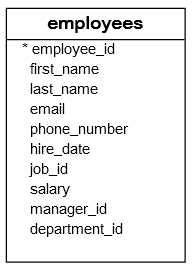
1) Using the SQL BETWEEN opeator with numbers example
The following statement uses the BETWEEN operator to find all employees whose salaries are between 2,500 and 2,900:
Notice that the result set includes the employees whose salaries are 2,500 and 2,900.
The following query returns the same result set as the above query. However, it uses comparison operators greater than or equal to (>=) and less than or equal to (<=) instead:
2) Using SQL NOT BETWEEN example
The following example uses the NOT BETWEEN operator to find all employees whose salaries are not in the range of 2,500 and 2,900:
3) Using SQL BETWEEN operator with a date ranges
The following example uses the BETWEEN operator to find all employees who joined the company between January 1, 1999 , and December 31, 2000 :
The following example uses the NOT BETWEEN operator to find employees who have not joined the company from January 1, 1989 to December 31, 1999 :
4) Using SQL BETWEEN operator with a function example
The following example uses the BETWEEN operator with the YEAR function to find employees who joined the company between 1990 and 1993:
In this example:
- First, the YEAR() function returns the year from the hire date.
- Second, the BETWEEN operator uses the result of the YEAR() function and check if it is within the range 1990 and 1993.
If your database doesn’t support the YEAR() function, you need to use a similar function: