Nsfw server Discord
В Дискорде часто встречается аббревиатура nsfw. Рассказываем, что значит канал nsfw Discord и как его добавить.
Что это
Аббревиатура NSFW означает not suitable for work. Это тег, которым помечаются сообщения/видеролики/ссылки и другие виды контента, которые содержат порнографию или нецензурную лексику. Словом, то, что нельзя просматривать в присутствии коллег, детей или посторонних людей.

В Дискорде этим тегом можно помечать текстовые каналы. При попытке открыть такой канал, выводится предупреждение о том, что на канале содержится контент для взрослых. Приложение предупреждает, что пользователь должен быть старше 18 лет. Нажмите Продолжить , чтобы начать смотреть контент, или Отклонить .

Как включить
Как сделать NSFW канал в Дискорде? Любой уже созданный чат может получить этот тег. Это делается в два клика.
- Зайдите в настройки канала, которому хотите добавить тег. Для этого кликните на значок шестерёнки, которая появляется при наведении на название чата на странице сервера справа в Дискорде.

- Во вкладке Обзор (вы попадаете на неё сразу) переключите тумблер NSFW-канал в положение Включено (кнопка станет зелёной).

Готово! Вот как включить NSFW в Дискорде. Отключить метку можно обратным действием.
Боты для NSFW-каналов
Специально для Дискорд серверов NSFW со взрослым контентом созданы боты, которые выполняют различные действия на этих серверах. Ниже – ТОП-3 NSFW bot Discord.
- BbBot. У помощника огромное количество 18+ команд с картинками и поиском видео. Есть платные команды – напротив них стоит значок Патреона. Также есть несколько команд для модерации – экономика, репутация и отправка сообщений. Последний набор команд даёт возможность отправлять пользователям в личные сообщения картинки. Для этого адресат должен написать у себя команду, дающую согласие на получение контента.

- Martine. Позволяет настроить автоматический постинг картинок бесплатно. За это он просит проголосовать за него. Помимо этой возможности в боте есть модерация, настройка приветствий, музыка, emoji и другое. Настройка бота простая. Этот помощник подойдёт для любителей аниме, furry и других подобных стилей.

- Lawliet. В этом помощнике есть четыре NSFW-взаимодействия и команды с картинками. Можно запустить так называемую бомбу с картинками – отправить несколько картинок за раз. Также в боте есть модерация, создание приватных голосовых каналов, экономика, поиск картинок.

Топ Discord NSFW servers приводить здесь не будем, взрослые люди сами найдут их в сети. Серверов с такой пометкой очень много, и составлять топ по этому признаку достаточно бессмысленно. Но мы ждём ваших комментариев по поводу полезных ботов. Не только 18+, но и других. Нам интересно, чем пользуетесь вы. По некоторым помощникам мы, может, даже сделаем отдельный обзор.
Web server is returning an unknown error Error code 520
There is an unknown connection issue between Cloudflare and the origin web server. As a result, the web page can not be displayed.
What can I do?
If you are a visitor of this website:
Please try again in a few minutes.
If you are the owner of this website:
There is an issue between Cloudflare’s cache and your origin web server. Cloudflare monitors for these errors and automatically investigates the cause. To help support the investigation, you can pull the corresponding error log from your web server and submit it our support team. Please include the Ray ID (which is at the bottom of this error page). Additional troubleshooting resources.
Cloudflare Ray ID: 7c712fdef420c31c • Your IP: Click to reveal 155.133.64.159 • Performance & security by Cloudflare
How To Make A NSFW Channel On Discord Mobile (Age-Restricted Channel)
Are you trying to make an NSFW or age-restricted channel on Discord mobile? If so, this is the best guide to read.
Having an NSFW or an age-restricted channel channel is useful for posting certain images or messages which you don’t want to post on other channels, so it’s useful to be able to create or mark a channel on your mobile.
An age-restricted or NSFW channel means that users will need to confirm they are over the legal age to view the content in this channel. Age-restricted channels are exempt from the explicit content filter.
Also, this guide will on all mobile devices!
According to BusinessofApps, Discord had 140 million active users in 2021.
Lets get right in to this!
How To Create A NSFW Channel On Discord Mobile
Here are the steps you need to follow to create an NSFW channel.
1. Open A Web Browser On Your Mobile Device
Firstly, you need to open a web browser on your mobile device.
Unfortunately, you cannot follow this guide using the Discord app, but you can if you use a web browser on your mobile device.
2. Go To Discord.com
Secondly, you need to go to Discord.com.
Before you go any further, you will need to request the desktop version of the website.
To Request The Desktop Website On iOS Devices:
On Safari, you need to tap on the two A’s on the left hand side of your web address bar. This is a menu button.
Then, a menu will appear and you need to tap on “Request Desktop Website”.
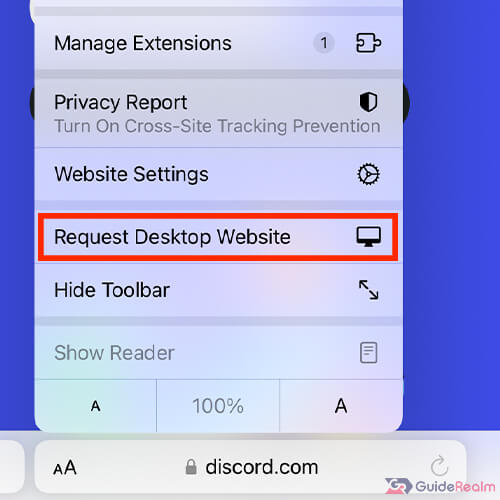
Now, the desktop version of Discord will load.
To Request The Desktop Website On Android:
On Google Chrome, you need to tap on the three dots. This is a menu button.
Or, if you are using Google Chrome on an iOS device or some Android devices, you need to tap on the share button, which is an arrow pointing out of a square.
Then, the “Request desktop site” button will be on one of those menus. Check the other if it’s not on the one you checked.

3. Log-in To Discord
Next, you need to log-in to Discord.
Tap on the three bars in the top right of Discord and this will open a menu.

Then, look for “Sign Up / Log In”. It may be near the bottom of the menu.
Once you have seen it, tap on it.
You will be taken to a “Create an account” page, but at the bottom you will see an option for “Already have an account?”
If you have an option saying “Open with the app”, then you need to request the desktop website again. You will then get the option for “Already have an account?”.

Tap on that option and you can then log-in to your existing Discord account.
Now, Discord will load in your web browser. It may look weird because it’s meant to be on computer screens, so you can rotate your phone horizontally if it makes it easier. You don’t have too, though.
4. Navigate To The Server And The Channel Which You Want To Make NSFW
You need to navigate to the server and the specific channel which you want to make or mark as NSFW.
Your servers will be on the left hand side. You may need to scroll down to find the server you want.
Next, you need to find or create the channel you want to make or mark as NSFW.
We will create a new channel to mark as NSFW, but you don’t have to.
Create A New Text Channel
You need to look for “Text Channels”.
Then, next to “Text Channels”, you will see a plus button.

Tap on the plus, and you will have the option to create a new text or voice channel. In this case, we want a new text channel.
You will need to enter a name for it as well.

5. Mark The Server As NSFW
Now, you need to tap on the text channel which you want to mark as NSFW.
Then, you need to tap on the cog to the right of the name of the channel.

This will open up the settings for this specific text channel.
Make sure “Overview” is selected and scroll down until you see the option for “Age-Restricted Channel”.
At this point, you may need to rotate your phone so it’s horizontal or in landscape mode.
An age-restricted channel is another term for an NSFW channel.
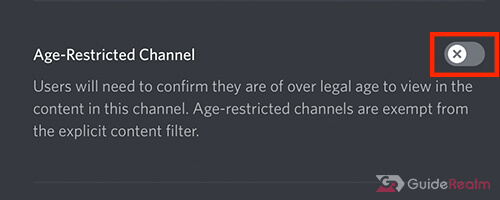
So, to make the channel NSFW or age-restricted, you need to tap on the switch and then save your settings.
Now your channel is age-restricted!
Also, you can easily turn this setting off, by tapping on the switch again and this will remove the age restriction and the server will no longer be NSFW.
Final Words
Now you know how to make a channel age-restricted or NSFW on Discord on your mobile device.
How to make a nsfw channel discord
If you looking to get solution of How to make a nsfw channel discord then must check given helpful tips & tricks and guides. We have listed all the related questions to provide you as much best possible solution.
How do you turn a channel into Nsfw on discord?
Within the edit channel overview tab, you’ll see an option to mark the channel as age-restricted. Click that option, and you’ll be good to go!
Can you make an entire discord server NSFW?
How do I enable NSFW in dank Memer?
All we need to do is go to the server that contains the channel that we want to make nsfw. Once you have the server. Open go to the actual channel and hover over it and you should see a gear for edit.