Ошибка Security Boot Fail при загрузке ноутбука Acer — решение
Security Boot Fail — частый гость на ноутбуках компании Acer; тревожное сообщение, которое можно увидеть при установке Windows с внешнего носителя (USB, HDD, SSD) либо при загрузке уже установленной ОС. В сегодняшней статье мы расскажем, что вызывает сообщение и как от него избавиться.
Что вызывает ошибку Security Boot
Ошибка Security Boot Fail буквально говорит пользователю, что загрузка носителя с активированной функцией Security Boot (безопасной загрузкой) завершилась неудачей. Данная функция на ноутбуках Acer, как правило, по умолчанию активирована в настройках BIOS. Ошибка Security Boot зачастую появляется по двум следующим причинам:
- на носителе находится модифицированный загрузчик (Windows Boot Manager);
- ОС (или ее инструменты) не поддерживает Security Boot.
Решение Security Boot Fail
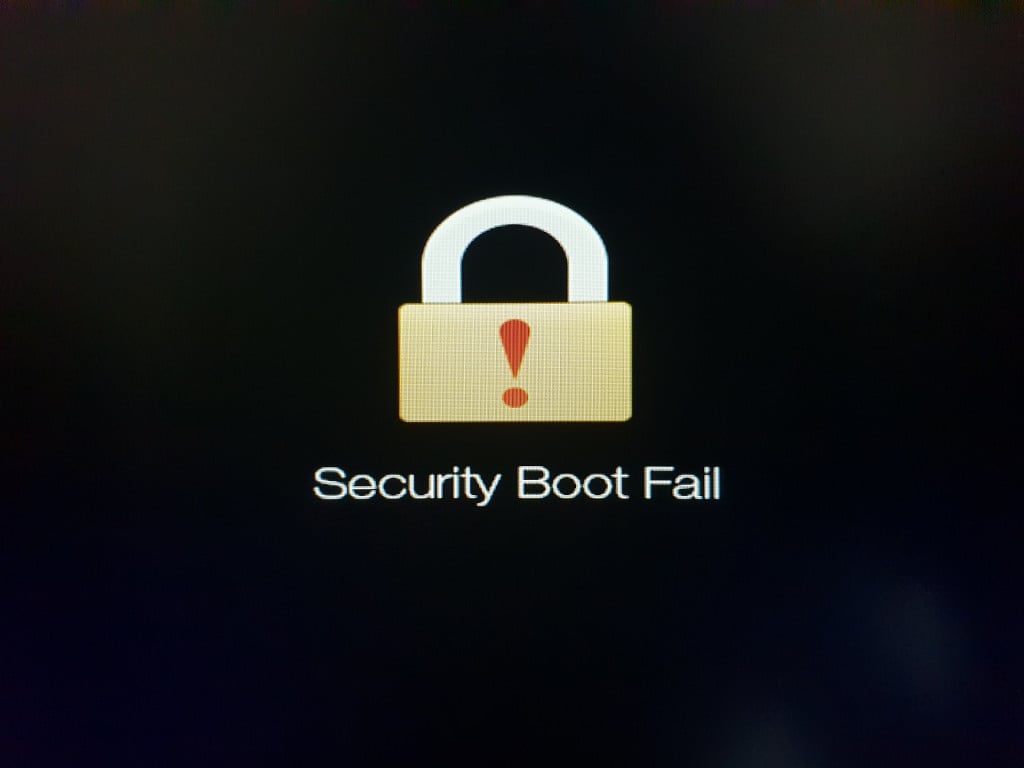
На самом деле, избавиться от Security Boot Fail довольно просто — это делается двумя элементарными способами.
Способ №1 Пересоздание установочного носителя
Если вы пытались загрузиться в установочный носитель Windows 10 или 11, рекомендуем пересоздать этот носитель при помощи более надежных утилит. К таким утилитам можно отнести Rufus, UltraISO и официальное ПО от Майкрософт — Media Creation Tool. Важно отметить, что ошибка безопасной загрузки очень часто появляется при создании установочника с помощью утилиты Ventoy.
Способ №2 Деактивация функции Security Boot
Можно поступить еще проще: взять и отключить функцию Security Boot в настройках BIOS/UEFI. Нет причины — нет проблемы. Куда еще проще, верно? Вот как деактивируется Security Boot:
- перезагрузите свой ноутбук;
- нажимайте F2 (или другую клавишу, зависит от модели) множество раз, чтобы открыть перед собой BIOS;
- попав в BIOS, выберите Security→SetSupervisorPassword;
- задайте пароль админа (запишите для надежности);
- далее перейдите в Boot→SecureBoot;
- задайте в строке безопасной загрузки параметр Disabled;
- сохраните изменения BIOS и перезагрузите ноутбук.
После вышеуказанных шагов сообщение Security Boot Fail не появится, т.к. функция безопасной загрузки деактивирована и это технически невозможно. Если же возникнут какие-то другие проблемы при загрузке с носителя, обратитесь к первому способу (↑).
Не удалось решить проблему на своем ноутбуке? Пожалуйста, опишите свою ситуацию в комментариях. Возможно, мы или другие посетители сайта сможем вам чем-то помочь.
Ошибка Security boot fail
Месяц не мог записать заметку на ⛔️ ошибку Security Boot Fail которая вылетала при установке Windows 10 c флешки. На работе один из сотрудников принес новый только купленный ноутбук Acer Aspire 3 с предустановленной по умолчанию операционной системой DOS.
�� Задача была стандартная записать на флешку windows 10 и установить ее на ноутбук.
✅ Но после заходу в Биос (что такое биос читайте в моей прошлой статье) я немного растерялся, так как почти все меню было неактивным и нельзя было чего то выбрать и в особенности в разделе boot (как видите меню Secure boot неактивно и по умолчанию выбрано Enable)

Полазив по меню какие есть, решил для эксперимента зайти в меню Security и попробовать что там есть доступное для выбора.
⚠️ Зайдя туда, мне был доступен только пункт Set Supervisor Password и была не было поставил для прикола пароль 1 (единица) и далее перезагрузил комп предварительно перед этим сохранив настройки.
При перезагрузки я снова зашел в БИОС набрав пароль какой поставил выше (кстати кто не знает в моей предыдущей статье я разбирал как зайти в биос на асер) и о ЧУДО меню стали активны)
�� Получается на ноутбуках ACER чтобы разблокировать �� Security Boot необходимо поставить пароль на биос и после этого уже можно править настройки загрузчиков.
Security boot fail acer что делать?

Что значит ошибка Security boot fail и что делать чтобы ее убрать?

Intel RST VMD Controller Driver для процессоров 12-13 поколений
Asus TUF Gaming не работает тачпад
Ошибка Access Denied на сайте Lenovo. Что делать?
Как убрать Security boot fail на ноутбуке Acer?
Довольно часто на современных ноутбуках при попытке загрузиться с флешки или с установочного диска можно увидеть ошибку Security boot fail. Появляется она из-за включенной опции Secure Boot, которая предназначена для защиты ноутбука от запуска на нем нелицензионного ПО, а также некоторых типов вирусов.
Но самой частой причиной появления ошибки Security boot fail является отсутствие поддержки UEFI на загрузочном устройстве с которого вы пытаетесь загрузиться (флешка, диск).
О том, как создать флешку с поддержкой UEFI читайте здесь.
В данной статье мы расскажем что нужно сделать, чтобы избавится от ошибки Security boot fail на ноутбуках Acer.
Отключаем Secure Boot на ноутбуке Acer
Заходим в BIOS и переходим на вкладку Security.
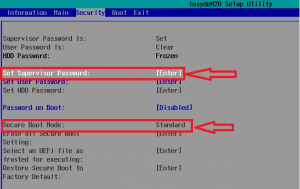
Установка пароля BIOS
Если опция Security Boot Mode неактивна, то выбираем Set Supervisor Password.
В появившемся окне придумываем пароль и дважды его вводим, подтверждая ввод кнопкой Enter.
Если не установить пароль, то отключить Secure Boot не получится.
После того, как пароль установлен ставим опцию Secure Boot в положение Disabled и сохраняем настройки кнопкой F10 и перезагружаем ноутбук, снова заходя в настройки BIOS.
Отключение Secure Boot
Теперь на вкладке Boot нужно включить поддержку Legasy BIOS (CSM Mode).
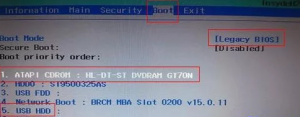
Включение поддержки Legasy
После этого настраиваем приоритет загрузки с флешки или с диска и убеждаемся в том, что ошибка Security boot fail больше не появляется.
Не забудьте. а лучше запишите куда – нибудь придуманный пароль BIOS. Иначе без него вы не сможете менять настройки BIOS.
How To Fix Failed or Missing Security Boot Failed or Default Boot Device on Acer
What causes the default boot device to be missing or boot failed error? How do we resolve the default boot device missing error?
We have analyzed several articles on the subject and have compiled the information learned here. This article will show you effective solutions to backup your files regularly.
What causes the default boot device to be missing error or boot failed error on Lenovo/Acer?
Some users of Lenovo and Acer computers have reported that they have encountered these errors of missing the default boot device or failure to start the computer.
Boot Stop error or boot error is an error that occurs when booting Windows and appears when a computer or laptop cannot find the Windows boot files.
- The boot sequence order is incorrect.
- The BIOS settings are not correct.
- The hard drive may have crashed.
- Missing boot files.
- reboot and select the proper boot device thumbnail
Do you get the error? Restart the system and choose the correct boot device when starting Windows 10/11/8/7, try these solutions to fix the problem.
How to fix the default boot device that is missing or boot failed?
- Change BIOS settings.
- Set the primary partition as active.
- Run the startup repair wizard.
- Replace the hard drive.
How to fix the default boot device that is missing or boot failed?
In this part, we will show you how to fix the boot device missing or boot failed error.
Solution 1. Change BIOS settings.
The default startup is missing, or the Lenovo boot failed error can be caused by an incorrect BIOS setting or an incorrect boot sequence.
A lot of Lenovo and Acer computer users have commented that they were able to fix the error by changing the BIOS boot settings.
Therefore, to fix this problem, you can try this method.
- Restart your PC.
- When the Lenovo logo boot screen is displayed, immediately press the corresponding hotkey to access BIOS. Typically, this hotkey is F2, but it can vary for different computer models. You can check the website of your laptop or motherboard manufacturer to find the exact key to access.
- On the BIOS setup screen, go to the Boot tab.
- Check and modify the boot order. Make sure the PC hard drive is in the first position. If not, you have to change the boot order of the hard drive. change boot order
- Then select Boot Mode, and switch from UEFI to Legacy Support.
- Then press F10 to save changes and exit.
After doing this, restart your laptop or desktop and check if the default boot device is missing error or if the default boot device failed to boot is fixed. If this solution doesn’t solve the problem, try another solution.
Solution 2. Set the partition as active
In case the primary partition is not set as active, you may also encounter the default boot device missing or boot failed error. Therefore, in order to fix this error, you can set the primary partition as active.
- Boot your computer from the Windows installation media. If you don’t have one, download Windows Media Creator to create one.
- Next, boot your computer from the Windows installation media
- Next, choose the language, date, and keyboard input.
- Click Repair your computer.
- Then choose Troubleshoot > Command Prompt to proceed.
- Enter the following commands on the PC.
- Diskpart
- List disk
- Select disk 0 (where 0 is the number of the disk on which the Windows operating system is installed)
- List partition
- Select partition 1 (where 1 is the primary partition on which the Windows operating system is installed)
- Activate
When you finish all these steps, remove the Windows installation media and restart your computer. Then check if the default boot device is missing error has already been fixed.
Solution 3. Run Startup Repair
If you encounter the error that the default boot device is missing or boot failed, you can run Windows Startup Repair, which will help you fix all Windows errors.
Now, here we have the tutorial.
- Boot your computer from the Windows installation media.
- Next, you have to choose the language, date, and keyboard input.
- Then click Repair your computer.
- Then click Troubleshoot > Startup Repair to
- Click Startup Repair
After you do this, Startup Repair will begin scanning for problems with your computer and repairing them. When the whole process is done, you need to restart your Lenovo or Acer computer and check if the boot device is missing or boot failed issue is fixed.
Solution 4 Change the hard drive
If none of the solutions that we have proposed above have helped you to solve the problem of missing boot device or startup failure, it may be that the hard drive is damaged.
Therefore, in order to fix this bootable device missing or boot failed problem, you will need to replace the hard drive.
But, before changing a hard drive, you will first have to recover all the important data that the damaged hard drive has if you have not previously made a backup of them.
If your computer is still under warranty, you may be able to send your failed hard drive back to the manufacturer for a replacement.
If your computer is no longer under warranty, you can choose to buy a new hard drive or SSD for your PC and reinstall Windows 10/11 on it.
When you have changed the hard drive, you will no longer encounter the boot device missing, or the boot failed problem.
Thanks to this article, you should be able to fix the default boot device successfully is missing error without losing any personal data.
From the above information, you should have been able to deduce the importance of making a backup. With your files backed up, you no longer have to worry about Windows errors like missing default boot device or boot failures.
Therefore, to avoid data loss, it is best to get into the habit of backing up your files or operating system in due time.
After taking a backup, you can restore your computer to a normal state or restore your files from the backup images when any Windows crash occurs.
Conclusion
In short, this article has introduced you to what causes the default boot device to be missing, the boot failed Acer error, the default boot device is missing, or the boot failed Lenovo.
We have also taught you four ways to fix this bootable device that is missing or boot failed error.
Patrick Johnson is a tech enthusiast & blogger; currently living in Florida, United States. He loves to write about Laptop Tips, Guides, configurations, features, and Accessories. Quora & Reddit are the popular two places where you will also find him. No matter what questions you have in your mind regarding the laptop, he may already have the answer.