Python Delete from SQLite Table
Learn to delete data from an SQLite table using Python. You’ll learn how to use Python’s built-in module sqlite3 to delete data from the SQLite table.
Goals of this lesson
- Delete a single and multiple rows, all rows, a single column, and multiple columns from the SQLite table using Python
- Use a Python parameterized query to provide value at runtime to the SQLite delete query
- Execute a bulk delete using a single query
Also Read:
- Solve Python SQLite Exercise
- Read Python SQLite Tutorial (Complete Guide)
Table of contents
Prerequisite
Before executing the following program, please make sure you know the SQLite table name and its column details.
For this lesson, I am using the ‘SqliteDb_developers’ table present in my SQLite database.
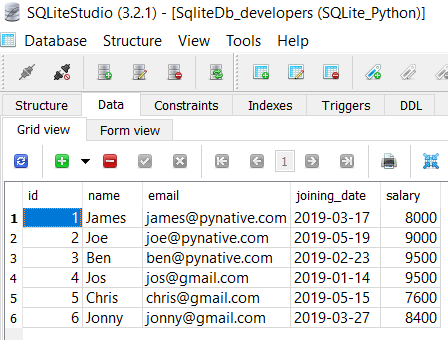
sqlitedb_developers table with data
If a table is not present in your SQLite database, then please refer to the following articles: –
Steps to delete a single row from SQLite table
How to delete from SQLite table using Python
-
Connect to SQLite from Python
Refer to Python SQLite database connection to connect to SQLite database from Python using sqlite3 module.
Next, prepare a SQL delete query to delete a row from a table. Delete query contains the row to be deleted based on a condition placed in where clause of a query.
For example, DELETE FROM MySQL_table WHERE >
Next, use a connection.cursor() method to create a cursor object. using cursor object we can execute SQL queries.
The cursor.execute(query) method executes the operation stored in the delete query.
After a successful delete operation, the execute() method returns the number of rows affected.
After successfully executing a delete operation, make changes persistent into a database using the commit() of a connection class.
Use a cursor.rowcount method to get the number of rows affected. The count depends on how many rows you are deleting.
You can also execute SQLite select query from Python to verify the result.
use cursor.clsoe() and connection.clsoe() method to close the cursor and SQLite connections after your work completes.
As of now, the SqliteDb_developers table contains six rows, so let’s remove the developer whose id is 6.
Example
Output:
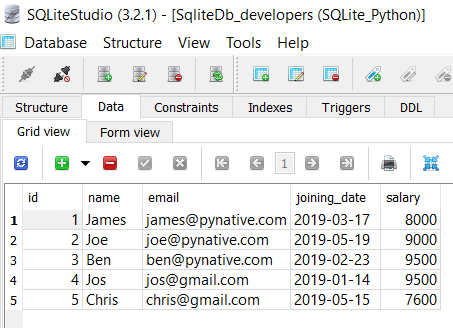
sqlitedb_developers table after deleting a row from Python
Note: If you are doing multiple delete operations and wanted to revert your change in case of failure of any operations, use the rollback() function of the connection class to revert the changes. Use rollback() function in except block.
Use Python Variable in a query to Delete Row from SQLite table
Most of the time, we need to delete a row from an SQLite table where the id passed at runtime. For example, when a user cancels his/her subscription, we need to delete the entry from a table as per the user id. In such cases, It is always best practice to use a parameterized query.
The parameterized query uses placeholders ( ? ) inside SQL statements that contain input from users. It helps us to delete runtime values and prevent SQL injection concerns.
Output
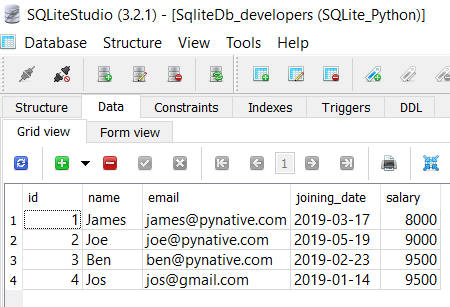
sqlitedb_developers table after removing row using a parameterized query
Let’s understand the above example
- We used the parameterized query to accept developer id at runtime using a placeholder( ? ) for the id column
- Next, We then prepared data tuple by using Python variables.
- Next, we passed the SQL delete query and data tuple to a cursor.execute() method.
- In the end, we made our changes permanent into the database using a commit() method of a connection class.
Delete multiple rows from SQLite table
In the above example, we have used execute() method of cursor object to update a single record, but sometimes, we need to delete an N-number of rows. For example, You want to delete employee data from the developer’s table who left the organization.
Instead of executing a delete query repeatedly to delete each record, you can perform the bulk delete operation in a single query using the cursor.executemany() method.
The executemany(query, seq_param) method accepts two parameters a SQL query and a list of records to delete.
In this example, we are removing three rows.
Output
Let’s understand the above example
- We prepared SQLite parameterized delete query with a single placeholder and then created a list of Ids to remove in tuple format.
- Each element of a list is nothing but a tuple for each row. Each tuple contains the id of a developer. Here we created three tuples, so we are deleting three rows.
- Next, we called a executemany() method to delete multiple rows from the SQLite table.
- To get to know the number of records updated, we used a cursor.rowcount method.
Next Steps:
To practice what you learned in this article, Please solve a Python Database Exercise project to Practice and master the Python Database operations.
Did you find this page helpful? Let others know about it. Sharing helps me continue to create free Python resources.
About Vishal
Founder of PYnative.com I am a Python developer and I love to write articles to help developers. Follow me on Twitter. All the best for your future Python endeavors!
Related Tutorial Topics:
Python Exercises and Quizzes
Free coding exercises and quizzes cover Python basics, data structure, data analytics, and more.
sqlite3 — DB-API 2.0 interface for SQLite databases
SQLite is a C library that provides a lightweight disk-based database that doesn’t require a separate server process and allows accessing the database using a nonstandard variant of the SQL query language. Some applications can use SQLite for internal data storage. It’s also possible to prototype an application using SQLite and then port the code to a larger database such as PostgreSQL or Oracle.
The sqlite3 module was written by Gerhard Häring. It provides an SQL interface compliant with the DB-API 2.0 specification described by PEP 249, and requires SQLite 3.7.15 or newer.
This document includes four main sections:
Tutorial teaches how to use the sqlite3 module.
Reference describes the classes and functions this module defines.
How-to guides details how to handle specific tasks.
Explanation provides in-depth background on transaction control.
The SQLite web page; the documentation describes the syntax and the available data types for the supported SQL dialect.
Tutorial, reference and examples for learning SQL syntax.
PEP 249 — Database API Specification 2.0
PEP written by Marc-André Lemburg.
Tutorial
In this tutorial, you will create a database of Monty Python movies using basic sqlite3 functionality. It assumes a fundamental understanding of database concepts, including cursors and transactions.
First, we need to create a new database and open a database connection to allow sqlite3 to work with it. Call sqlite3.connect() to create a connection to the database tutorial.db in the current working directory, implicitly creating it if it does not exist:
The returned Connection object con represents the connection to the on-disk database.
In order to execute SQL statements and fetch results from SQL queries, we will need to use a database cursor. Call con.cursor() to create the Cursor :
Now that we’ve got a database connection and a cursor, we can create a database table movie with columns for title, release year, and review score. For simplicity, we can just use column names in the table declaration – thanks to the flexible typing feature of SQLite, specifying the data types is optional. Execute the CREATE TABLE statement by calling cur.execute(. ) :
We can verify that the new table has been created by querying the sqlite_master table built-in to SQLite, which should now contain an entry for the movie table definition (see The Schema Table for details). Execute that query by calling cur.execute(. ) , assign the result to res , and call res.fetchone() to fetch the resulting row:
We can see that the table has been created, as the query returns a tuple containing the table’s name. If we query sqlite_master for a non-existent table spam , res.fetchone() will return None :
Now, add two rows of data supplied as SQL literals by executing an INSERT statement, once again by calling cur.execute(. ) :
The INSERT statement implicitly opens a transaction, which needs to be committed before changes are saved in the database (see Transaction control for details). Call con.commit() on the connection object to commit the transaction:
We can verify that the data was inserted correctly by executing a SELECT query. Use the now-familiar cur.execute(. ) to assign the result to res , and call res.fetchall() to return all resulting rows:
The result is a list of two tuple s, one per row, each containing that row’s score value.
Now, insert three more rows by calling cur.executemany(. ) :
Notice that ? placeholders are used to bind data to the query. Always use placeholders instead of string formatting to bind Python values to SQL statements, to avoid SQL injection attacks (see How to use placeholders to bind values in SQL queries for more details).
We can verify that the new rows were inserted by executing a SELECT query, this time iterating over the results of the query:
Each row is a two-item tuple of (year, title) , matching the columns selected in the query.
Finally, verify that the database has been written to disk by calling con.close() to close the existing connection, opening a new one, creating a new cursor, then querying the database:
You’ve now created an SQLite database using the sqlite3 module, inserted data and retrieved values from it in multiple ways.
How-to guides for further reading:
-
How to use placeholders to bind values in SQL queries
-
How to adapt custom Python types to SQLite values
-
How to convert SQLite values to custom Python types
-
How to use the connection context manager
-
How to create and use row factories
Explanation for in-depth background on transaction control.
Reference
Module functions
Open a connection to an SQLite database.
database ( path-like object ) – The path to the database file to be opened. Pass ":memory:" to open a connection to a database that is in RAM instead of on disk.
timeout (float) – How many seconds the connection should wait before raising an OperationalError when a table is locked. If another connection opens a transaction to modify a table, that table will be locked until the transaction is committed. Default five seconds.
detect_types (int) – Control whether and how data types not natively supported by SQLite are looked up to be converted to Python types, using the converters registered with register_converter() . Set it to any combination (using | , bitwise or) of PARSE_DECLTYPES and PARSE_COLNAMES to enable this. Column names takes precedence over declared types if both flags are set. Types cannot be detected for generated fields (for example max(data) ), even when the detect_types parameter is set; str will be returned instead. By default ( 0 ), type detection is disabled.
isolation_level (str | None) – The isolation_level of the connection, controlling whether and how transactions are implicitly opened. Can be "DEFERRED" (default), "EXCLUSIVE" or "IMMEDIATE" ; or None to disable opening transactions implicitly. See Transaction control for more.
check_same_thread (bool) – If True (default), ProgrammingError will be raised if the database connection is used by a thread other than the one that created it. If False , the connection may be accessed in multiple threads; write operations may need to be serialized by the user to avoid data corruption. See threadsafety for more information.
factory (Connection) – A custom subclass of Connection to create the connection with, if not the default Connection class.
cached_statements (int) – The number of statements that sqlite3 should internally cache for this connection, to avoid parsing overhead. By default, 128 statements.
Raises an auditing event sqlite3.connect with argument database .
Raises an auditing event sqlite3.connect/handle with argument connection_handle .
New in version 3.4: The uri parameter.
Changed in version 3.7: database can now also be a path-like object , not only a string.
New in version 3.10: The sqlite3.connect/handle auditing event.
Return True if the string statement appears to contain one or more complete SQL statements. No syntactic verification or parsing of any kind is performed, other than checking that there are no unclosed string literals and the statement is terminated by a semicolon.
This function may be useful during command-line input to determine if the entered text seems to form a complete SQL statement, or if additional input is needed before calling execute() .
sqlite3. enable_callback_tracebacks ( flag , / ) 
Enable or disable callback tracebacks. By default you will not get any tracebacks in user-defined functions, aggregates, converters, authorizer callbacks etc. If you want to debug them, you can call this function with flag set to True . Afterwards, you will get tracebacks from callbacks on sys.stderr . Use False to disable the feature again.
Register an unraisable hook handler for an improved debug experience:
Register an adapter callable to adapt the Python type type into an SQLite type. The adapter is called with a Python object of type type as its sole argument, and must return a value of a type that SQLite natively understands .
sqlite3. register_converter ( typename , converter , / ) 
Register the converter callable to convert SQLite objects of type typename into a Python object of a specific type. The converter is invoked for all SQLite values of type typename; it is passed a bytes object and should return an object of the desired Python type. Consult the parameter detect_types of connect() for information regarding how type detection works.
Note: typename and the name of the type in your query are matched case-insensitively.
Module constants
Pass this flag value to the detect_types parameter of connect() to look up a converter function by using the type name, parsed from the query column name, as the converter dictionary key. The type name must be wrapped in square brackets ( [] ).
This flag may be combined with PARSE_DECLTYPES using the | (bitwise or) operator.
Pass this flag value to the detect_types parameter of connect() to look up a converter function using the declared types for each column. The types are declared when the database table is created. sqlite3 will look up a converter function using the first word of the declared type as the converter dictionary key. For example:
This flag may be combined with PARSE_COLNAMES using the | (bitwise or) operator.
sqlite3. SQLITE_OK ¶ sqlite3. SQLITE_DENY ¶ sqlite3. SQLITE_IGNORE 
Flags that should be returned by the authorizer_callback callable passed to Connection.set_authorizer() , to indicate whether:
Access is allowed ( SQLITE_OK ),
The SQL statement should be aborted with an error ( SQLITE_DENY )
The column should be treated as a NULL value ( SQLITE_IGNORE )
String constant stating the supported DB-API level. Required by the DB-API. Hard-coded to "2.0" .
String constant stating the type of parameter marker formatting expected by the sqlite3 module. Required by the DB-API. Hard-coded to "qmark" .
The named DB-API parameter style is also supported.
Version number of the runtime SQLite library as a string .
Version number of the runtime SQLite library as a tuple of integers .
Integer constant required by the DB-API 2.0, stating the level of thread safety the sqlite3 module supports. This attribute is set based on the default threading mode the underlying SQLite library is compiled with. The SQLite threading modes are:
-
Single-thread: In this mode, all mutexes are disabled and SQLite is unsafe to use in more than a single thread at once.
-
Multi-thread: In this mode, SQLite can be safely used by multiple threads provided that no single database connection is used simultaneously in two or more threads.
-
Serialized: In serialized mode, SQLite can be safely used by multiple threads with no restriction.
The mappings from SQLite threading modes to DB-API 2.0 threadsafety levels are as follows:
How to delete a record from table?
I have a problem with deleting a record from my SQLite3 database:
Everything is OK, no errors, but the delete function doesn’t work!
Does anyone have an idea?

7 Answers 7
The correct syntax for a parameterized query is:
Make sure the parameter uses the comma, to make it a python tuple.
This will help prevent SQL Injection which is possible when passing in a formatted string. More on SQL Injection here


I’m a little late to the party but if you Google search «python sqlite delete row» This is the first thing that comes up and I was having the same issue where things were not getting DELETE’d from my sqlite DB. I’m using Python 2.7 on Debian Jessie.
Previously, when I wrote Python code for adding and retrieving information in the sqlite database, I had written the commands with correct capitalization where needed and it worked.
This for some reason does not work with the DELETE command. I had to send that command in all lower-case before sqlite would respect the command being sent.
I have no idea why. I tried all the previously mentioned methods but having the command sent in lowercase was the only way I could get it to work. Hope this helps any struggling neophytes in their journey into Python and sqlite.
Python SQLite — Delete Data
To delete records from a SQLite table, you need to use the DELETE FROM statement. To remove specific records, you need to use WHERE clause along with it.
To update specific rows, you need to use the WHERE clause along with it.
Syntax
Following is the syntax of the DELETE query in SQLite −
Example
Assume we have created a table with name CRICKETERS using the following query −
And if we have inserted 5 records in to it using INSERT statements as −
Following statement deletes the record of the cricketer whose last name is ‘Sangakkara’.
If you retrieve the contents of the table using the SELECT statement, you can see only 4 records since we have deleted one.
If you execute the DELETE FROM statement without the WHERE clause, all the records from the specified table will be deleted.
Since you have deleted all the records, if you try to retrieve the contents of the CRICKETERS table, using SELECT statement you will get an empty result set as shown below −
Deleting data using python
To add records to an existing table in SQLite database −
Import sqlite3 package.
Create a connection object using the connect() method by passing the name of the database as a parameter to it.
The cursor() method returns a cursor object using which you can communicate with SQLite3 . Create a cursor object by invoking the cursor() object on the (above created) Connection object.
Then, invoke the execute() method on the cursor object, by passing an DELETE statement as a parameter to it.
Example
Following python example deletes the records from EMPLOYEE table with age value greater than 25.