Парсим на Python: Pyparsing для новичков
Парсинг (синтаксический анализ) представляет собой процесс сопоставления последовательности слов или символов — так называемой формальной грамматике. Например, для строчки кода:
имеет место следующая грамматика: сначала идёт ключевое слово import, потом название модуля или цепочка имён модулей, разделённых точкой, потом ключевое слово as, а за ним — наше название импортируемому модулю.
В результате парсинга, например, может быть необходимо прийти к следующему выражению:
Данное выражение представляет собой словарь Python, который имеет два ключа: ‘import’ и ‘as’. Значением для ключа ‘import’ является список, в котором по порядку перечислены названия импортируемых модулей.
Для парсинга как правило используют регулярные выражения. Для этого имеется модуль Python под названием re (regular expression — регулярное выражение). Если вам не доводилось работать с регулярными выражениями, их вид может вас испугать. Например, для строки кода ‘import matplotlib.pyplot as plt’ оно будет иметь вид:
К счастью, есть удобный и гибкий инструмент для парсинга, который называется Pyparsing. Главное его достоинство — он делает код более читаемым, а также позволяет проводить дополнительную обработку анализируемого текста.
В данной статье мы установим Pyparsing и создадим на нём наш первый парсер.
Вначале установим Pyparsing. Если Вы работаете в Linux, в командной строке наберите:
В Windows Вам необходимо в командной строке, запущенной с правами администратора, предварительно зайти в каталог, где лежит файл pip.exe (например, C:\Python27\Scripts\), после чего выполнить:
Другой способ — это зайти на страницу проекта Pyparsing на SourceForge, скачать там инсталлятор для Windows и установить Pyparsing как обычную программу. Полную информацию о всевозможных способах установки Pyparsing можно получить на странице проекта.
Перейдём к парсингу. Пусть s — следующая строка:
В результате парсинга мы хотим получить словарь:
Сначала необходимо импортировать Pyparsing. Запустите например Python IDLE и введите:
Звёздочка * выше означает импорт всех имён из pyparsing. В результате это может нарушить рабочее пространство имён, что приведёт к ошибкам в работе программы. В нашем случае * используется временно, потому что мы пока не знаем, какие классы из Pyparsing мы будем использовать. После того, как мы напишем парсер, мы заменим * на названия использованных нами классов.
При использовании pyparsing, парсер вначале пишется для отдельных ключевых слов, символов, коротких фраз, а потом из отдельных частей получается парсер для всего текста.
Начнём с того, что у нас в строке есть название модуля. Формальная грамматика: в общем случае название модуля — это слово, состоящее из букв и символа нижнего подчёркивания. На pyparsing:
Word — это слово, alphas — буквы. Word(alphas + ‘_’) — слово, состоящее из букв и нижнего подчёркивания. module_name переводится как название модуля. Теперь читаем всё вместе: название модуля — это слово, состоящее из букв и символа нижнего подчёркивания. Таким образом, запись на Pyparsing очень близка к естественному языку.
Полное имя модуля — это название модуля, потом точка, потом название другого модуля, потом снова точка, потом название третьего модуля и так далее, пока по цепочке не дойдём до искомого модуля. Полное имя модуля может состоять из имени одного модуля и не иметь точек. На pyparsing:
ZeroOrMore дословно переводится как «ноль или более», а это означает, что содержимое в скобках может повторяться несколько раз или отсутствовать. В итоге читаем полностью вторую строчку парсера: полное имя модуля — это название модуля, после которого ноль и более раз идут точка и название модуля.
После полного названия модуля идёт необязательная часть ‘as plt’. Она представляет собой ключевое слово ‘as’, после которого идёт имя, которое мы сами дали импортируемому модулю. На pyparsing:
Optional дословно переводится как «необязательный», а это означает, что содержимое в скобках может быть, а может отсутствовать. В сумме получаем: «необязательное выражение, состоящее из слова ‘as’ и названия модуля.
Полная инструкция импорта состоит из ключевого слова import, после которого идёт полное имя модуля, потом необязательная конструкция ‘as plt’. На pyparsing:
В итоге имеем наш первый парсер:
Теперь надо распарсить строку s:
Вывод можно улучшить, преобразовав результат в список:
Теперь будем совершенствовать парсер. Прежде всего, мы бы не хотели видеть в выводе парсера слово import и точку между названиями модулей. Для подавления вывода используется Suppress(). С учётом этого наш парсер выглядит так:
Выполнив parse_module.parseString(s).asList() , получим:
Давайте теперь сделаем так, чтобы парсер сразу возвращал нам словарь вида <'import':[модуль1, модуль2, . ], 'as':модуль>. Прежде чем сделать это, вначале нужно отдельно получить доступ к списку импортируемых модулей (full_module_name) и к нашему собственному названию модуля (import_as). Для этого pyparsing позволяет назначать имена результатам парсинга. Давайте дадим списку импортируемых модулей имя ‘modules’, а тому, как мы сами назвали модуль — имя ‘import as’:
Как видно из двух строчек выше, чтобы дать результату парсинга имя, нужно выражение парсера поставить в скобки, и после этого выражения в скобках дать название результата. Давайте посмотрим, что изменилось. Для этого выполним код:
Теперь мы можем отдельно извлекать цепочку модулей для импорта искомого и наше название для него. Осталось сделать так, чтобы парсер возвращал словарь. Для этого используется так называемое ParseAction — действие в процессе парсинга:
lambda — это анонимная функция в Python, t — аргумент этой функции. Потом идёт двоеточие и выражение словаря Python, в который мы подставляем нужные нам данные. Когда мы вызываем asList(), мы получаем список. Имя модуля после as всегда одно, и список t.import_as.asList() всегда будет содержать только одно значение. Поэтому мы берём единственный элемент списка (он имеет индекс ноль) и пишем asList()[0].
Проверим парсер. Выполним parse_module.parseString(s).asList() и получим:
Мы почти достигли цели. Так как у полученного списка единственный аргумент, добавим [0] в конце строки для парсинга текста: parse_module.parseString(s).asList()[0]
Мы получили то, что хотели.
Достигнув цели, необходимо вернуться к ‘from pyparsing import *’ и поменять звёздочку на те классы, которые нам пригодились:
В итоге наш код имеет следующий вид:
Мы рассмотрели совсем простой пример и лишь небольшую часть возможностей Pyparsing. За бортом — создание рекурсивных выражений, обработка таблиц, поиск по тексту с оптимизацией, резко ускоряющей сам поиск, и многое другое.
В заключение пару слов о себе. Я аспирант и ассистент МГТУ им. Баумана (кафедра МТ-1 „Металлорежущие станки“). Увлекаюсь Python, Linux, HTML, CSS и JS. Моё хобби — автоматизация инженерной деятельности и инженерных расчётов. Считаю, что могу быть полезным Хабру, делясь своими знаниями о работе в Pyparsing, Sage и некоторыми особенностями автоматизации инженерных расчётов. Также знаю среду SageMathCloud, которая является мощной альтернативой Wolfram Alpha. SageMathCloud заточена на проведение расчётов на Python в облаке. При этом Вам доступна консоль (Ubuntu под капотом), Sage, IPython и LaTeX. Есть возможность совместной работы. Помимо кода на Python SageMathCloud поддерживает html, css, js, coffescript, go, fortran, scilab и многое другое. В настоящее время среда бесплатна (достаточно стабильная бета-версия), потом будет будет работать по системе Freemium. На текущий момент времени эта среда не освещена на Хабре, и я хотел бы восполнить этот пробел.
Благодарю Дарью Фролову и Никиту Коновалова за помощь в редактировании статьи.
Parsing text with Python
I hate parsing files, but it is something that I have had to do at the start of nearly every project. Parsing is not easy, and it can be a stumbling block for beginners. However, once you become comfortable with parsing files, you never have to worry about that part of the problem. That is why I recommend that beginners get comfortable with parsing files early on in their programming education. This article is aimed at Python beginners who are interested in learning to parse text files.
In this article, I will introduce you to my system for parsing files. I will briefly touch on parsing files in standard formats, but what I want to focus on is the parsing of complex text files. What do I mean by complex? Well, we will get to that, young padawan.
For reference, the slide deck that I use to present on this topic is available here. All of the code and the sample text that I use is available in my Github repo here.
Why parse files?
First, let us understand what the problem is. Why do we even need to parse files? In an imaginary world where all data existed in the same format, one could expect all programs to input and output that data. There would be no need to parse files. However, we live in a world where there is a wide variety of data formats. Some data formats are better suited to different applications. An individual program can only be expected to cater for a selection of these data formats. So, inevitably there is a need to convert data from one format to another for consumption by different programs. Sometimes data is not even in a standard format which makes things a little harder.
So, what is parsing?
Parse Analyse (a string or text) into logical syntactic components.
I don’t like the above Oxford dictionary definition. So, here is my alternate definition.
Parse Convert data in a certain format into a more usable format.
The big picture
With that definition in mind, we can imagine that our input may be in any format. So, the first step, when faced with any parsing problem, is to understand the input data format. If you are lucky, there will be documentation that describes the data format. If not, you may have to decipher the data format for yourselves. That is always fun.
Once you understand the input data, the next step is to determine what would be a more usable format. Well, this depends entirely on how you plan on using the data. If the program that you want to feed the data into expects a CSV format, then that’s your end product. For further data analysis, I highly recommend reading the data into a pandas DataFrame .
If you a Python data analyst then you are most likely familiar with pandas. It is a Python package that provides the DataFrame class and other functions to do insanely powerful data analysis with minimal effort. It is an abstraction on top of Numpy which provides multi-dimensional arrays, similar to Matlab. The DataFrame is a 2D array, but it can have multiple row and column indices, which pandas calls MultiIndex , that essentially allows it to store multi-dimensional data. SQL or database style operations can be easily performed with pandas (Comparison with SQL). Pandas also comes with a suite of IO tools which includes functions to deal with CSV, MS Excel, JSON, HDF5 and other data formats.
Although, we would want to read the data into a feature-rich data structure like a pandas DataFrame , it would be very inefficient to create an empty DataFrame and directly write data to it. A DataFrame is a complex data structure, and writing something to a DataFrame item by item is computationally expensive. It’s a lot faster to read the data into a primitive data type like a list or a dict . Once the list or dict is created, pandas allows us to easily convert it to a DataFrame as you will see later on. The image below shows the standard process when it comes to parsing any file. 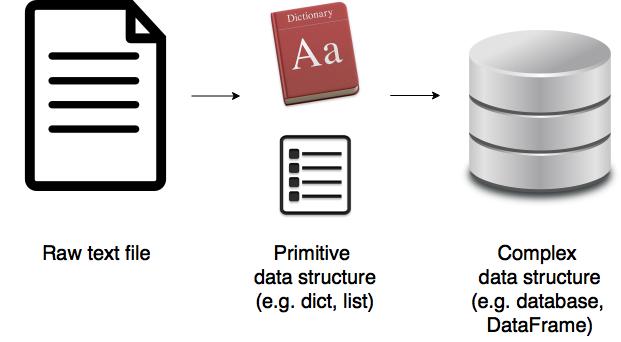
Parsing text in standard format
If your data is in a standard format or close enough, then there is probably an existing package that you can use to read your data with minimal effort.
For example, let’s say we have a CSV file, data.txt:
You can handle this easily with pandas.
Parsing text using string methods
Python is incredible when it comes to dealing with strings. It is worth internalising all the common string operations. We can use these methods to extract data from a string as you can see in the simple example below.
Parsing text in complex format using regular expressions
As you saw in the previous two sections, if the parsing problem is simple we might get away with just using an existing parser or some string methods. However, life ain’t always that easy. How do we go about parsing a complex text file?
Step 1: Understand the input format
That’s a pretty complex input file! Phew! The data it contains is pretty simple though as you can see below:
The sample text looks similar to a CSV in that it uses commas to separate out some information. There is a title and some metadata at the top of the file. There are five variables: School, Grade, Student number, Name and Score. School, Grade and Student number are keys. Name and Score are fields. For a given School, Grade, Student number there is a Name and a Score. In other words, School, Grade, and Student Number together form a compound key.
The data is given in a hierarchical format. First, a School is declared, then a Grade. This is followed by two tables providing Name and Score for each Student number. Then Grade is incremented. This is followed by another set of tables. Then the pattern repeats for another School. Note that the number of students in a Grade or the number of classes in a school are not constant, which adds a bit of complexity to the file. This is just a small dataset. You can easily imagine this being a massive file with lots of schools, grades and students.
It goes without saying that the data format is exceptionally poor. I have done this on purpose. If you understand how to handle this, then it will be a lot easier for you to master simpler formats. It’s not unusual to come across files like this if have to deal with a lot of legacy systems. In the past when those systems were being designed, it may not have been a requirement for the data output to be machine readable. However, nowadays everything needs to be machine-readable!
Step 2: Import the required packages
We will need the Regular expressions module and the pandas package. So, let’s go ahead and import those.
Step 3: Define regular expressions
In the last step, we imported re, the regular expressions module. What is it though?
Well, earlier on we saw how to use the string methods to extract data from text. However, when parsing complex files, we can end up with a lot of stripping, splitting, slicing and whatnot and the code can end up looking pretty unreadable. That is where regular expressions come in. It is essentially a tiny language embedded inside Python that allows you to say what string pattern you are looking for. It is not unique to Python by the way (treehouse).
You do not need to become a master at regular expressions. However, some basic knowledge of regexes can be very handy in your programming career. I will only teach you the very basics in this article, but I encourage you to do some further study. I also recommend regexper for visualising regular expressions. regex101 is another excellent resource for testing your regular expression.
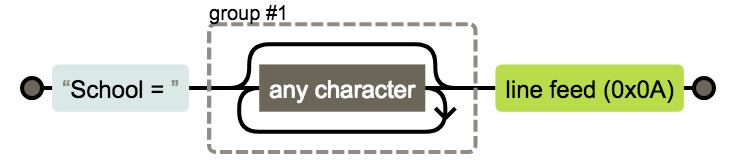
We are going to need three regexes. The first one, as shown below, will help us to identify the school. Its regular expression is School = (.*)\n . What do the symbols mean?
- . : Any character
- * : 0 or more of the preceding expression
- (.*) : Placing part of a regular expression inside parentheses allows you to group that part of the expression. So, in this case, the grouped part is the name of the school.
- \n : The newline character at the end of the line
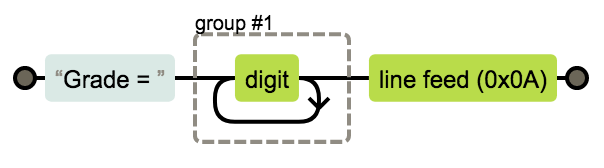
We then need a regular expression for the grade. Its regular expression is Grade = (\d+)\n . This is very similar to the previous expression. The new symbols are:
- \d : Short for [0-9]
- + : 1 or more of the preceding expression
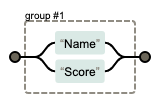
Finally, we need a regular expression to identify whether the table that follows the expression in the text file is a table of names or scores. Its regular expression is (Name|Score) . The new symbol is:
- | : Logical or statement, so in this case, it means ‘Name’ or ‘Score.’
We also need to understand a few regular expression functions:
- re.compile(pattern) : Compile a regular expression pattern into a RegexObject.
A RegexObject has the following methods:
- match(string) : If the beginning of string matches the regular expression, return a corresponding MatchObject instance. Otherwise, return None .
- search(string) : Scan through string looking for a location where this regular expression produced a match, and return a corresponding MatchObject instance. Return None if there are no matches.
A MatchObject always has a boolean value of True . Thus, we can just use an if statement to identify positive matches. It has the following method:
- group() : Returns one or more subgroups of the match. Groups can be referred to by their index. group(0) returns the entire match. group(1) returns the first parenthesized subgroup and so on. The regular expressions we used only have a single group. Easy! However, what if there were multiple groups? It would get hard to remember which number a group belongs to. A Python specific extension allows us to name the groups and refer to them by their name instead. We can specify a name within a parenthesized group (. ) like so: (?P<name>. ) .
Let us first define all the regular expressions. Be sure to use raw strings for regex, i.e., use the subscript r before each pattern.
Step 4: Write a line parser
Then, we can define a function that checks for regex matches.
Step 5: Write a file parser
Finally, for the main event, we have the file parser function. It is quite big, but the comments in the code should hopefully help you understand the logic.
Step 6: Test the parser
We can use our parser on our sample text like so:
This is all well and good, and you can see by comparing the input and output by eye that the parser is working correctly. However, the best practice is to always write unittests to make sure your code is doing what you intended it to do. Whenever you write a parser, please ensure that it’s well tested. I have gotten into trouble with my colleagues for using parsers without testing before. Eeek! It’s also worth noting that this does not necessarily need to be the last step. Indeed, lots of programmers preach about Test Driven Development. I have not included a test suite here as I wanted to keep this tutorial concise.
Is this the best solution?
I have been parsing text files for a year and perfected my method over time. Even so, I did some additional research to find out if there was a better solution. Indeed, I owe thanks to various community members who advised me on optimising my code. The community also offered some different ways of parsing the text file. Some of them were clever and exciting. My personal favourite was this one. I presented my sample problem and solution at the forums below:
If your problem is even more complex and regular expressions don’t cut it, then the next step would be to consider parsing libraries. Here are a couple of places to start with:
-
: A PyCon lecture by Erik Rose looking at the pros and cons of various parsing libraries. : Tools and libraries that allow you to create parsers when regular expressions are not enough.
Conclusion
Now that you understand how difficult and annoying it can be to parse text files, if you ever find yourselves in the privileged position of choosing a file format, choose it with care. Here are Stanford’s best practices for file formats.
I’d be lying if I said I was delighted with my parsing method, but I’m not aware of another way, of quickly parsing a text file, that is as beginner friendly as what I’ve presented above. If you know of a better solution, I’m all ears! I have hopefully given you a good starting point for parsing a file in Python! I spent a couple of months trying lots of different methods and writing some insanely unreadable code before I finally figured it out and now I don’t think twice about parsing a file. So, I hope I have been able to save you some time. Have fun parsing text with python!
Text Parsing in Python with US-Patent Data

In today’s world, there is simply much more unstructured data than structured data. Unstructured data(for instance — metadata, images, videos etc.) makeup 80% and more of enterprise data and is growing at a rate of 55% and 65% per year (according to Datamotion Source). So, in this article, I will be going to work on semi-structured data called — U.S. Patents Data which is in XML format, you will learn how to do text parsing in python and how to deal with semi-structured. At last, we will end up with converting the semi-structured data into structured data which is easier to read and understood by machines and humans.
Introduction
As we know, data wrangling/data munging/ data cleaning is that steps in the data science process which takes 80% of the time of the data scientist, leaving only 20% for exploration and modelling(source — What data scientist really do via HBR(Harvard Business Review) & IBM — Data Scientists Productivity).
For today’s article, I am using USPTO (the United States Patent and Trademark Office) SOURCE LINK WHICH is the federal agency for granting U.S. patents and registering trademarks. They also provide open data about U.S. patents. So, today we will work with one open dataset they provided on their website. (Source— download the dataset from here-Patent grant full-text data/XML)
Dataset Description — Patent grant full-text data (no images) (JAN 1976 — present) (1976–2001 Automated Patent System (APS) format is Green Book) Contains the full text of each patent grant issued weekly (Tuesdays) from January 1, 1976, to present (excludes images/drawings and reexaminations). The dataset contains (JAN 2002 — present) the full text of each patent grant issued weekly (Tuesdays) (excludes images/drawings and reexaminations). The file format is eXtensible Markup Language (XML) in accordance with the Patent Grant International Common Element (ICE) Document Type Definition (DTD).
N ote- Dataset is quite large if you tried to open the dataset into text editor software (for instance — notepadd++ etc. maybe your computer get stuck because of less RAM. At least 8GB or More RAM is required to read all the data) My suggestion is to use the online free or paid platform for instance — Kaggle, GCP, AWS etc.
Just for all the user, I have uploaded the file on Kaggle. (Source — Download the dataset from here- U.S.-Patents-Data)
For ease of use and easy understanding. Firstly, I copied all the XML data into a Text editor ( Source—I used notepad++)
Our dataset initially look like this
Now, for anyone to understand the above code is quite an arduous task. Especially, if you are novice in this field. So, now the question is how to deal with file like this one?
Don’t worry you don’t need to know everything about XML. Some few basic is quite enough. For better understanding, let’s explain you with very simple XML file.
Suppose this is your XML file(see below code). If you see below you notice there is one tag in starting saying something like<?xml version =”1.0" …>, then another one tag called <contact-info> inside which three more tags (name, company, phone) are present. So what are these? what does it mean? etc…
In the example encoding=” UTF-8“, specifies that 8-bits are used to represent the characters. To represent 16-bit characters, UTF-16 encoding can be used.
Before explaining the above code, you need to know some syntax rules of XML.
XML Declaration
The XML document can optionally have an XML declaration. It is written as follows −
Where version is the XML version and encoding specifies the character encoding used in the document (as I said earlier).
Syntax Rules for XML Declaration
- The XML declaration is case sensitive and must begin with “<?xml>” where “xml” is written in lower-case.
- If the document contains XML declaration, then it strictly needs to be the first statement of the XML document.
- The XML declaration strictly needs be the first statement in the XML document.
- An HTTP protocol can override the value of encoding that you put in the XML declaration. ( Source — To learn more refer toTutorialsPoint)
From the above code, what I can understand there is only one main tag/column(in terms of a table) called contact-info inside which three more tags/columns called name, company and phone are present or you can say three columns with contact-info/name, contact-info/company, contact-info/phone. It depends upon your perception of how you see the problem. Below I have converted the XML file into CSV file and open it MS-Excel.
So now you have a basic understanding of XML document and how they look like. So let’s get started.
Just for making little interesting. I change it to a case study which you have to deal, being a data scientist.
Here is the background information on your task
XYZ XXX Pty Ltd, a small legal company, has approached your company ABC XXX Pty Ltd. XYZ XXX Pty Ltd is keen to learn more about U.S. Patents from January 1976 — till present. Primarily, XYZ XXX Pty Ltd needs help with its customer and legal trademarks. The company has a large dataset (which they provided to your company and being a data scientist your company assigned the task to you)related to patents, but their team is unsure how to effectively analyse it to help optimise its marketing strategy.
You decide to start the preliminary data extraction and identify ways to do text parsing and improve the quality of XYZ XXX Pty Ltd’s data.
After exploration, you identified some tags which is very important in making their business strategy.
- grant_id: this is unique Id provided for each patent grant which is consisting of alphanumeric characters
2. patent_kind: what type of category to which the patent grant belongs
3. patent_title: Inventor gave the patent title to the patent claim
4. number_of_claims: the number of claims for a given grant(an integer denoting).
5. citations_examiner_count: the number of citations made by the examiner for a given patent grant (an integer denoting)
6. citations_applicant_count: the number of citations made by the applicant for a given patent grant (an integer denoting)
7. inventors: tag contains a list of the patent inventors’ names
8. claims_text: a list of claim texts for the different patent claims
9. abstract: the patent abstract text.
Software and tools I used-
Environment: Python 3.7.1 and Anaconda 5.7.4 (64-bit)
Libraries used:
pandas 0.23.4 (for data frame, included in Anaconda Python 3.6)
re 2.2.1 (for regular expression, included in Anaconda Python 3.6)
Table of Content
- Import the libraries
- Reading a File
- Compiling a Regular Expression pattern
- Data Cleaning & Creating lists
- Creating a DataFrame using pd.DataFrame()
- Checking Missing Value
- Saving DataFrame into CSV
- Summary
1. Import the libraries
2. Reading a File
As I said earlier I copied all the data into text file and named as “U.S. Patents” you can also download the same file from Kaggle. So, we start with open a file in reading mode, then read it’s content and store in file_content_raw variable. Next step, is to find a number of patents and to find out several patents. I have created a regular expression pattern, which returns a pattern object called text1. If you feel you are not getting any understanding of regular expression, then one of a good way is to see its visualization. (Source — Regular expression visualizer using railroad diagrams.)
At last, we spilt the pattern object and using while loop we iterate it and finding out the number of patents in the file.
3. Compiling a Regular Expression pattern
A regular expression is one of the best things I feel in order to find out the particular pattern or object from the text. Below, I have created a regular expression for each column in which we are interested in.
I am just explaining one that is grant_id. Once you explore the file you see that in line 3 we can get the grant_id.
We see the US patents grant_id is starting with capital U and S followed by some alphanumeric, then followed by some digit numbers. Below(in the figure), d <6>means d for digit and exactly 6 occurrences. (Note/Tip— making a right regular expression which extracts the right text from each file is not a straightforward task and sometimes you have to do a lot of validation to retrieve each text pattern)
Similarly, I make regular expressions for each matching patterns and store into their corresponding pattern object.
4. Data Cleaning & Creating lists
Now, the crucial step came.
1.) So, firstly I created 9 empty lists keep in mind that I have to build pandas data frame later on and with the list, it’s quite easy to make data frame.
2.) After that, I iterating each line from file_content and using re.findall(Return a list of all non-overlapping matches of pattern in the string). So, grant_id below is the pattern object which we created above and using re.findall(). I can find out all the non-overlapping matches of pattern in the string( line in our case). Similarly, I have done it for the rest of the columns.
5. Creating a DataFrame using pd.DataFrame()
Iteration part is done and we get the lists as results. Now, the time to create the data frame using pd.DataFrame()
6. Checking Missing Value
7. Dataframe
As you can see this structured data frame is easy to read and understood by both machines and humans.
Just to be on the safer side, what I done I extracted the details of inventors who claimed about “Thin Food Cluster” in Row 0. Then, using the same claim_text I searched it on google and see what findings I am getting.
Google recommends me this website (FPO- Free patents online). When open the website it shows the same document with same inventors name and patent title and same U.S. grant_id etc. along with more information. Hence, it validates that the results of extraction are correct. (Note- I just showed you only one way, however, I did several other testings on this dataset)
Summary
I hope you learn something new, especially how to deal with semi-structured data like — XML, JSON etc. Do note, we just used only two main libraries one is pandas for creating data frame and another one is a re module for creating a regular expression.
We probably can achieve more tags by using a regular expression, but I leave it to you to do that.
Source code can be found at Github. I look forward to hearing any feedback or questions. Also, any new topic or concept you want me to discuss. Comment down below. Thank you.
Parsing text files using Python
I am very new to Python and am looking to use it to parse a text file. The file has between 250-300 lines of the following format:
I need to store the following information into another file (excel or text) for all the entries from this file
So my result file should look like this for the above entried
Thanks in advance,
Any help would be really appreciated
6 Answers 6
To get you started:
will get you an array of the parts of the match. I’d then suggest you use the csv module to store the results in a standard format.
This makes assumptions about whitespace and also assumes that every line conforms to the pattern. You might want to add error checking (such as checking that pat.match() doesn’t return None ) if you want to handle dirty input gracefully.
The two RE patterns of interest seem to be.
If the two patterns I described are not general enough, they may need to be tweaked, of course, but I think this general approach will be useful. While many Python users on Stack Overflow intensely dislike REs, I find them very useful for this kind of pragmatical ad hoc text processing.
Maybe the dislike is explained by others wanting to use REs for absurd uses such as ad hoc parsing of CSV, HTML, XML, . — and many other kinds of structured text formats for which perfectly good parsers exist! And also, other tasks well beyond REs’ «comfort zone», and requiring instead solid general parser systems like pyparsing. Or at the other extreme super-simple tasks done perfectly well with simple strings (e.g. I remember a recent SO question which used if re.search(‘something’, s): instead of if ‘something’ in s: !-).
But for the reasonably broad swathe of tasks (excluding the very simplest ones at one end, and the parsing of structured or somewhat-complicated grammars at the other) for which REs are appropriate, there’s really nothing wrong with using them, and I recommend to all programmers to learn at least REs’ basics.