Как получить номер строки sql
«Analytic Functions» for information on syntax, semantics, and restrictions
ROW_NUMBER is an analytic function. It assigns a unique number to each row to which it is applied (either each row in the partition or each row returned by the query), in the ordered sequence of rows specified in the order_by_clause , beginning with 1.
By nesting a subquery using ROW_NUMBER inside a query that retrieves the ROW_NUMBER values for a specified range, you can find a precise subset of rows from the results of the inner query. This use of the function lets you implement top-N, bottom-N, and inner-N reporting. For consistent results, the query must ensure a deterministic sort order.
SQL ROW_NUMBER
Summary: in this tutorial, you will learn how to use the ROW_NUMBER() to assign a sequential number to each row in a query result set.
SQL ROW_NUMBER() Function Overview
The ROW_NUMBER() is a window function that assigns a sequential integer number to each row in the query’s result set.
The following illustrates the syntax of the ROW_NUMBER() function:
- First, the PARTITION BY clause divides the result set returned from the FROM clause into partitions. The PARTITION BY clause is optional. If you omit it, the whole result set is treated as a single partition.
- Then, the ORDER BY clause sorts the rows in each partition. Because the ROW_NUMBER() is an order sensitive function, the ORDER BY clause is required.
- Finally, each row in each partition is assigned a sequential integer number called a row number. The row number is reset whenever the partition boundary is crossed.
SQL ROW_NUMBER() examples
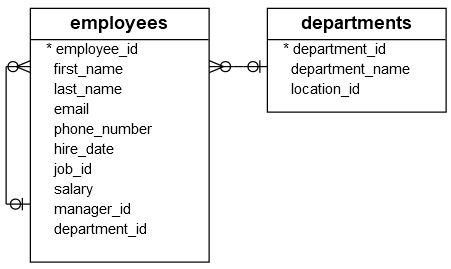
We will use the employees and departments tables from the sample database for the demonstration:
A) Simple SQL ROW_NUMBER() example
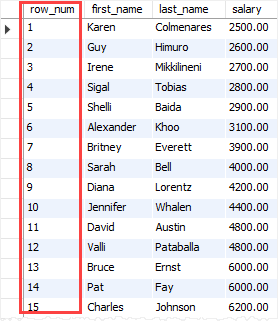
The following statement finds the first name, last name, and salary of all employees. In addition, it uses the ROW_NUMBER() function to add sequential integer number to each row.
The following picture shows the partial result set:
B) Using SQL ROW_NUMBER() for pagination
The ROW_NUMBER() function can be used for pagination. For example, if you want to display all employees on a table in an application by pages, which each page has ten records.
- First, use the ROW_NUMBER() function to assign each row a sequential integer number.
- Second, filter rows by requested page. For example, the first page has the rows starting from one to 9, and the second page has the rows starting from 11 to 20, and so on.
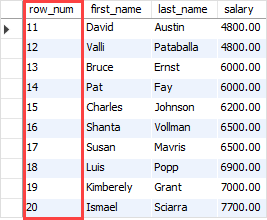
The following statement returns the records of the second page, each page has ten records.
The following shows the output:
If you want to use the common table expression (CTE) instead of the subquery, here is the query:
C) Using SQL ROW_NUMBER() for finding nth highest value per group
The following example shows you how to find the employees whose have the highest salary in their departments:
- First, the PARTITION BY clause distributes the employees by departments.
- Second, the ORDER BY clause sorts the employee in each department by salary in the descending order.
- Third, the ROW_NUMBER() assigns each row a sequential integer number. It resets the number when the department changes.
The following shows the result set of the subquery:
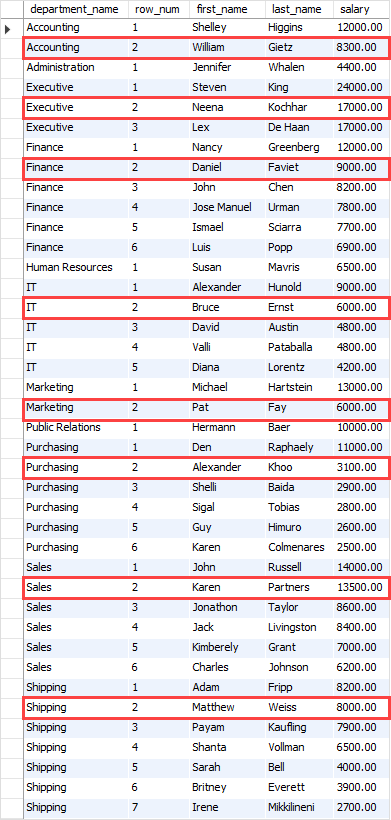
In the outer query, we selected only the employee rows which have the row_num with the value 1.
Here is the output of the whole query:
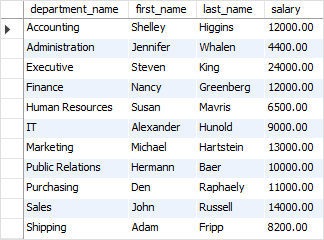
If you change the predicate in the WHERE clause from 1 to 2, 3, and so on, you will get the employees who have the second highest salary, third highest salary, and so on.
In this tutorial, you have learned how to use the SQL ROW_NUMBER() function to assign a sequential integer number to each row in the result set of a query.
Name already in use
sql-docs / docs / t-sql / functions / row-number-transact-sql.md
- Go to file T
- Go to line L
- Copy path
- Copy permalink
- Open with Desktop
- View raw
- Copy raw contents Copy raw contents
Copy raw contents
Copy raw contents
Numbers the output of a result set. More specifically, returns the sequential number of a row within a partition of a result set, starting at 1 for the first row in each partition.
ROW_NUMBER and RANK are similar. ROW_NUMBER numbers all rows sequentially (for example 1, 2, 3, 4, 5). RANK provides the same numeric value for ties (for example 1, 2, 2, 4, 5).
[!NOTE] ROW_NUMBER is a temporary value calculated when the query is run. To persist numbers in a table, see IDENTITY Property and SEQUENCE.
. image type=»icon» source=»../../includes/media/topic-link-icon.svg» border=»false». Transact-SQL syntax conventions
PARTITION BY value_expression
Divides the result set produced by the FROM clause into partitions to which the ROW_NUMBER function is applied. value_expression specifies the column by which the result set is partitioned. If PARTITION BY is not specified, the function treats all rows of the query result set as a single group. For more information, see OVER Clause (Transact-SQL).
order_by_clause
The ORDER BY clause determines the sequence in which the rows are assigned their unique ROW_NUMBER within a specified partition. It is required. For more information, see OVER Clause (Transact-SQL).
bigint
There is no guarantee that the rows returned by a query using ROW_NUMBER() will be ordered exactly the same with each execution unless the following conditions are true.
Values of the partitioned column are unique.
Values of the ORDER BY columns are unique.
Combinations of values of the partition column and ORDER BY columns are unique.
ROW_NUMBER() is nondeterministic. For more information, see Deterministic and Nondeterministic Functions.
A. Simple examples
The following query returns the four system tables in alphabetic order.
| name | recovery_model_desc |
|---|---|
| master | SIMPLE |
| model | FULL |
| msdb | SIMPLE |
| tempdb | SIMPLE |
To add a row number column in front of each row, add a column with the ROW_NUMBER function, in this case named Row# . You must move the ORDER BY clause up to the OVER clause.
| Row# | name | recovery_model_desc |
|---|---|---|
| 1 | master | SIMPLE |
| 2 | model | FULL |
| 3 | msdb | SIMPLE |
| 4 | tempdb | SIMPLE |
Adding a PARTITION BY clause on the recovery_model_desc column, will restart the numbering when the recovery_model_desc value changes.
| Row# | name | recovery_model_desc |
|---|---|---|
| 1 | model | FULL |
| 1 | master | SIMPLE |
| 2 | msdb | SIMPLE |
| 3 | tempdb | SIMPLE |
B. Returning the row number for salespeople
The following example calculates a row number for the salespeople in [!INCLUDEssSampleDBCoFull] based on their year-to-date sales ranking.
C. Returning a subset of rows
The following example calculates row numbers for all rows in the SalesOrderHeader table in the order of the OrderDate and returns only rows 50 to 60 inclusive.
D. Using ROW_NUMBER() with PARTITION
The following example uses the PARTITION BY argument to partition the query result set by the column TerritoryName . The ORDER BY clause specified in the OVER clause orders the rows in each partition by the column SalesYTD . The ORDER BY clause in the SELECT statement orders the entire query result set by TerritoryName .
E. Returning the row number for salespeople
The following example returns the ROW_NUMBER for sales representatives based on their assigned sales quota.
Here is a partial result set.
F. Using ROW_NUMBER() with PARTITION
The following example shows using the ROW_NUMBER function with the PARTITION BY argument. This causes the ROW_NUMBER function to number the rows in each partition.
How do I use ROW_NUMBER()?

And for the second question, the primary key of the row is what should be used to identify a particular row. Don’t try and use the row number for that.
If you returned Row_Number() in your main query,
Then when you want to go 5 rows back then you can take the current row number and use the following query to determine the row with currentrow -5
Though I agree with others that you could use count() to get the total number of rows, here is how you can use the row_count() :
To get the total no of rows:
To get the row numbers where name is Matt:
You can further use min(rownum) or max(rownum) to get the first or last row for Matt respectively.
These were very simple implementations of row_number() . You can use it for more complex grouping. Check out my response on Advanced grouping without using a sub query

If you need to return the table’s total row count, you can use an alternative way to the SELECT COUNT(*) statement.
Because SELECT COUNT(*) makes a full table scan to return the row count, it can take very long time for a large table. You can use the sysindexes system table instead in this case. There is a ROWS column that contains the total row count for each table in your database. You can use the following select statement:
This will drastically reduce the time your query takes.

You can use this for get first record where has clause


ROW_NUMBER() returns a unique number for each row starting with 1. You can easily use this by simply writing:
May not be related to the question here. But I found it could be useful when using ROW_NUMBER —


You can use Row_Number for limit query result.
— With above query, I will get PAGE 1 of results from TABLENAME .

If you absolutely want to use ROW_NUMBER for this (instead of count(*)) you can always use:
Need to create virtual table by using WITH table AS , which is mention in given Query.
By using this virtual table, you can perform CRUD operation w.r.t row_number .
You can use INSERT , UPDATE or DELETE in last sentence by in spite of SELECT .

SQL Row_Number() function is to sort and assign an order number to data rows in related record set. So it is used to number rows, for example to identify the top 10 rows which have the highest order amount or identify the order of each customer which is the highest amount, etc.
If you want to sort the dataset and number each row by seperating them into categories we use Row_Number() with Partition By clause. For example, sorting orders of each customer within itself where the dataset contains all orders, etc.
But as I understand you want to calculate the number of rows of grouped by a column. To visualize the requirement, if you want to see the count of all orders of the related customer as a seperate column besides order info, you can use COUNT() aggregation function with Partition By clause