Python Keyword Arguments
Summary: in this tutorial, you’ll learn about the Python keyword arguments, and how to use them to make function calls more obvious.
Introduction to the Python keyword arguments
Let’s start with a simple function that calculates the net price from the selling price and discount:
The get_net_price() function has two parameters: price and discount .
The following shows how to call the get_net_price() function to calculate the net price from the price 100 and discount 10% :
In the get_net_price(100, 0.1) function call, we pass each argument as a positional argument. In other words, we pass the price argument first and the discount argument second.
However, the function call get_net_price(100, 0.1) has a readability issue. Because by looking at that function call only, you don’t know which argument is price and which one is the discount .
On top of that, when you call the get_net_price() function, you need to know the position of each argument.
If you don’t, the function will calculate the net_price incorrectly. For example:
To improve the readability, Python introduces the keyword arguments.
The following shows the keyword argument syntax:
By using the keyword argument syntax, you don’t need to specify the arguments in the same order as defined in the function.
Therefore, you can call a function by swapping the argument positions like this:
The following shows how to use the keyword argument syntax to call the get_net_price() function:
Both of them returns the same result.
When you use the keyword arguments, their names that matter, not their positions.
Note that you can call a function by mixing positional and keyword arguments. For example:
Keyword arguments and default parameters
Suppose that you have the following get_net_price() function that calculates the net price from the selling price, tax, and discount.
In the get_net_price() function, the tax and discount parameters have default values of 7% and 5% respectively.
The following calls the get_net_price() function and uses the default values for tax and discount parameters:
Suppose that you want to use the default value for the tax parameter but not discount . The following function call doesn’t work correctly.
… because Python will assign 100 to price and 0.1 to tax, not discount.
To fix this, you must use keyword arguments:
Or you can mix the positional and keyword arguments:
Python keyword argument requirements
Once you use a keyword argument, you need to use keyword arguments for the remaining parameters.
The following will result in an error because it uses the positional argument after a keyword argument:
To fix this, you need to use the keyword argument for the third argument like this:
Python Function Arguments
This article explains Python’s various function arguments with clear examples of how to use them. But before learning all function arguments in detail, first, understand the use of argument or parameter in the function.
Also, See
Table of contents
What is a function argument?
When we define and call a Python function, the term parameter and argument is used to pass information to the function.
- parameter: It is the variable listed inside the parentheses in the function definition.
- argument: It is a value sent to the function when it is called. It is data on which function performs some action and returns the result.
Example:
In this example, the function sum_marks() is defined with three parameters, a , b , c , and print the sum of all three values of the arguments passed during a function call.
Output:
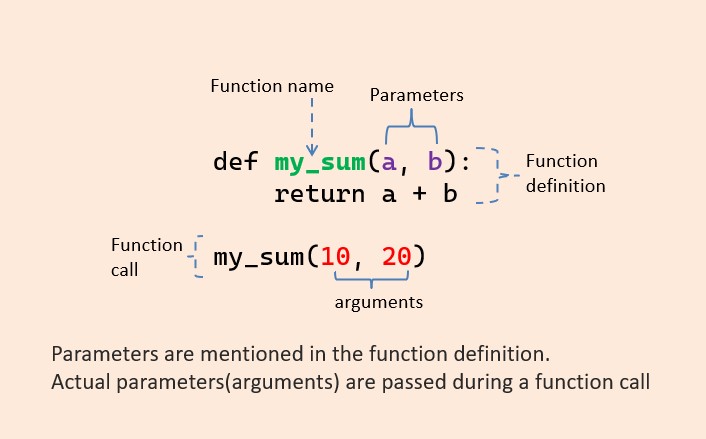
function argument and parameter
Note: A function must be called with the correct number of arguments by default. For example, the above function expects 3 arguments, so you have to call the my_sum() function with 3 arguments; otherwise, you will get an error.
Does function need arguments?
It is not mandatory to use arguments in function definition. But if you need to process user data, you need arguments in the function definition to accept that data.
Also, we use argument in function definition when we need to perform the same task multiple times with different data.
Can a function be called without arguments?
If the function is defined with parameters, the arguments passed must match one of the arguments the function accepts when calling.
Types of function arguments
There are various ways to use arguments in a function. In Python, we have the following 4 types of function arguments.
- Default argument
- Keyword arguments (named arguments)
- Positional arguments
- Arbitrary arguments (variable-length arguments *args and **kwargs )
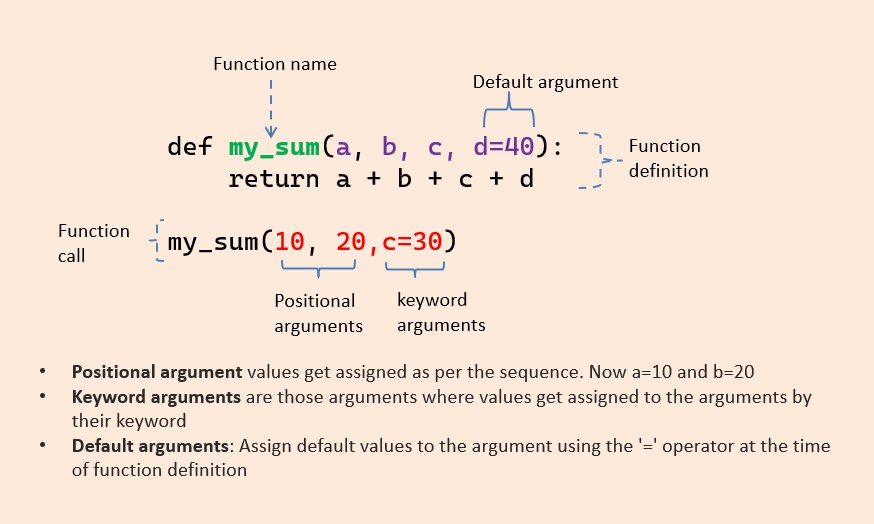
Types of Python function arguments explained with examples
Default Arguments
In a function, arguments can have default values. We assign default values to the argument using the ‘=’ (assignment) operator at the time of function definition. You can define a function with any number of default arguments.
The default value of an argument will be used inside a function if we do not pass a value to that argument at the time of the function call. Due to this, the default arguments become optional during the function call.
It overrides the default value if we provide a value to the default arguments during function calls.
Let us understand this with an example.
Example:
Let’s define a function student() with four arguments name , age , grade , and school . In this function, grade and school are default arguments with default values.
- If you call a function without school and grade arguments, then the default values of grade and school are used.
- The age and name parameters do not have default values and are required (mandatory) during a function call.
Passing one of the default arguments:
If you pass values of the grade and school arguments while calling a function, then those values are used instead of default values.
Example:
Output:
Keyword Arguments
Usually, at the time of the function call, values get assigned to the arguments according to their position. So we must pass values in the same sequence defined in a function definition.
For example, when we call student(‘Jon’, 12, ‘Five’, ‘ABC School’) , the value “Jon” gets assigned to the argument name, and similarly, 12 to age and so on as per the sequence.
We can alter this behavior using a keyword argument.
Keyword arguments are those arguments where values get assigned to the arguments by their keyword (name) when the function is called. It is preceded by the variable name and an ( = ) assignment operator. The Keyword Argument is also called a named argument.
Example:
Output:
Change the sequence of keyword arguments
Also, you can change the sequence of keyword arguments by using their name in function calls.
Python allows functions to be called using keyword arguments. But all the keyword arguments should match the parameters in the function definition. When we call functions in this way, the order (position) of the arguments can be changed.
Example:
Positional Arguments
Positional arguments are those arguments where values get assigned to the arguments by their position when the function is called. For example, the 1st positional argument must be 1st when the function is called. The 2nd positional argument needs to be 2nd when the function is called, etc.
By default, Python functions are called using the positional arguments.
Example: Program to subtract 2 numbers using positional arguments.
Note: If you try to pass more arguments, you will get an error.
Output
Note: In the positional argument number and position of arguments must be matched. If we change the order, then the result may change. Also, If we change the number of arguments, we will get an error.
Important points to remember about function argument
Point 1: Default arguments should follow non-default arguments
Example:
Point: Default arguments must follow the default argument in a function definition
Default arguments must follow the default argument. For example, When you use the default argument in a definition, all the arguments to their right must also have default values. Otherwise, you’ll get an error.
Example:
Point 2: keyword arguments should follow positional arguments only.
we can mix positional arguments with keyword arguments during a function call. But, a keyword argument must always be after a non-keyword argument (positional argument). Else, you’ll get an error.
I.e., avoid using keyword argument before positional argument.
Example:
Point 3: The order of keyword arguments is not important, but All the keyword arguments passed must match one of the arguments accepted by the function.
Example:
Point 4: No argument should receive a value more than once
Variable-length arguments
In Python, sometimes, there is a situation where we need to pass multiple arguments to the function. Such types of arguments are called arbitrary arguments or variable-length arguments.
We use variable-length arguments if we don’t know the number of arguments needed for the function in advance.
Types of Arbitrary Arguments:
- arbitrary positional arguments ( *args )
- arbitrary keyword arguments ( **kwargs )
The *args and **kwargs allow you to pass multiple positional arguments or keyword arguments to a function.
Arbitrary positional arguments ( *args )
We can declare a variable-length argument with the * (asterisk) symbol. Place an asterisk ( * ) before a parameter in the function definition to define an arbitrary positional argument.
we can pass multiple arguments to the function. Internally all these values are represented in the form of a tuple. Let’s understand the use of variable-length arguments with an example.
This is a simple function that takes three arguments and returns their average:
This function works, but it’s limited to only three arguments. What if you need to calculate the average marks of more than three subjects or the number of subjects is determined only at runtime? In such cases, it is advisable to use the variable-length of positional arguments to write a function that could calculate the average of all subjects no matter how many there are.
Example:
Output:
Note: args is just a name. You can choose any name that you prefer, such as *subjects.
Arbitrary keyword arguments (**kwargs)
We saw how to use *args . Now let’s see how to use the **kwargs argument. The **kwargs allow you to pass multiple keyword arguments to a function. Use the **kwargs if you want to handle named arguments in a function.
Use the unpacking operator( ** ) to define variable-length keyword arguments. Keyword arguments passed to a kwargs are accessed using key-value pair (same as accessing a dictionary in Python).
Example:
Did you find this page helpful? Let others know about it. Sharing helps me continue to create free Python resources.
About Vishal
Founder of PYnative.com I am a Python developer and I love to write articles to help developers. Follow me on Twitter. All the best for your future Python endeavors!
Related Tutorial Topics:
Python Exercises and Quizzes
Free coding exercises and quizzes cover Python basics, data structure, data analytics, and more.
Python args and kwargs: Demystified
Sometimes, when you look at a function definition in Python, you might see that it takes two strange arguments: *args and **kwargs . If you’ve ever wondered what these peculiar variables are, or why your IDE defines them in main() , then this article is for you. You’ll learn how to use args and kwargs in Python to add more flexibility to your functions.
By the end of the article, you’ll know:
- What *args and **kwargs actually mean
- How to use *args and **kwargs in function definitions
- How to use a single asterisk ( * ) to unpack iterables
- How to use two asterisks ( ** ) to unpack dictionaries
This article assumes that you already know how to define Python functions and work with lists and dictionaries.
Free Bonus: Click here to get a Python Cheat Sheet and learn the basics of Python 3, like working with data types, dictionaries, lists, and Python functions.
Passing Multiple Arguments to a Function
*args and **kwargs allow you to pass multiple arguments or keyword arguments to a function. Consider the following example. This is a simple function that takes two arguments and returns their sum:
This function works fine, but it’s limited to only two arguments. What if you need to sum a varying number of arguments, where the specific number of arguments passed is only determined at runtime? Wouldn’t it be great to create a function that could sum all the integers passed to it, no matter how many there are?
Using the Python args Variable in Function Definitions
There are a few ways you can pass a varying number of arguments to a function. The first way is often the most intuitive for people that have experience with collections. You simply pass a list or a set of all the arguments to your function. So for my_sum() , you could pass a list of all the integers you need to add:
This implementation works, but whenever you call this function you’ll also need to create a list of arguments to pass to it. This can be inconvenient, especially if you don’t know up front all the values that should go into the list.
This is where *args can be really useful, because it allows you to pass a varying number of positional arguments. Take the following example:
In this example, you’re no longer passing a list to my_sum() . Instead, you’re passing three different positional arguments. my_sum() takes all the parameters that are provided in the input and packs them all into a single iterable object named args .
Note that args is just a name. You’re not required to use the name args . You can choose any name that you prefer, such as integers :
The function still works, even if you pass the iterable object as integers instead of args . All that matters here is that you use the unpacking operator ( * ).
Bear in mind that the iterable object you’ll get using the unpacking operator * is not a list but a tuple . A tuple is similar to a list in that they both support slicing and iteration. However, tuples are very different in at least one aspect: lists are mutable, while tuples are not. To test this, run the following code. This script tries to change a value of a list:
The value located at the very first index of the list should be updated to 9 . If you execute this script, you will see that the list indeed gets modified:
The first value is no longer 0 , but the updated value 9 . Now, try to do the same with a tuple:
Here, you see the same values, except they’re held together as a tuple. If you try to execute this script, you will see that the Python interpreter returns an error:
This is because a tuple is an immutable object, and its values cannot be changed after assignment. Keep this in mind when you’re working with tuples and *args .
Using the Python kwargs Variable in Function Definitions
Okay, now you’ve understood what *args is for, but what about **kwargs ? **kwargs works just like *args , but instead of accepting positional arguments it accepts keyword (or named) arguments. Take the following example:
When you execute the script above, concatenate() will iterate through the Python kwargs dictionary and concatenate all the values it finds:
Like args , kwargs is just a name that can be changed to whatever you want. Again, what is important here is the use of the unpacking operator ( ** ).
So, the previous example could be written like this:
Note that in the example above the iterable object is a standard dict . If you iterate over the dictionary and want to return its values, like in the example shown, then you must use .values() .
In fact, if you forget to use this method, you will find yourself iterating through the keys of your Python kwargs dictionary instead, like in the following example:
Now, if you try to execute this example, you’ll notice the following output:
As you can see, if you don’t specify .values() , your function will iterate over the keys of your Python kwargs dictionary, returning the wrong result.
Ordering Arguments in a Function
Now that you have learned what *args and **kwargs are for, you are ready to start writing functions that take a varying number of input arguments. But what if you want to create a function that takes a changeable number of both positional and named arguments?
In this case, you have to bear in mind that order counts. Just as non-default arguments have to precede default arguments, so *args must come before **kwargs .
To recap, the correct order for your parameters is:
- Standard arguments
- *args arguments
- **kwargs arguments
For example, this function definition is correct:
The *args variable is appropriately listed before **kwargs . But what if you try to modify the order of the arguments? For example, consider the following function:
Now, **kwargs comes before *args in the function definition. If you try to run this example, you’ll receive an error from the interpreter:
In this case, since *args comes after **kwargs , the Python interpreter throws a SyntaxError .
Unpacking With the Asterisk Operators: * & **
You are now able to use *args and **kwargs to define Python functions that take a varying number of input arguments. Let’s go a little deeper to understand something more about the unpacking operators.
The single and double asterisk unpacking operators were introduced in Python 2. As of the 3.5 release, they have become even more powerful, thanks to PEP 448. In short, the unpacking operators are operators that unpack the values from iterable objects in Python. The single asterisk operator * can be used on any iterable that Python provides, while the double asterisk operator ** can only be used on dictionaries.
Let’s start with an example:
This code defines a list and then prints it to the standard output:
Note how the list is printed, along with the corresponding brackets and commas.
Now, try to prepend the unpacking operator * to the name of your list:
Here, the * operator tells print() to unpack the list first.
In this case, the output is no longer the list itself, but rather the content of the list:
Can you see the difference between this execution and the one from print_list.py ? Instead of a list, print() has taken three separate arguments as the input.
Another thing you’ll notice is that in print_unpacked_list.py , you used the unpacking operator * to call a function, instead of in a function definition. In this case, print() takes all the items of a list as though they were single arguments.
You can also use this method to call your own functions, but if your function requires a specific number of arguments, then the iterable you unpack must have the same number of arguments.
To test this behavior, consider this script:
Here, my_sum() explicitly states that a , b , and c are required arguments.
If you run this script, you’ll get the sum of the three numbers in my_list :
The 3 elements in my_list match up perfectly with the required arguments in my_sum() .
Now look at the following script, where my_list has 4 arguments instead of 3:
In this example, my_sum() still expects just three arguments, but the * operator gets 4 items from the list. If you try to execute this script, you’ll see that the Python interpreter is unable to run it:
When you use the * operator to unpack a list and pass arguments to a function, it’s exactly as though you’re passing every single argument alone. This means that you can use multiple unpacking operators to get values from several lists and pass them all to a single function.
To test this behavior, consider the following example:
If you run this example, all three lists are unpacked. Each individual item is passed to my_sum() , resulting in the following output:
There are other convenient uses of the unpacking operator. For example, say you need to split a list into three different parts. The output should show the first value, the last value, and all the values in between. With the unpacking operator, you can do this in just one line of code:
In this example, my_list contains 6 items. The first variable is assigned to a , the last to c , and all other values are packed into a new list b . If you run the script, print() will show you that your three variables have the values you would expect:
Another interesting thing you can do with the unpacking operator * is to split the items of any iterable object. This could be very useful if you need to merge two lists, for instance:
The unpacking operator * is prepended to both my_first_list and my_second_list .
If you run this script, you’ll see that the result is a merged list:
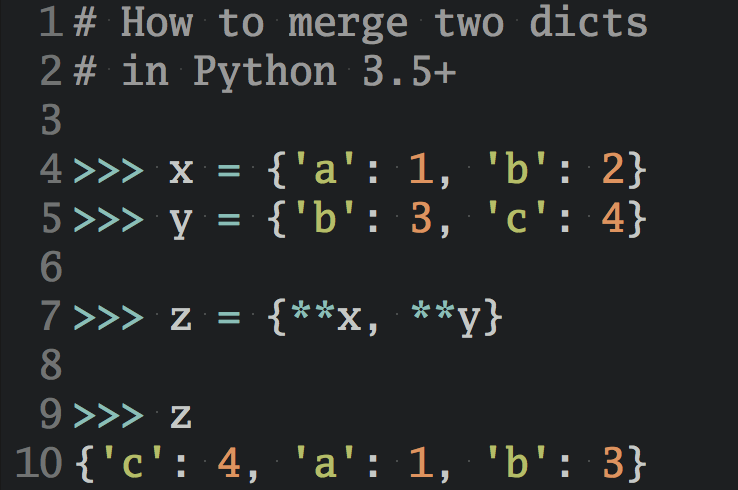
You can even merge two different dictionaries by using the unpacking operator ** :
Here, the iterables to merge are my_first_dict and my_second_dict .
Executing this code outputs a merged dictionary:
Remember that the * operator works on any iterable object. It can also be used to unpack a string:
In Python, strings are iterable objects, so * will unpack it and place all individual values in a list a :
The previous example seems great, but when you work with these operators it’s important to keep in mind the seventh rule of The Zen of Python by Tim Peters: Readability counts.
To see why, consider the following example:
There’s the unpacking operator * , followed by a variable, a comma, and an assignment. That’s a lot packed into one line! In fact, this code is no different from the previous example. It just takes the string RealPython and assigns all the items to the new list a , thanks to the unpacking operator * .
The comma after the a does the trick. When you use the unpacking operator with variable assignment, Python requires that your resulting variable is either a list or a tuple. With the trailing comma, you have defined a tuple with only one named variable, a , which is the list [‘R’, ‘e’, ‘a’, ‘l’, ‘P’, ‘y’, ‘t’, ‘h’, ‘o’, ‘n’] .
Where's the tuple? Show/Hide
You never get to see the tuple that Python creates in this operation, because you use tuple unpacking in combination with the unpacking operator * .
If you name a second variable on the left-hand side of the assignment, Python will assign the last character of the string to the second variable, while collecting all remaining characters in the list a :
When you use this operation with a second named variable like shown above, the results might be more familiar, if you’ve worked with tuple unpacking before. However, if you want to unpack all items of the variable-length iterable into a single variable, a , then you need to add the comma ( , ) without naming a second variable. Python will then unpack all items into the first named variable, which is a list.
While this is a neat trick, many Pythonistas would not consider this code to be very readable. As such, it’s best to use these kinds of constructions sparingly.
Conclusion
You are now able to use *args and **kwargs to accept a changeable number of arguments in your functions. You have also learned something more about the unpacking operators.
- What *args and **kwargs actually mean
- How to use *args and **kwargs in function definitions
- How to use a single asterisk ( * ) to unpack iterables
- How to use two asterisks ( ** ) to unpack dictionaries
If you still have questions, don’t hesitate to reach out in the comments section below! To learn more about the use of the asterisks in Python, have a look at Trey Hunner’s article on the subject.
Watch Now This tutorial has a related video course created by the Real Python team. Watch it together with the written tutorial to deepen your understanding: Python args and kwargs: Demystified
Get a short & sweet Python Trick delivered to your inbox every couple of days. No spam ever. Unsubscribe any time. Curated by the Real Python team.
About Davide Mastromatteo
Developer and editor of “the Python Corner". Blood donor, Apple user, Python and Swift addicted. NFL, Rugby and Chess lover. Constantly hungry and foolish.
Each tutorial at Real Python is created by a team of developers so that it meets our high quality standards. The team members who worked on this tutorial are:


Master Real-World Python Skills With Unlimited Access to Real Python
Join us and get access to thousands of tutorials, hands-on video courses, and a community of expert Pythonistas:
Master Real-World Python Skills
With Unlimited Access to Real Python
Join us and get access to thousands of tutorials, hands-on video courses, and a community of expert Pythonistas:
What Do You Think?
What’s your #1 takeaway or favorite thing you learned? How are you going to put your newfound skills to use? Leave a comment below and let us know.
Commenting Tips: The most useful comments are those written with the goal of learning from or helping out other students. Get tips for asking good questions and get answers to common questions in our support portal. Looking for a real-time conversation? Visit the Real Python Community Chat or join the next “Office Hours” Live Q&A Session. Happy Pythoning!
Python Keyword Arguments
You can also send arguments with the key = value syntax.
This way the order of the arguments does not matter.
Example
def my_function(child3, child2, child1):
print("The youngest child is " + child3)
my_function(child1 = "Emil", child2 = "Tobias", child3 = "Linus")
The phrase Keyword Arguments are often shortened to kwargs in Python documentations.
Related Pages

COLOR PICKER


Report Error
If you want to report an error, or if you want to make a suggestion, do not hesitate to send us an e-mail:
Thank You For Helping Us!
Your message has been sent to W3Schools.
Top Tutorials
Top References
Top Examples
Get Certified
W3Schools is optimized for learning and training. Examples might be simplified to improve reading and learning. Tutorials, references, and examples are constantly reviewed to avoid errors, but we cannot warrant full correctness of all content. While using W3Schools, you agree to have read and accepted our terms of use, cookie and privacy policy.